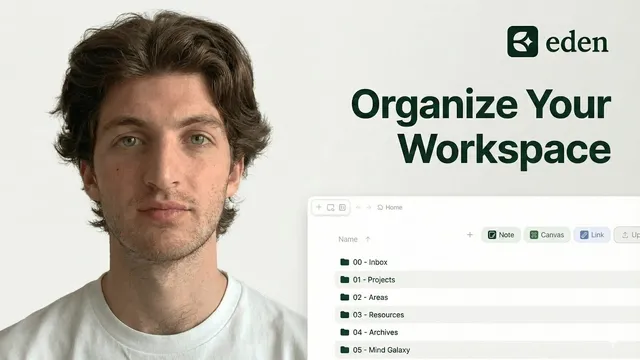
The Best Way To Organize Your Eden Workspace ! (PARA + Zettelkasten)
Based on Noah Vincent's video on YouTube. If you like this content, support the original creators by watching, liking and subscribing to their content.
Use PARA folders to manage execution: Projects for deadlines, Areas for ongoing responsibilities, Resources for reference material, and Archive for inactive items.
Briefing
Eden organization is built as a hybrid system: PARA-style folders keep execution clear, while Zettelkasten-style notes in a single “Mind Galaxy” space generate ideas through links and serendipity. The payoff is practical—active projects stay tidy and deadline-driven, yet creativity still has room to recombine concepts across unrelated topics.
Folder management starts with a choice between top-down and bottom-up organization. Top-down means creating folders and subfolders first, then placing documents inside—an approach better suited to project management. Bottom-up means capturing notes first, then letting tags and links shape structure over time—better aligned with knowledge management. Eden’s advantage is combining both: PARA provides the top-down scaffolding for work, while Zettelkasten provides the bottom-up engine for knowledge.
The PARA method organizes the workspace into four top-level folders. “Projects” holds active work with defined outcomes and deadlines—examples include newsletters, YouTube videos, courses, and client deliverables. “Areas” stores ongoing responsibilities without an end date, such as health, finances, relationships, and other responsibilities that must be maintained continuously. “Resources” is for reference material that supports current or future work but doesn’t require immediate action—AI prompts, reference guides, workflows, templates, SOPs, and checklists. “Archive” is the cleanup valve: completed projects, outdated resources, and inactive areas move here to prevent clutter while preserving easy retrieval. A weekly habit of archiving inactive items is recommended to keep focus intact.
To capture raw inputs, the system adds an “inbox” folder. Because Eden’s default capture destination isn’t available yet, new notes are routed manually into the inbox (with the expectation that future features will allow setting it as the default). The inbox becomes a staging area for quicknotes, email ideas, and inspiration captured as links or fragments. A weekly review then sorts inbox items into the right PARA categories.
For idea generation, the Zettelkasten method—popularized by Nicholas Luhmann—is implemented through a bottom-up workflow using a “Mind Galaxy” folder. Notes are stored at one level with no subfolders to encourage unexpected connections. The method runs on four note types: fleeting notes (quick captures and highlights), literature notes (summaries written in one’s own words), permanent notes (atomic, standalone concepts extracted from literature notes), and connections (links that turn isolated facts into a thinking network). In Eden, linking is done using the “@” feature rather than the double-bracket approach used in other tools.
The system’s core principle is that creativity needs a dedicated space for recombination, while execution needs a structured space for completion. PARA ensures clarity, speed, and focus when producing newsletters or courses; Mind Galaxy supports deeper thinking, learning through the “generation effect,” and serendipity by keeping ideas visible and linkable. The final guidance is to keep the whole setup minimalist—start with what’s needed now, avoid overengineering, and iterate as requirements emerge. The transcript also includes practical steps for importing a Cortex workspace into Eden using a Cortex token, plus a note that “Noah’s Arc Bank” templates will be updated once Eden adds a document duplication/share feature.
Cornell Notes
The system combines PARA folder structure with a Zettelkasten-style note network to balance execution and creativity. PARA organizes active work into Projects (deadlines), Areas (ongoing responsibilities), Resources (reference material), and Archive (inactive items kept for retrieval). For bottom-up knowledge work, all idea notes live in a single “Mind Galaxy” space with no subfolders to encourage serendipitous connections. Zettelkasten’s workflow moves from fleeting notes to literature notes (own-word summaries), then to permanent notes (atomic concepts), and finally to connections using Eden’s “@” linking feature. This matters because it keeps active tasks uncluttered while still letting new insights emerge from linking ideas across topics.
Why does the system treat folder organization and note organization as two different problems?
What exactly goes into each PARA folder, and what purpose does Archive serve?
How does the inbox function as a capture system in Eden when default routing isn’t available?
How does the Zettelkasten workflow progress from raw inputs to reusable knowledge?
Why does Mind Galaxy require no subfolders, and how does that affect creativity?
What linking method does Eden use here, and how is it different from other tools?
Review Questions
- How would you decide whether an item belongs in Projects, Areas, Resources, or Archive under PARA?
- Walk through the four Zettelkasten note types in order and describe what changes at each step.
- Why does the system insist that Mind Galaxy notes stay at one level with no subfolders, and what risk does it try to prevent?
Key Points
- 1
Use PARA folders to manage execution: Projects for deadlines, Areas for ongoing responsibilities, Resources for reference material, and Archive for inactive items.
- 2
Add an inbox folder for capture so raw ideas can be reviewed weekly and sorted into the right PARA categories.
- 3
Implement Zettelkasten in a single Mind Galaxy space with no subfolders to encourage serendipitous connections.
- 4
Convert fleeting notes into literature notes by writing summaries in your own words, then extract permanent notes as atomic, standalone concepts.
- 5
Create connections between permanent notes using Eden’s “@” linking feature and include the reason for each link.
- 6
Keep the overall system minimalist: start with what’s needed now and refine as needs emerge.
- 7
When migrating from Cortex to Eden, import using the Cortex token from Cortex settings and then move imported items into the appropriate PARA folders.