The Cannonical Roam Demo - complete version - December 20, 2019
Based on Conor White-Sullivan's video on YouTube. If you like this content, support the original creators by watching, liking and subscribing to their content.
Roam’s slash commands can insert 24-hour “current time” timestamps, enabling manual time tracking that links back to specific work sessions.
Briefing
A workflow built around Roam turns note-taking into a system for time tracking, task management, and email drafting—without forcing users into rigid folders. In a live demo, Roam is presented as “an Excel of note-taking,” where indented lists gradually unlock deeper capabilities like linked references, tables, and automated views. The practical payoff is that tasks and notes can be filtered by context (time, projects, or domains like email) so people can keep an “inbox zero” style workflow while still retaining a searchable knowledge base.
The demo starts with attention management: user interviews and work sessions are logged with timestamps inserted via a slash command that generates a 24-hour “current time” entry. By adding time ranges and then linking back to the relevant interview notes, the user can quickly estimate how long each conversation or research session took. While the current setup is described as manual, the roadmap includes richer time-tracking features such as aggregating “time” entries, filtering them, and generating charts.
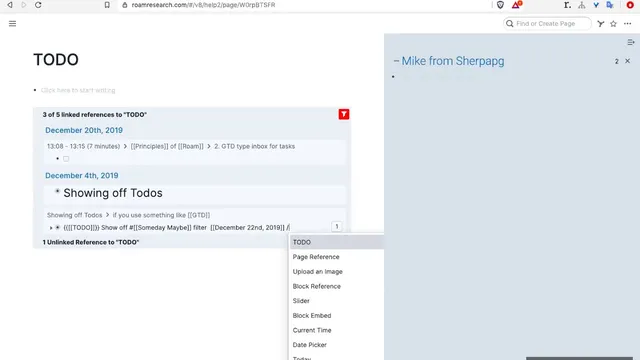
Task management follows a GTD-style inbox approach. A “make to do” action converts a bullet into a checkbox task while also creating a linked “to do” page. That page can be filtered to hide scheduled items (pushing them into “scheduled” or “someday” lists) so the inbox only shows unscheduled work. Scheduling is handled through slash commands and a date picker, and tasks automatically appear on the correct daily pages once scheduled. The demo emphasizes that tasks can be removed from the inbox view simply by applying or adjusting filters, supporting both “do it now” triage and later review.
Roam’s task system also connects directly to email work. When the user drafts strategically important emails—such as investor or client communications—they often write the content inside Roam, then paste it into an email client (Superhuman is mentioned). Roam supports copying either plain text or “block references,” which paste with a footnote-style trail showing where the content was used before. This lets the user reuse stable facts (like routing numbers or account numbers) without hunting through documents, aiming for “autocomplete away” retrieval.
For larger planning, the demo highlights dependency graphing and reverse dependency thinking: starting from the next action or “next step” and working backward to identify prerequisites and time constraints. Daily habits and project plans can be represented as linked structures, with starred shortcuts for quick access. Another planning mode uses recursive knowledge graphs for curriculum-like structures, where completing one module unlocks paths to subsequent modules, and progress can be tracked per learner.
Finally, the demo positions Roam as a flexible alternative to Evernote/OneNote-style organization. Because Roam is a web app, it’s less likely to be blocked by firewall policies, and it supports overlapping taxonomies—like viewing only the tasks relevant to “email” when in that context—something the demo claims is harder in file-based tools like Excel or OneNote. Pricing is mentioned as $14 per month, and the system is framed as growing with the user from simple outlining to advanced querying and calculations.
Cornell Notes
Roam is demonstrated as a unified system where indented notes become tasks, time logs, and email-ready drafts through linking and filtering. The workflow uses slash commands to insert 24-hour timestamps for attention management, then aggregates time by linking ranges back to specific user interviews. Tasks are created from bullets (“make to do”), appear on linked to-do pages, and are filtered so the inbox stays focused on unscheduled work while scheduled items move to date-based views. For writing important emails, content is drafted in Roam and pasted into Superhuman, with “block references” preserving provenance and reuse. For big projects, dependency graphs are built by starting at the next action and working backward to identify prerequisites and time constraints.
How does Roam support attention management and time tracking in the demo?
What does the GTD-style inbox workflow look like, and how does filtering keep it manageable?
How does Roam connect tasks and context—especially for email—without forcing a single folder structure?
Why draft important emails inside Roam, and what is the role of block references?
How does dependency graphing work for large projects in this workflow?
What planning example demonstrates Roam’s recursive knowledge graph capability?
Review Questions
- How does the demo’s timestamp insertion method enable later time aggregation by interview or session?
- What mechanisms keep the inbox focused on unscheduled tasks, and how do scheduled tasks reappear on the correct daily pages?
- In what ways do block references improve reuse and traceability when drafting emails in Roam?
Key Points
- 1
Roam’s slash commands can insert 24-hour “current time” timestamps, enabling manual time tracking that links back to specific work sessions.
- 2
Tasks created from bullets (“make to do”) automatically generate linked to-do pages, and filters keep the inbox focused on unscheduled items.
- 3
Scheduling uses slash commands and a date picker so tasks appear on the correct daily pages while disappearing from the unscheduled inbox view.
- 4
Email drafting can be done inside Roam and pasted into Superhuman, with “block references” preserving provenance and reuse trails.
- 5
Context-based filtering lets users view only the tasks relevant to a domain (like email) instead of scanning a single master list.
- 6
Large projects can be mapped with reverse dependency graphing by starting from the next action and working backward to prerequisites and time constraints.
- 7
Roam is positioned as a flexible alternative to Evernote/OneNote-style organization because it supports overlapping taxonomies and is a web app less likely to be blocked by firewalls.