The Introduction of BlockSuite and Database Block
Based on AFFiNE's video on YouTube. If you like this content, support the original creators by watching, liking and subscribing to their content.
BlockSuite is built for local-first collaborative apps using CRDT state management (built on Yjs) to handle conflicts automatically.
Briefing
BlockSuite is positioned as a local-first, block-based application framework built around CRDT state management—aiming to make rich collaborative editing feel as simple as working with local data, while also unlocking new ways to structure content. The core shift is that BlockSuite treats every update as an incremental, conflict-resilient operation, then layers a provider-based database backend on top so state changes can be stored locally or synced to the cloud without forcing developers to adopt complex editor-specific transformation models.
At the heart of the architecture is a CRDT data model (built on Yjs). CRDT records the full history of operations and automatically resolves conflicts during real-time collaboration. That design removes the need to learn framework-specific concepts like transformation commands or serialized action formats that many collaborative editors require for undo/redo. Instead, BlockSuite exposes simple block-level APIs—add, update, and delete blocks—so editing becomes closer to manipulating a list or map. Because CRDTs have stable serialized formats and can encode partial updates, changes can be distributed efficiently across network and local storage, with the underlying provider handling the I/O details.
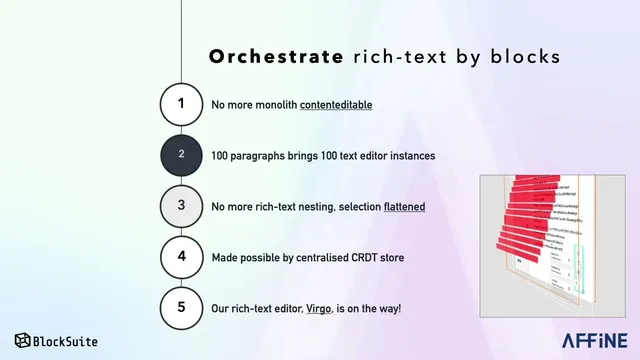
BlockSuite also changes how rich text is modeled. Traditional editors often rely on a single contenteditable region, which limits control over how the browser mutates the DOM and makes it harder to implement consistent, block-level collaboration. BlockSuite replaces that approach with many discrete text blocks: a document becomes a collection of blocks (e.g., one per paragraph), and each block is a standalone text editor instance that only handles text. Non-text elements like images and tables no longer need to be embedded inside a contenteditable container, because the block store can manage them as separate block types.
That block store is a prerequisite for the architecture, and it enables both performance and extensibility. The editor logic inside each text block can stay small, which makes it feasible to build a custom text editor called “Virgo” quickly and iterate on it independently of the rest of the system. For extensibility, BlockSuite defines blocks using web components, so third-party blocks can be built with any UI framework by packaging them as web components. It also supports multiple “container blocks” so the same underlying data can be presented in different layouts and selection states—enabling collaborative apps like kanban boards, documents, or forms that share a common model but differ in view.
Rendering is treated as modular too. Instead of requiring a DOM-based renderer, BlockSuite includes an experimental canvas renderer for whiteboards, where the top-level canvas view is driven by block state. Finally, the framework’s direction extends beyond editing: a prototype “Database Block” is introduced. It can convert regular blocks (paragraphs, lists, etc.) into database-ready blocks, transform between “Virgo” and database representations, and preserve column information across the workspace. It also supports switching among multiple database views—kanban, timeline, schedule, list—and includes a third-party plugin system for custom data types and custom “wheels” from the community.
Cornell Notes
BlockSuite is a local-first, block-based framework built on CRDT state management (via Yjs) to make collaborative editing work like local development. CRDT history enables automatic conflict resolution and efficient incremental updates, so developers can use simple block APIs (add/update/delete) rather than editor-specific transformation DSLs. Rich content is modeled as many discrete blocks (e.g., one text block per paragraph) instead of a single contenteditable region, giving better control over DOM behavior and collaboration. Blocks are extensible through web components, container blocks enable multiple views over the same data model, and rendering can be swapped (including an experimental canvas renderer). A prototype Database Block adds database features like sorting/filtering and view switching (kanban/timeline/schedule/list) with support for custom data types via plugins.
How does BlockSuite’s CRDT approach change what developers must learn for collaboration and undo/redo?
Why does BlockSuite avoid a single contenteditable region for rich text?
What does “local-first” mean in BlockSuite’s architecture, and how does syncing work?
How does BlockSuite support extensibility across different UI frameworks?
What is the purpose of container blocks, and how do they relate to views?
What capabilities does the prototype Database Block add on top of block-based editing?
Review Questions
- How does CRDT history enable conflict resolution and efficient incremental updates in BlockSuite, and why does that reduce the need for editor-specific transformation concepts?
- What architectural changes allow BlockSuite to model rich text as many blocks rather than a single contenteditable region, and how does that affect non-text elements like images and tables?
- In what ways do web components and container blocks work together to support third-party extensibility and multiple views over the same data model?
Key Points
- 1
BlockSuite is built for local-first collaborative apps using CRDT state management (built on Yjs) to handle conflicts automatically.
- 2
Editing is organized around block-level operations (add/update/delete), avoiding editor-specific transformation DSLs common in other collaborative editors.
- 3
Rich content is modeled as many discrete blocks (e.g., per-paragraph text blocks) rather than a single contenteditable region, improving control over DOM behavior.
- 4
A centralized block store enables separate handling of text and non-text elements like images and tables without embedding them in contenteditable.
- 5
Blocks are extensible via web components, allowing third-party blocks to be authored in any UI framework and packaged consistently.
- 6
Container blocks support multiple layouts and selection states over the same shared data model, enabling different app experiences from the same underlying structure.
- 7
A prototype Database Block adds database features (sorting/filtering), block-to-database conversion, multi-view switching (kanban/timeline/schedule/list), and plugin support for custom data types.