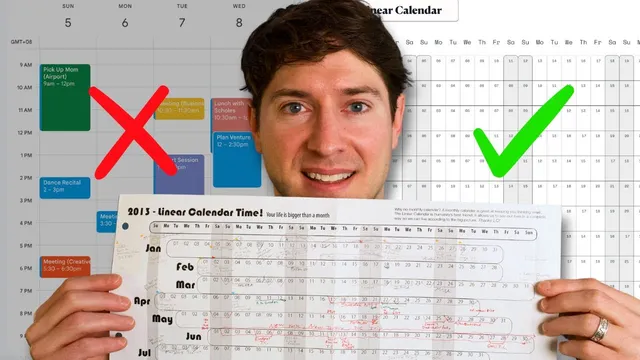
The Most Useful Calendar View in 2026 That No One Told You About
Based on Linking Your Thinking with Nick Milo's video on YouTube. If you like this content, support the original creators by watching, liking and subscribing to their content.
Use a linear calendar to restore a full-year “big picture” that week view often hides.
Briefing
A single, static “linear calendar” view can replace the usual week-by-week grind by giving people a full-year picture they can actually use—both to balance workload and to recover life context. Instead of relying on fragmented views that make time feel small, the linear calendar stretches the year into one continuous layout, making it easier to spot busy stretches, overlaps, and gaps at a glance. The result is less reactive scheduling and more deliberate year planning.
The core pitch is that calendars exist to visualize time so it can be used better. Historically, that need drove tools like railway timetables (showing time across locations) and Gantt charts (showing task dependencies along a timeline). But Gantt charts can become brittle when dependencies change—one update can make the whole wall of planning instantly outdated. The linear calendar takes a different approach: it’s a single-year snapshot designed to stay readable and flexible, letting users adjust their plans without rebuilding everything.
Three reasons anchor the method. First, it shifts perspective: the linear layout restores the “big picture” that week views can shrink. Second, it helps manage bandwidth: clustered events become visible, so users can reschedule, drop commitments, or decide whether an item still deserves attention. Third—and unusually personal—it preserves memories. Because the year’s meaningful moments sit together in one view, people can quickly reconnect with context (trips, relationships, projects) that might otherwise fade.
Personal use is straightforward. Dates for travel, important milestones, and resonant events are marked across the year, then overlaps reveal when choices are required. The physical workflow matters: pencil-first planning makes it easy to revise when too many items collide. Team use follows the same logic but adds collaboration. In a tool called Miro, the group maintains multiple linear calendars (for 2023, 2024, 2025), layering sales periods, workshops, sabbaticals, conferences, and major initiatives. When clusters appear—like a potential launch colliding with workshops and travel—the team asks whether the timing is realistic, then either reschedules or moves the effort to a later window.
To apply the system, the transcript lays out four steps: mark personal dates (birthdays, holidays, travel), mark work dates (deadlines, launch dates, milestones), mark active efforts that consume significant bandwidth (not just deadlines), then reflect on what the layout reveals—what’s missing, what’s overly clustered, and what should change. The calendar can be printed (the creator recommends a 11x17 version for better readability) or used digitally with markup.
Finally, the method is framed as a call for more visual time tools. Week view is useful for detail, but it’s weak for big-picture planning. The linear calendar is presented as a practical example of what’s missing: richer, filterable time visualizations that could connect events to notes, tasks, and context across an entire year. The takeaway is simple—stop treating time as a series of isolated weeks and start planning the year as one coherent view.
Cornell Notes
A linear calendar turns the entire year into one continuous, static view, making it easier to see the big picture that week and month layouts often hide. It helps users manage bandwidth by revealing clusters and overlaps, so commitments can be rescheduled or dropped before they become problems. It also supports memory by keeping meaningful life moments—like trips and personal milestones—visible in one place, helping people reconnect with context quickly. The method works both personally (pencil-first planning, then revising) and in teams (shared linear calendars in Miro with comments). A practical workflow is to mark personal dates, work deadlines/milestones, and major ongoing efforts, then reflect on what’s missing or overbooked and adjust.
Why does a linear calendar change planning compared with week view?
How does the linear calendar help with bandwidth management?
What does “preserve your memories” mean in practice?
What’s the difference between marking deadlines and marking active efforts?
How do teams use the linear calendar collaboratively?
What are the four-step workflow for using the linear calendar?
Review Questions
- If you only used week view, what specific planning failures might the linear calendar prevent, and how would you detect them using the yearly layout?
- Pick one upcoming project and one personal commitment. How would you categorize them (personal date, work date, active effort) and what overlap would you look for on the linear calendar?
- When clusters appear on a team linear calendar, what decision process should follow—reschedule, cancel, or rethink—and what information from the layout supports that choice?
Key Points
- 1
Use a linear calendar to restore a full-year “big picture” that week view often hides.
- 2
Mark three layers—personal dates, work dates, and active efforts—to reflect both events and bandwidth-heavy work.
- 3
Treat clusters and overlaps as signals to reschedule, drop, or move initiatives to a more realistic window.
- 4
Plan with pencil first (in print or digitally) so revisions are easy when conflicts appear.
- 5
Use the same single static yearly view to align teams on timing, especially when workshops, travel, and sabbaticals overlap.
- 6
Reflect after mapping the year: identify what’s missing, what’s overly clustered, and what must change to preserve balance.
- 7
Print the layout if possible (the transcript recommends 11x17 for readability) or use a digital version with markup for flexibility.