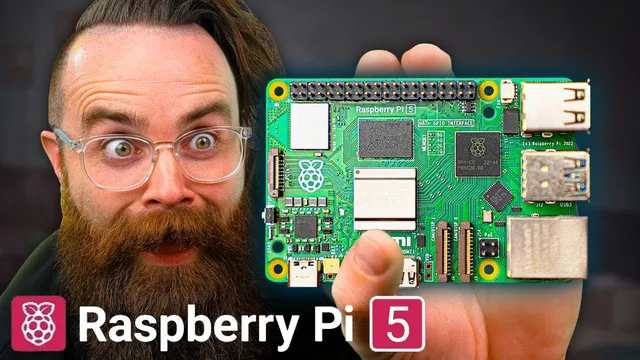
the Raspberry Pi 5
Based on NetworkChuck's video on YouTube. If you like this content, support the original creators by watching, liking and subscribing to their content.
Raspberry Pi 5’s performance leap comes from a 2.4GHz quad-core Arm Cortex-A76 CPU, an 800MHz VideoCore GPU with Vulkan 1.2 support, and faster I/O enabled by the RP1 south-bridge.
Briefing
Raspberry Pi 5 arrives with a major performance jump—enough to make it a plausible “desktop replacement” for everyday tasks, and a real upgrade for gaming and media compared with Raspberry Pi 4. The headline changes are a faster quad-core 64-bit Arm Cortex-A76 CPU at 2.4GHz, a new VideoCore GPU clocked at 800MHz that supports OpenGL ES 3.1 and Vulkan 1.2, and faster I/O enabled by Raspberry Pi’s in-house RP1 south-bridge silicon. Together, those upgrades target the bottlenecks that limited earlier Pi models: graphics throughput, storage and networking speed, and camera/display bandwidth.
On the compute side, Raspberry Pi 5 uses the RP1 chip to control the input/output between the CPU and external peripherals, unlocking higher USB performance. It keeps two USB 2.0 ports and adds two USB 3.0 ports capable of 5Gbps, including simultaneous 5Gbps operation—an important shift for projects like NAS builds and high-throughput storage. For video and display, it supports dual 4K output at 60 frames per second with HDR, backed by the GPU and improved display/camera connectivity. The camera interface also gets a bandwidth boost: a previous dedicated 1Gbps two-lane link is replaced by a pair of 4-lane 1.5Gbps transceivers, tripling total bandwidth for combinations of up to two cameras or displays.
Storage and expansion get a further lift. Peak microSD performance is claimed to double with support for SDR104 high-speed mode, and the board adds a PCIe 2.0 interface for higher-bandwidth peripherals—opening the door to faster SSD setups and network cards than what earlier Pis could comfortably handle. Memory is upgraded to LPDDR4X-4267, and the board finally includes a physical power button, which supports clean shutdown and restart behavior without unplugging.
In practical use, the Pi 5 can drive a dual 4K60 setup, but it doesn’t behave like a full desktop PC under heavy multimedia load. In testing, web browsing and video playback are workable, yet multiple simultaneous streams push the GPU hard (usage near saturation) and cause stuttering, with temperatures rising into the low 50s Celsius. Network performance tests against a NAS show that 4K playback over the network can struggle, while more typical desktop workflows—running a browser, installing VS Code, using LibreOffice, and handling other tasks—remain “pretty usable,” with occasional lag.
Benchmarks reinforce the upgrade story. CPU tests show higher event throughput in both single-threaded and multithreaded runs, and Geekbench results come back dramatically higher on the Pi 5 than the Pi 4. Browser performance measured with Speedometer 2.0 jumps from 19.2 on the Pi 4 to 54.6 on the Pi 5. Gaming tests using Open Arena show the Pi 5 can deliver far higher frame rates out of the box than the Pi 4 at comparable settings, turning previously unplayable situations into playable ones.
Raspberry Pi 5’s core message is straightforward: it’s no longer just a tinkering board. With faster CPU/GPU performance, improved I/O via RP1, and better display and expansion options, it’s positioned as a serious small computer—especially for learning, light-to-moderate productivity, and gaming that benefits from the new graphics and storage pathways.
Cornell Notes
Raspberry Pi 5 upgrades the CPU, GPU, and I/O in ways that remove key bottlenecks from Raspberry Pi 4. A 2.4GHz quad-core Arm Cortex-A76 CPU and an 800MHz VideoCore GPU (OpenGL ES 3.1, Vulkan 1.2) pair with the RP1 south-bridge to deliver faster USB (up to 5Gbps) and improved camera/display bandwidth. The board also adds a power button, faster microSD mode (SDR104), LPDDR4X-4267 RAM, and a PCIe 2.0 interface for high-bandwidth peripherals. In benchmarks, the Pi 5 substantially outperforms the Pi 4 in CPU, browser (Speedometer 2.0), and gaming (Open Arena), while real-world desktop use is workable but can stutter under heavy multi-video loads or 4K network playback.
What are the biggest hardware changes that explain the Pi 5’s performance jump over Pi 4?
How does RP1 change what you can do with storage, networking, and peripherals?
What display and camera capabilities does the Pi 5 add, and why do they matter?
Does the Pi 5 function like a desktop computer in everyday use?
How do benchmark results quantify the Pi 5 vs Pi 4 gap?
What role does cooling play, and what happens when the Pi 5 is under load?
Review Questions
- Which specific Pi 5 subsystem changes (CPU, GPU, RP1/I-O, storage, or memory) most directly address the bottlenecks seen in Pi 4 desktop and media use?
- In the Pi 5 vs Pi 4 comparisons, which benchmark results best reflect real user experience: CPU throughput, browser Speedometer 2.0, or gaming frame rates—and why?
- What practical signs during multitasking indicate the Pi 5 is hitting limits (e.g., GPU usage, stutter behavior, temperature range), and what workload types trigger them?
Key Points
- 1
Raspberry Pi 5’s performance leap comes from a 2.4GHz quad-core Arm Cortex-A76 CPU, an 800MHz VideoCore GPU with Vulkan 1.2 support, and faster I/O enabled by the RP1 south-bridge.
- 2
USB 3.0 on the Pi 5 can reach 5Gbps and supports simultaneous 5Gbps operation, making NAS and high-throughput peripherals more realistic.
- 3
Dual 4K60 HDR output is supported, and camera/display bandwidth increases via a new transceiver design that triples total camera/display link capacity.
- 4
The board improves storage pathways with SDR104 high-speed microSD mode and adds PCIe 2.0 for higher-bandwidth SSD and network-card projects.
- 5
A physical power button enables proper shutdown/restart behavior without unplugging, addressing a common usability gap on earlier Pis.
- 6
Real-world desktop use is workable for browsing and office-style tasks, but heavy multi-video playback and some 4K network streaming can still stutter under load.
- 7
Benchmarks and tests show large gains over Raspberry Pi 4 in CPU throughput, Speedometer 2.0 browser scores, and Open Arena gaming performance.