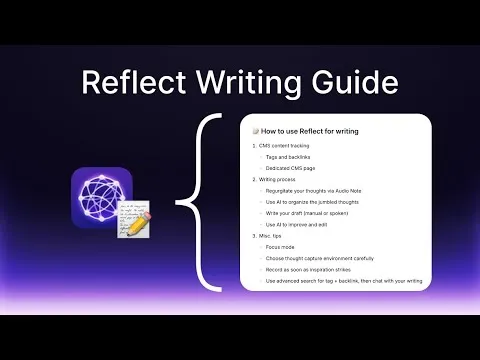
The ultimate guide to using Reflect for writing
Based on Reflect Notes's video on YouTube. If you like this content, support the original creators by watching, liking and subscribing to their content.
Use tags and backlinks to run a simple writing funnel: “article idea” in daily notes, “article draft” in dedicated notes, and “published article” when finished.
Briefing
Reflect is positioned as a writing system built around one core idea: writing is organized thinking, and the fastest way to improve output is to reduce admin work while keeping the thinking process intact. The workflow starts with a lightweight “CMS” inside Reflect—tracking items from article ideas to drafts to published pieces—then moves into a practical drafting pipeline that uses audio capture, AI-assisted structuring, and AI editing tools to keep the writer focused on content rather than formatting.
For content tracking, the guide lays out two options. The first uses tags and backlinks to create a simple funnel: “article idea” notes feed into “article draft” notes, which later become “published article” notes. When an idea is still fuzzy, it lives in daily notes with an “article idea” tag; once writing begins, the idea is converted into a dedicated note tagged as an “article draft,” and the “article idea” tag is removed to avoid clutter. Backlinks then connect the draft to the relevant project or context (for example, a personal website, an agency, or a specific topic), letting writers quickly see what’s in progress and what’s ready to publish.
The second option is a dedicated CMS page that organizes ideas, drafts, and published items into nested bullet lists. It supports drag-and-drop movement between stages, mimicking a traditional CMS. But the guide warns that this approach can become messy as more notes accumulate, turning the page into a “sea of lost backlinks.” It also argues against combining the two systems (tags plus the CMS page) because the tag layer becomes redundant when backlinks already define the relationships. The recommendation leans toward tags and backlinks, with advanced search as the payoff: writers can filter by tags and backlinks (e.g., “article idea” plus notes linked to a specific Reflect note) and then “chat” with the filtered results to plan next steps.
The writing process itself follows a three-stage rhythm. First, thoughts are captured as audio notes—ideally on a phone with one-click recording—so inspiration can be recorded immediately, even when it’s unstructured. The guide emphasizes that accuracy and AI transcription help turn rambling into usable text later. Second, AI is used to transform the transcription into a simple ordered list of key points, intentionally avoiding complex AI-generated outlines so the writer retains control of structure and voice. Third, drafting can be done by typing from the key points, optionally inserting voice notes, or by speaking the full draft and then manually shortening it.
Editing is where AI is treated as especially valuable. Reflect’s AI prompts can continue writing, fix spelling and grammar, rephrase, simplify and condense, suggest titles, and run “copy editor” style passes that improve clarity without changing tone. The guide also recommends Focus Mode (hiding sidebars) to reduce distractions, and it closes with workflow tactics: record in the environment where thinking comes easiest, capture inspiration immediately, and use tag/backlink search plus AI Q&A to identify which drafts can realistically be finished soon. The overall message is pragmatic: build a clean pipeline for ideas, draft with minimal friction, and use AI primarily for organization and editing—not for replacing the writer’s thinking.
Cornell Notes
Reflect-based writing is built around a simple pipeline: capture article ideas, convert them into dedicated drafts, and mark them as published when finished. Tags and backlinks create the funnel (“article idea” → “article draft” → “published article”), while backlinks connect each note to a project or context. Drafting starts with audio notes recorded immediately when inspiration hits, then AI turns the transcription into an ordered list of key points (avoiding complex outlines). The writer then types from those key points and uses AI prompts mainly for editing—grammar fixes, simplification, title suggestions, and copy-editor style improvements. Advanced search and “chat” over filtered results help writers decide what to work on next and what can be finished today.
How does the “CMS” funnel work inside Reflect without using a traditional website CMS?
Why does the guide prefer tags and backlinks over a dedicated CMS page?
What is the recommended way to capture raw material for an article?
How should AI be used to shape structure during drafting?
What AI tasks are considered most useful during editing?
How do advanced search and “chat” over results help with planning?
Review Questions
- What steps convert an “article idea” into an “article draft” and then into a “published article” within the tag/backlink funnel?
- Why does the guide recommend using an ordered key-point list instead of a complex AI outline?
- How can advanced search filters (tags plus backlinks) help decide what to work on next?
Key Points
- 1
Use tags and backlinks to run a simple writing funnel: “article idea” in daily notes, “article draft” in dedicated notes, and “published article” when finished.
- 2
Remove the “article idea” tag once writing starts so idea lists don’t mix with in-progress drafts.
- 3
Use backlinks to connect drafts to projects or contexts (personal website, agency, or topic) so progress is visible in incoming backlinks.
- 4
Prefer tags and backlinks over a dedicated CMS page unless drag-and-drop is essential; dedicated pages can become cluttered as notes grow.
- 5
Capture inspiration immediately with audio notes in the environment where thinking is strongest, then rely on AI transcription to turn rambling into text.
- 6
Use AI to generate a simple ordered list of key points, then draft in your own voice from that list rather than relying on complex outlines.
- 7
Edit with AI prompts mainly for grammar, condensation, title ideas, and copy-editor style improvements; use Focus Mode to reduce distractions while writing.