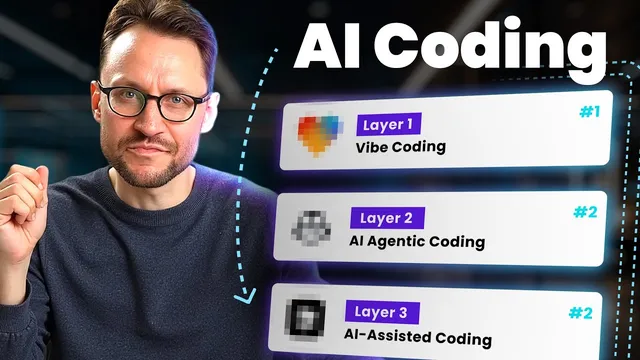
This AI Coding Stack Writes 90% of My Code
Based on Simon Høiberg's video on YouTube. If you like this content, support the original creators by watching, liking and subscribing to their content.
Use Lovable for vibe coding to generate designs, prototypes, and starter application code from natural-language descriptions, then sync the result to GitHub.
Briefing
AI product development can move far faster than traditional planning-to-coding workflows when teams combine three layers of AI tooling: “vibe coding” for rapid front-end and prototype generation, “agent-based coding” for asynchronous implementation via pull requests, and “AI assisted coding” for hands-on refinement inside an editor. The practical payoff is speed and leverage—one small team claims AI now produces roughly 90% of its code, enabling faster feature delivery and even letting low- or non-technical founders build SaaS products without months of manual engineering.
The stack starts with vibe coding, which replaces the old sequence of lengthy design work and handoff to developers. Instead of spending weeks drafting in Figma, polishing prototypes, and then manually implementing, the team uses a single tool called Lovable. By describing the desired “vibe” in natural language, Lovable generates planning artifacts, drafts, designs, and a prototype—then outputs starter application code built with modern, widely used frameworks and UI libraries. The workflow is positioned as non- or low-tech friendly: a UI/UX designer on the team can guide the process with some terminology while letting Lovable handle the heavy lifting. The result is a usable front end and a real codebase starter within hours, synced directly to GitHub so other tools can pick up the project.
Next comes agent-based coding, where AI agents work in the background against the team’s existing repositories. The mechanism centers on GitHub pull requests: an AI agent downloads the codebase from GitHub, performs the requested task in the cloud, and returns a PR that can be reviewed, modified, or approved. GitHub Copilot is highlighted as a strong option because it’s integrated into GitHub’s issue-to-PR workflow. Teams create tasks in the repository’s Issues area, describe what they need, and then Copilot generates a PR under the Pull Requests tab. Review is encouraged at the code level, and for non-developers the team suggests using preview links from hosting services such as Vercel or Amplify to see changes in action.
A key advantage is asynchronous execution. Instead of keeping a developer at a keyboard, the team breaks work into smaller tasks—three, five, or ten—and lets agents run while humans handle other priorities. Quality, however, depends heavily on task descriptions. Adding technical detail and engineering terminology improves outcomes; weak prompts lead to repeated iterations.
The final layer, AI assisted coding, is closer to pair programming inside an editor. Tools like Cursor are presented as the most powerful for this stage, with alternatives such as VS Code extensions including Klein and GitHub Copilot. This layer assumes at least some programming fundamentals and comfort navigating a codebase, making it more suitable for routine software engineers, though patient low-tech users can participate.
The stack’s credibility is reinforced with concrete usage: the team reports spending most effort in layers one and two, launching an end-to-end vibe marketing experience for FeedHive, updating features, and building a new SaaS. It also addresses common complaints about low-quality vibe coding by pointing to two failure modes: rushed, low-quality prompts and the inability to work from zero coding knowledge. The proposed fix is learning basic software engineering fundamentals so AI output can be guided and improved. The overall message is that AI coding becomes reliably productive when the workflow is structured—starting from vibe-driven prototypes, moving to agent-driven PRs, and reserving editor-level collaboration for the parts that need human judgment.
Cornell Notes
The core idea is a three-layer AI coding workflow that turns product ideas into working SaaS code quickly. Lovable handles “vibe coding,” generating designs, prototypes, and starter application code from natural-language descriptions. GitHub Copilot powers “agent-based coding,” where AI agents take tasks from GitHub Issues, work asynchronously against the repository, and return changes as pull requests for review and approval. Cursor (and editor extensions like Klein or GitHub Copilot in VS Code) supports “AI assisted coding,” where humans refine code with AI inside the editor. The approach matters because it shifts effort from manual implementation to structured prompting, review, and incremental tasking—so a small team can ship faster and even enable low-tech founders, provided they learn enough fundamentals to guide quality prompts.
How does “vibe coding” replace the traditional design-to-development handoff?
What makes agent-based coding different from copy-paste AI coding?
Why is asynchronous execution a major productivity lever in this stack?
What determines whether AI agents produce high-quality PRs?
When should teams use AI assisted coding instead of relying only on vibe coding and agents?
Why do critics claim vibe coding produces low-quality output, and what’s the proposed fix?
Review Questions
- What are the three layers of the AI coding stack, and what specific job does each layer perform in the workflow?
- How does the GitHub Issues → GitHub Copilot → Pull Request loop work, and what role does human review play?
- What prompt-quality and knowledge-level factors most strongly influence output quality across the stack?
Key Points
- 1
Use Lovable for vibe coding to generate designs, prototypes, and starter application code from natural-language descriptions, then sync the result to GitHub.
- 2
Run agent-based coding through GitHub Copilot so AI agents take tasks from GitHub Issues, work asynchronously, and return changes as pull requests for review.
- 3
Break larger builds into smaller GitHub tasks to maximize asynchronous throughput while humans handle other work.
- 4
Treat task description quality as a primary control knob: add technical detail and engineering terminology to reduce rework.
- 5
Reserve AI assisted coding (Cursor or editor extensions like Klein/GitHub Copilot in VS Code) for cases where human judgment and codebase navigation matter.
- 6
If vibe coding output feels poor, improve prompts and build at least lightweight software engineering fundamentals rather than relying on zero-knowledge prompting.