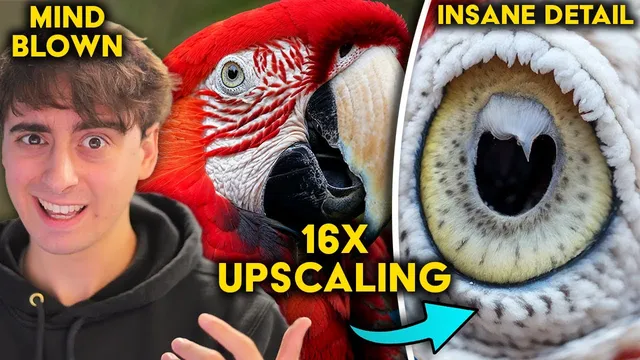
This is NEXT LEVEL! AI Upscaling that Pushes BEYOND the boundaries of Photography.
Based on MattVidPro's video on YouTube. If you like this content, support the original creators by watching, liking and subscribing to their content.
Magnific AI’s new feature lifts the earlier 2x cap, enabling upscales up to 16x and outputs up to 10,000×10,000 pixels (~100 megapixels).
Briefing
Magnific AI’s new upscaling feature pushes image enhancement far beyond the earlier 2x limit, enabling outputs up to 4x, 8x, and even 16x—translating to a maximum image size of 10,000×10,000 pixels (about 100 megapixels). That scale matters because it moves AI upscaling from “better-looking” toward “camera-like detail,” letting creators zoom into textures—fibers, pores, droplets, and micro-patterns—that normally require specialized macro photography or expensive high-resolution sensors.
Early community reactions highlight both the promise and the tradeoffs. Multiple creators showcased 16x and 100-megapixel results, including a rose close-up where the AI added dense, realistic-looking micro-detail and even individual petal veins. Another example used a blurry, low-resolution Stable Diffusion image and transformed it into a highly detailed, photo-like scene at extreme resolution, with the caveat that the output can behave like a reimagination rather than a strict enlargement. In other words: the system doesn’t just interpolate pixels—it invents plausible structure where the source lacks information.
A closer look at hands-on tests reinforces that pattern. When upscaling an AI-generated Scarlet Macaw image (from a 1024×1024 generation), the results were striking at first glance: feathers and fine hairs looked convincingly detailed. But zooming further revealed hallucinated anatomy—extra eyes, unexpected objects embedded in the eye region, and other “added” features that required editing or reprompting to correct. Similar issues appeared across subjects: a grumpy goldfish upscale stayed mostly believable, while a cat portrait produced uneven facial features (notably nose and eye shape) and odd textures around the ears. A 3D-render lemon performed well overall, but hands and background text suffered from the same core limitation: at very high resolutions, the model may render different parts independently, causing mismatches and artifacts.
The most consistent theme was not whether detail could increase—it clearly could—but whether the system could keep the original image coherent. Some upscales preserved backgrounds and blur in a pleasing way; others introduced “sandpaper” textures, misread artistic dot patterns as text, or turned intended elements into something unintended (like macro imagery that backtracked into plants and flowers). Real phone photos were the harshest test: one upscale became “horrifying,” with excessive hallucination around eyes, nose, and fur, while another dog photo was more usable but still showed scary eye behavior and nose inaccuracies. Even a personal portrait attempt produced a face that didn’t resemble the subject, including altered facial features and glasses.
Despite the uneven results, the technology impressed with consistency across many AI-generated inputs and with the sheer ability to generate 100-megapixel outputs. The biggest practical concern came down to cost and workflow: Magnific’s pricing tiers (including a $40/month Pro plan and higher tiers) were described as too limited for frequent, iterative upscaling—especially when multiple passes or post-editing in tools like Photoshop are often needed. The conclusion: Magnific AI is a meaningful leap in high-resolution AI enhancement, but the pricing and lack of a free trial make it hard to justify for users who need reliable, repeatable results.
Cornell Notes
Magnific AI’s latest update removes the earlier 2x cap and enables extreme upscaling up to 4x, 8x, and 16x, reaching a maximum output of 10,000×10,000 pixels (about 100 megapixels). Creators report that the system can add convincing micro-detail—fibers, veins, droplets, pores—making images look more like high-end photography when zoomed in. Hands-on tests show the same strength comes with a weakness: at very high resolutions the model often “reimagines” missing information, producing hallucinated anatomy, mismatched parts (like hands), or distorted facial features. The practical takeaway is that results can be impressive but may require reprompting, editing, or multiple upscale passes, which raises cost and workflow demands.
What changed in Magnific AI’s upscaling capability, and what does that mean in real image terms?
Why do many examples look “photo-real” at first glance, yet still fail on closer inspection?
How do results differ between AI-generated images and real phone photos?
What kinds of artifacts or inconsistencies show up at extreme resolutions?
What workflow and cost constraints limit adoption despite the impressive tech?
Review Questions
- When Magnific AI outputs a 100-megapixel image, what specific limitation still affects realism at extreme zoom levels?
- Give two examples of hallucination or inconsistency described in the tests (e.g., anatomy changes, mismatched hands, background artifacts).
- Why might AI-generated inputs upscale more reliably than real phone photos in this workflow?
Key Points
- 1
Magnific AI’s new feature lifts the earlier 2x cap, enabling upscales up to 16x and outputs up to 10,000×10,000 pixels (~100 megapixels).
- 2
The system often adds convincing micro-detail, but it can also invent missing structure, making results more “reimagined” than strictly enlarged.
- 3
Zooming further than the initial reveal frequently exposes hallucinated anatomy (extra eyes, incorrect facial features) or incorrect textures.
- 4
Extreme upscaling can create region-by-region inconsistencies, including mismatched replicated elements like hands and style drift in backgrounds or patterns.
- 5
Real phone photos were reported as the toughest inputs, with some upscales becoming unrecognizable due to excessive hallucination.
- 6
Iterative workflows—rerunning, reprompting, or editing—may be necessary for accuracy, which increases both time and cost.
- 7
Pricing tiers were criticized as too restrictive for users who need repeated large upscales to get reliable results.