this is really cool
Based on The PrimeTime's video on YouTube. If you like this content, support the original creators by watching, liking and subscribing to their content.
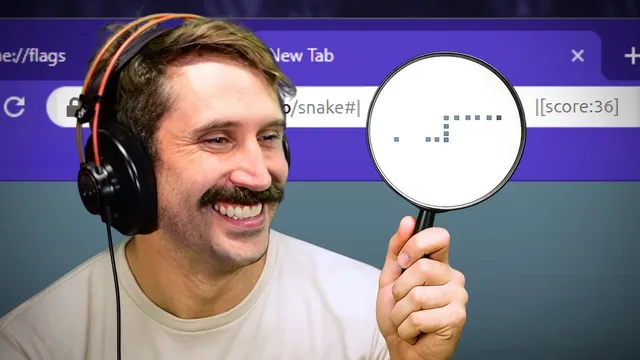
The Snake game is rendered by updating the URL bar every frame, turning address text into a live display.
Briefing
A browser-based Snake game is rendered directly inside the URL bar using Unicode characters—an approach that turns a normally static UI element into a live, frame-by-frame display. The trick hinges on encoding each game frame as a single line of text: Braille-pattern Unicode characters represent the snake and the apple, while additional Unicode whitespace characters preserve spacing so the layout doesn’t collapse.
After spotting the game on Hacker News, the investigation goes straight to the implementation. The code draws the URL every frame, using document fragments to update the displayed URL without triggering a full page reload or polluting browser history—so the game can keep responding to input smoothly. Instead of relying on regular spaces, the implementation uses a Unicode whitespace character that won’t be URL-encoded into “%20,” because that encoding would shift the spacing and break the carefully aligned character grid.
The visual core is a set of Braille characters. In Unicode, Braille patterns occupy the range U+2800 through U+28FF, giving 256 possible values—exactly what you get from a 2×4 dot matrix (8 dots total, one bit per dot). Each Braille character is constructed by mapping bits to dot positions: the first three bits correspond to the left column of the 2×4 grid, the next three bits to the right column, and the final two bits to the bottom-left and bottom-right dots. That bit-to-dot mapping lets the code “paint” the snake and food by choosing the right Unicode value for each 2×4 block.
Because the URL bar is only one character tall, the game compresses the board into horizontal slices. The rendering process starts at the upper-left corner of the board, treats each Braille character as a 2×4 tile, then walks across the grid column by column. For each tile, it pulls the current snake segments from the left and right columns, shifts bits into the correct positions, and combines them—using bitwise operations rather than arithmetic—to produce the final Braille code point. Each resulting character is then appended to the URL string by offsetting from the Braille base (0x2800).
The result is a playable Snake game that looks like a classic grid-based board, but is actually just text—updated continuously in the address bar. Controls are mapped to keyboard keys (with K/J and H/L mentioned for up/down and left/right), and the presenter notes that keyboard choice can affect performance. Beyond the gameplay novelty, the deeper takeaway is how Unicode’s Braille block can be used as a compact pixel format: a 2×4 “bitmap” per character, encoded into a single-line string that browsers can display instantly.
Cornell Notes
A Snake game is built by updating the URL bar every frame, using Unicode Braille characters to act like tiny 2×4 pixel tiles. Each Braille character comes from the Unicode range U+2800–U+28FF, which provides 256 patterns—matching the 8-dot (2×4) grid encoded as bits. The code maps snake segments into dot positions by splitting bits across left and right columns and the bottom dots, then combines them with bitwise operations and offsets from 0x2800. Document fragments and special Unicode whitespace prevent history pollution and avoid URL-encoding issues that would otherwise ruin spacing. The approach turns a one-character-tall display area into a readable, animated game board.
How can a game be animated in the URL bar without reloading the page or breaking navigation?
Why does the game use a special Unicode whitespace character instead of a normal space?
What makes Unicode Braille characters a good “pixel” format for Snake?
How are bits mapped into a Braille character’s dot positions?
How does the renderer turn a snake grid into a sequence of Braille characters?
Why is the game’s layout constrained to one character height, and how is that handled?
Review Questions
- What problem does URL percent-encoding of spaces create for a text-based grid game, and how does using a different Unicode whitespace character solve it?
- Explain how the 2×4 Braille dot matrix maps to 8 bits and why that yields exactly 256 possible Unicode values.
- Describe the high-level steps for converting a snake position into a sequence of Braille characters in the URL bar.
Key Points
- 1
The Snake game is rendered by updating the URL bar every frame, turning address text into a live display.
- 2
document fragments help update the URL without triggering page reloads or disrupting browser history behavior.
- 3
Using a Unicode whitespace character avoids URL percent-encoding (“%20”) that would otherwise break spacing and alignment.
- 4
Unicode Braille characters (U+2800–U+28FF) provide 256 patterns that map cleanly to an 8-dot 2×4 bitmap.
- 5
Each Braille character is constructed by mapping snake occupancy bits to dot positions across left/right columns and bottom dots.
- 6
Bitwise shifts and OR operations assemble the final Braille code value, which is then offset from 0x2800 to produce the correct Unicode character.
- 7
The one-character-tall URL bar is handled by packing vertical detail into each Braille character’s 2×4 structure.