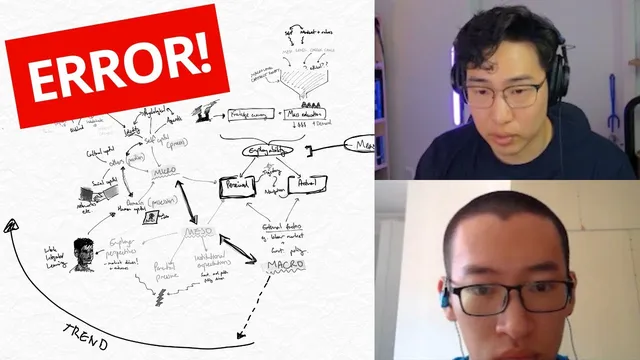
This One Mistake Made his Mindmap Useless
Based on Justin Sung's video on YouTube. If you like this content, support the original creators by watching, liking and subscribing to their content.
Retention drops when mind maps become overly dense in localized areas and hard to scan, often caused by adding relationships without frequent zoomed-out checks.
Briefing
Mind maps stop working when new branches get added too quickly—before the map is periodically zoomed out, checked for fit, and rearranged. The core fix is a workflow: build a clear “backbone” first, then add the next layer of main concepts across the whole structure, and only then start testing relationships—pausing to reorganize whenever an added connection makes the layout dense or messy.
A student described two problems: retention was weak, and even when reviewing the mind map, it didn’t feel useful for answering exam questions. Multiple attempts showed a pattern: the more complete and less overloaded the map was, the better the retention. The latest attempt was the highest quality, but still not ideal because the student ran out of room for additional keywords—everything became overwhelming.
The coaching diagnosis focused less on “adding more” and more on how the map was built. One issue was that the map became overly detailed in a localized area while other sections stayed thin—described as “segmental” mapping. Another was “anti–spider webbing”: instead of embracing the messy growth that comes from discovering new relationships, the student avoided adding them because the layout would likely turn chaotic. The result was a network that looked logical at a glance but was hard to navigate and therefore unlikely to support recall.
The deeper structural mistake was timing. After creating an overall backbone, the student added extra concepts in a way that didn’t account for how those new nodes would connect to the rest of the map. That’s why arrows crossed and density spiked in one region. Even adding a single extra concept could trigger a cascade of conflicts—because relationships multiply as the map grows. The coach emphasized that this is normal at an early skill level; the goal isn’t to avoid complexity, but to manage it.
The proposed method is iterative and deliberate. After each new element, the learner should ask: how does this connect to the big picture? Then zoom out, pause, and rearrange immediately if the structure becomes tangled. Waiting too long to reorganize makes the task harder—like moving furniture into a house and only then trying to redesign the rooms. Frequent “zoom in / zoom out” cycles create earlier opportunities to reposition nodes so connections stay cleaner.
The coach also challenged the student’s approach to relationships. It’s valid to connect “technological advancement” to “income” through production logic, but exam-ready maps benefit from awareness of multiple possible connections. The map doesn’t need to include every relationship, but it should reflect that more than one network is plausible—so the final structure is chosen with intention.
Finally, the session offered practical constraints: working with 100+ keywords while still learning can be too much. Reducing the active set to around 30–50 makes the process manageable without truly skipping content, since delayed keywords can be revisited later. The real danger isn’t postponing coverage; it’s mistaking rereading and rewriting for actual memory. The takeaway: retention improves when the map remains navigable, and navigability comes from constant checking, pausing, and restructuring before the layout becomes committed and overwhelming.
Cornell Notes
The session links weak mind-map retention to a specific building mistake: adding new keywords and relationships without frequent “zoom in / zoom out” checks. When a map becomes segmental (too detailed in one area) or turns into anti–spider webbing (avoiding relationships because it will get messy), it becomes hard to follow and less useful for recall. The fix is procedural: create a backbone first, add main concepts across the whole map, then test relationships while repeatedly pausing to rearrange whenever connections threaten to tangle. Reducing the number of active keywords (e.g., 30–50 instead of 100+) helps learners manage complexity without skipping learning.
What is the “one mistake” that makes a mind map feel useless for answering questions?
How do “segmental” mapping and “anti–spider webbing” hurt retention?
Why does adding just one extra concept sometimes break the whole map layout?
What workflow replaces “add everything, then fix it later”?
How should a learner handle relationships that “logically make sense” but may not be the only connection?
Why reduce keyword count during early skill-building, and does it mean skipping content?
Review Questions
- When should a mind-map builder zoom out and rearrange—after every keyword, after every section, or only at the end? Justify using the session’s logic.
- Describe a situation where segmental mapping would likely occur and explain how it would affect exam recall.
- What’s the difference between postponing keyword coverage and “skipping” in a memory sense?
Key Points
- 1
Retention drops when mind maps become overly dense in localized areas and hard to scan, often caused by adding relationships without frequent zoomed-out checks.
- 2
A backbone should be created first; then main concepts should be added across the whole map before deepening any one region.
- 3
After adding each new node, the learner should pause and ask how it connects to the big picture, then zoom out to decide whether rearrangement is needed.
- 4
Segmental mapping and anti–spider webbing (avoiding relationships because they’ll get messy) both reduce navigability and weaken recall.
- 5
Rearrange early and often; delaying restructuring makes the task harder and increases overwhelm.
- 6
Exploring multiple plausible relationships improves judgment about which connections to include, even when one connection seems logically obvious.
- 7
During early learning, limit active keywords (around 30–50 rather than 100+) to keep the zoom-in/zoom-out workflow workable without skipping learning.