Time-blocking in Obsidian
Based on Joshua Duffney's video on YouTube. If you like this content, support the original creators by watching, liking and subscribing to their content.
Time-blocking is positioned as “guide rails” that help accomplish goals instead of becoming a rigid, self-punishing schedule.
Briefing
Time-blocking is framed as a choice between rigid self-imposed pressure and “guide rails” that steer daily effort toward real goals. Built around Cal Newport’s deep-work-oriented planner concept, the workflow pairs a structured time grid with a shutdown ritual—then adapts that system inside Obsidian using plugins and templates so planning and execution live in the same knowledge base.
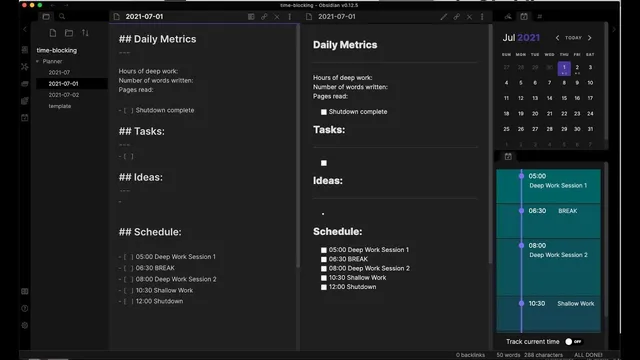
The core mechanism is a grid of hour- or half-hour blocks that assigns specific work to specific times, including buffers around meetings. In Newport’s planner, the left side emphasizes daily task lists, daily metrics, and a shutdown ritual, while the right side provides the distinctive schedule grid. The Obsidian version recreates that grid by combining a calendar plugin, a daily notes plugin, and a “day planner” plugin that emulates the visual time-block layout in Markdown.
Daily tracking goes beyond checklists. The system logs “daily metrics” tied to output and learning: hours of deep work, number of words written, and number of pages read—explicitly linking reading to writing productivity. It also includes a checkbox for the shutdown ritual, plus a place for tasks and ideas. Importantly, the “ideas” area functions as a scratch space for capturing items that arise during the day but aren’t urgent enough to interrupt the planned workflow.
A typical day begins with a deep work block—about an hour and a half—used for writing a book chapter (the transcript cites work on a chapter titled “hacked”). After that, the schedule shifts to a work session focused on tasks such as Terraform storage issues, with a template that pre-populates the rough structure for new days. The day planner’s time blocks also incorporate meetings and buffer time, reducing the need to keep tools like Outlook or Teams open during deep work.
The system’s planning loop closes with the shutdown ritual. At day’s end, tasks and ideas get moved forward—either to the next day or into a weekly review—so the planner doesn’t become a dumping ground. Weekly review is handled through a single Obsidian file organized by headings for each week (rather than a separate spread per week). That weekly layer keeps flexibility: it can support fine-grained day-by-day planning or a broader overview of learning goals, such as starting to learn Cousteau or reading “The Paradox of Choice,” with the transcript giving an example of assigning those intentions to week two of July.
Overall, the approach turns time-blocking into an Obsidian-native workflow: a daily time grid for execution, a metrics-driven view of progress, and a structured daily/weekly review cycle that preserves continuity across days and weeks while still allowing adjustments as new meetings and ideas appear.
Cornell Notes
Time-blocking is used as “guide rails” rather than a prison, with a daily schedule grid that assigns work to specific hour or half-hour blocks. The Obsidian setup recreates Cal Newport’s planner style by using a calendar plugin, a daily notes plugin, and a day planner plugin to emulate the grid view in Markdown. Daily notes track deep work hours plus writing and reading metrics (words written and pages read), along with a shutdown ritual checklist. A scratch area captures tasks and ideas that arise during the day without derailing the planned blocks. At day’s end, tasks roll into the next day or a weekly review organized in a single year/month file with headings per week, allowing both detailed and high-level planning.
How does the Obsidian time-blocking workflow recreate Cal Newport’s planner structure?
What daily metrics are tracked, and why are they tied to the user’s writing process?
What role does the “ideas” area play in the daily workflow?
How does the system handle meetings and reduce context switching during deep work?
What happens at the end of each day, and how does that connect to weekly review?
How does the template-based approach work for new days?
Review Questions
- What specific plugins are used to recreate the schedule grid view inside Obsidian, and what does each one contribute?
- How do the daily metrics (deep work hours, words written, pages read) function as part of the productivity system rather than as passive tracking?
- In what ways does the weekly review structure (single year/month file with weekly headings) provide flexibility compared with a separate weekly spread?
Key Points
- 1
Time-blocking is positioned as “guide rails” that help accomplish goals instead of becoming a rigid, self-punishing schedule.
- 2
Cal Newport’s planner concept is adapted into Obsidian by combining a calendar plugin, a daily notes plugin, and a day planner plugin to recreate the time-grid view.
- 3
Daily notes track both execution and learning through metrics: hours of deep work, words written, and pages read.
- 4
A dedicated scratch area captures tasks and ideas that arise during the day without forcing immediate disruption of planned time blocks.
- 5
Buffer time and scheduled meetings reduce the need to keep communication tools open during deep work.
- 6
A shutdown ritual at day’s end moves unfinished items to the next day or into weekly review, preventing backlog sprawl.
- 7
Weekly review is organized in a year/month file with headings per week, enabling either detailed day-by-day plans or broader weekly learning goals.