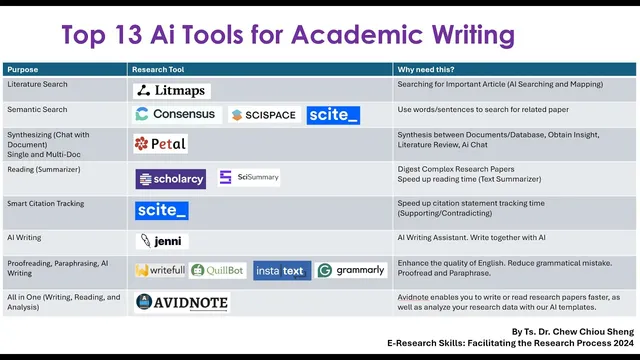
Top 13 AI Research Tools For Academic Writing
Based on E-Research Skills's video on YouTube. If you like this content, support the original creators by watching, liking and subscribing to their content.
Use a literature-mapping workflow that expands from one seed paper via citations and semantic connections, then iteratively “update results” until the set is relevant.
Briefing
Academic writing gets faster when researchers treat the workflow as a pipeline: find relevant literature, map relationships, synthesize evidence across papers, then draft, revise, and proof with targeted tools. The core takeaway is a step-by-step stack of 13 AI research tools—organized around four stages—so students can move from “what should I read?” to “what should I write?” without skipping verification.
The first stage is literature search and literature mapping. One tool highlighted for this purpose takes a single starting paper and expands outward by surfacing related articles through citations and semantic connections. It presents a visual map where time runs from older papers on one side to newer papers on the other, while node size reflects how many references connect to each work. Users are instructed to click only papers that match both the title and abstract to their topic; irrelevant results (for example, medical education when the target is language learning) should be excluded to avoid drifting into the wrong research area. The workflow then iterates: users keep selecting “update results” until the set of papers feels sufficient, and can switch layouts (e.g., side-by-side) to manage the growing list.
A second key capability in this literature stage is evidence tracking—especially for writing discussion sections. Another tool is presented as strong at identifying supporting versus contradicting claims across papers, including counts of agreement and disagreement and percentages that indicate confidence in each type of claim. The practical value is straightforward: when drafting argumentation, writers can quickly locate which findings align and which conflict, then cite the underlying sources.
The next stage focuses on synthesis and reading. Tools are recommended for single-document and multi-document synthesis, including summarization that can extend beyond text into figures (so readers can interpret charts and diagrams without manually studying every visual). Multi-document checking is emphasized over single-paper reading, with guidance to keep the number of papers manageable (roughly 3–5, up to around 10) to maintain coherence. These tools can also generate structured outputs such as literature-review matrices, comparative analyses, and outlines.
For the writing stage, a dedicated AI writing tool is positioned as a co-author rather than an autopilot: it helps generate sentences and outlines based on imported articles, but users are repeatedly warned not to copy and paste AI output directly. The tool can also produce citations automatically from the user’s library, and it supports rewriting tasks like paraphrasing and generating counterpoints (e.g., “contradicting statement” prompts). After drafting, the transcript shifts to revision and proofing: paraphrasing and proofreading tools are recommended for word-by-word editing, style control, and reducing AI-detection risk—though the message stays consistent that writers must review carefully and verify claims against original sources.
The final part of the stack includes “all-in-one” options that combine reading, rewriting, and analysis, plus a broader set of templates for tasks like proposals, surveys, interviews, coding, translation, and data-analysis prompts. Across the full list, the repeated rule is verification: AI suggestions are treated as starting points that still require reading the original papers, checking relevance, and editing for academic accuracy and originality.
Cornell Notes
The transcript lays out a practical AI-assisted workflow for academic writing: start with literature search/mapping, then synthesize and read across papers, and finally draft and revise with proofreading/paraphrasing tools. A literature-mapping tool expands from one seed article into a network of related works using citation and semantic links, with a visual timeline and reference-based sizing to help prioritize what to read. For synthesis and evidence use, tools provide single- and multi-document summarization, figure explanations, and comparative analysis, including support vs contradiction tracking with agreement counts and percentages. Writing tools generate outlines and sentences with imported sources, but the guidance stresses co-writing rather than copy-pasting, followed by careful manual verification and editing. The overall value is speed plus structure—while keeping academic rigor through source checking.
How does a literature-mapping tool turn one article into a broader literature set, and what should users verify before saving papers?
Why is support/contradiction tracking especially useful for discussion sections?
What’s the difference between single-document and multi-document synthesis, and why does the transcript push multi-document checks?
How do writing tools in the workflow support drafting without turning into “AI autopilot”?
What revision and paraphrasing guidance is given to reduce risk and improve academic quality?
What kinds of “all-in-one” templates and features are mentioned beyond writing and summarizing?
Review Questions
- When expanding from a seed paper in a literature-mapping tool, what two checks does the transcript recommend before clicking a suggested article?
- How do support vs contradiction metrics (counts and percentages) change how a writer should structure a discussion section?
- What is the transcript’s rule for using AI writing output—what should users do instead of copy-pasting?
Key Points
- 1
Use a literature-mapping workflow that expands from one seed paper via citations and semantic connections, then iteratively “update results” until the set is relevant.
- 2
Verify relevance at the title and abstract level before saving papers; exclude off-topic results even if they appear in the network.
- 3
Prioritize multi-document synthesis (about 3–5 papers, up to ~10) to surface themes and comparisons faster than combining single-paper summaries later.
- 4
Track supporting and contradicting claims across studies to strengthen discussion sections with evidence counts and confidence percentages.
- 5
Draft with AI as a co-writer by importing your library and using outlines/sentence suggestions, but avoid copy-pasting AI output directly.
- 6
After drafting, use proofreading and paraphrasing tools for word-by-word edits, then manually verify every claim against the original sources.
- 7
Consider all-in-one tools and templates for proposals, surveys, interviews, translation, coding, and data-analysis prompts—while still grounding specifics in real literature.