Two Workflows for Reading, Note-Taking, and Visual Thinking that Are Transforming the Way I Use AI
Based on Zsolt's Visual Personal Knowledge Management's video on YouTube. If you like this content, support the original creators by watching, liking and subscribing to their content.
Use ChatGPT as a short reflective partner during audiobook listening, then import only the chapter-level summary into Obsidian.
Briefing
AI use doesn’t have to mean handing over private notes. Zsolt’s two workflows aim to keep personal information “ring-fenced” while still using AI to generate summaries, connections, and visual structures that make reading and knowledge work stick.
The first workflow targets non-fiction reading, where audio-only often fails to produce recall. Instead of treating an audiobook as the primary input, he listens to the book on Audible while keeping ChatGPT open on his phone. After roughly 5–10 minutes (or whenever an idea hits), he pauses the chapter and records a short, interactive voice conversation with ChatGPT—positioning it less as a long chat partner and more as a reflective notebook. He uses the discussion to refine articulation (especially since he’s not a native speaker) and then asks ChatGPT for a concise summary at the end of each chapter. Crucially, he imports only that AI-generated summary into Obsidian—not highlights or raw book notes—then uses a “flipped notes” layout to pair the summary with an illustration created from the same conversation. He also keeps each chapter in a separate chat so ideas don’t bleed across chapters and so the workflow stays manageable.
Several practical rules make the method work reliably. Long voice reflections can trigger interruptions, but holding the screen prevents ChatGPT from responding until he releases it. Multitasking breaks the experience; he recommends staying physically engaged—walking, pacing, or even using idle moments like standing in line or waiting at traffic lights—because listening plus voice reflection doesn’t require constant attention on the phone. He also insists on timing: generate the summary immediately after finishing the chapter, import it right away, and move on. That freshness helps catch omissions or additions ChatGPT makes compared with what he personally considered important.
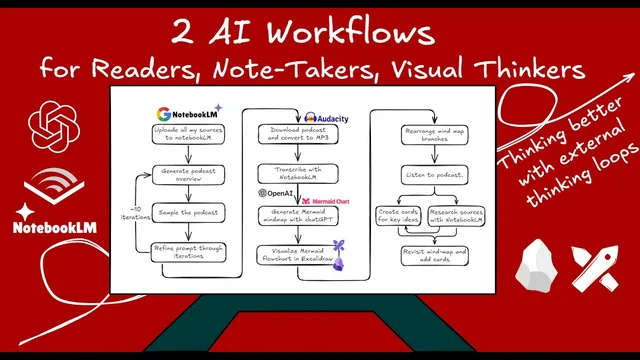
The second workflow builds a visual “external loop” from a whole body of knowledge. He starts by feeding books and notes about visual thinking into NotebookLM, then prompts it to generate a podcast-style overview (with a tight 500-character prompt limit). After downloading the podcast, he converts it to MP3 with Audacity, imports it into Obsidian, and uses NotebookLM again to transcribe the audio. Next, he uploads the transcript to ChatGPT to produce a Mermaid mind map; since Excalidraw struggles with mind maps, he requests a Mermaid flowchart instead. He then imports the flowchart into Excalidraw, rearranges branches into a more map-like layout, tweaks styling, and splits the canvas so the mind map sits beside the text while he creates illustrations. The result is a connected visual index: book covers act as links into his Obsidian vault, and the map becomes a jump-off point for future exploration.
Together, the workflows aim at selective sharing—external materials like books and curated reflections rather than a dump of private notes—while still producing summaries, structure, and new perspectives. Both workflows are presented as free to try: NotebookLM, ChatGPT, Obsidian, and Excalidraw are all used without paid subscriptions, with the broader claim that motion-friendly reading and AI-assisted visual synthesis can change how information turns into usable knowledge.
Cornell Notes
The core idea is to use AI for reading and knowledge synthesis without exposing personal notes. For non-fiction, he listens to an audiobook while running short voice conversations with ChatGPT every 5–10 minutes, then imports only a chapter-level summary into Obsidian and pairs it with an illustration in a flipped-notes format. He keeps each chapter in a separate chat and generates summaries immediately to preserve recall and catch missing details. For a broader topic, he feeds a library of materials into NotebookLM, generates a podcast overview, downloads and transcribes it, then uses ChatGPT to create a Mermaid flowchart that he rebuilds in Excalidraw as a linked visual map. The payoff is a privacy-conscious, visual “external loop” that produces new perspectives and future navigation paths.
Why does the audiobook + reflection workflow focus on non-fiction, and what problem is it trying to solve?
What exactly gets imported into Obsidian in the reading workflow, and why does that matter for privacy?
How does the workflow prevent the reflection chat from becoming unwieldy or mixing ideas across chapters?
What practical tactics improve the reliability of voice reflection with ChatGPT?
How does the second workflow turn a large knowledge set into a navigable visual map?
Why does the workflow switch from Mermaid mind maps to flowcharts?
Review Questions
- In the non-fiction reading workflow, what is the minimum unit of AI output that gets imported into Obsidian, and what does that choice protect?
- What sequence of tools transforms a topic library into a linked visual map in the NotebookLM → podcast → transcript → Mermaid → Excalidraw workflow?
- Which timing and chat-structure rules (e.g., separate chats per chapter, immediate summaries) are used to improve recall and prevent idea mixing?
Key Points
- 1
Use ChatGPT as a short reflective partner during audiobook listening, then import only the chapter-level summary into Obsidian.
- 2
Pause every 5–10 minutes (or when an idea triggers) to keep reflections grounded and summaries accurate.
- 3
Generate and import the chapter summary immediately after finishing the chapter to preserve freshness and reduce memory loss.
- 4
Keep each chapter in a separate ChatGPT chat with a prompt that limits conversation length to prevent cross-chapter contamination.
- 5
Avoid multitasking during the reflection process; pace or walk to stay engaged while using voice reflection.
- 6
For topic-level synthesis, feed a curated knowledge set into NotebookLM, generate a podcast overview, download and transcribe it, then convert the transcript into a Mermaid flowchart.
- 7
Build the final visual map in Excalidraw with clickable links back to Obsidian so the output becomes a navigable index for future exploration.