Visualize Your Knowledge Base with Recall AI! | Graph View 2.0 Review & Tutorial
Based on The Organized Notebook's video on YouTube. If you like this content, support the original creators by watching, liking and subscribing to their content.
Recall automatically organizes stored resources using tags and filters, reducing the need for manual tagging.
Briefing
Recall is positioned as a personal AI knowledge base for people drowning in saved links, articles, and notes—turning that pile into something searchable, connected, and actively studyable. Instead of relying on manual organization, it automatically surfaces stored resources on a Home screen using tags and filters, while still letting users add new entries from URLs, Wikipedia, Google Knowledge Graph, or Wikidata, or by writing notes directly. A key workflow centers on linking ideas: highlight text in a note, create a connection to an existing concept (like “artificial intelligence”), and instantly see related cards and resources grouped under that node.
The platform then extends beyond storage into interaction. An AI chat feature lets users query their entire knowledge base, with @mentions and tag-based search narrowing results to specific topics or contexts. For learning, a Review area functions like a space repetition system, generating study questions tied to the cards a user wants to practice and tracking performance as questions are answered. For content capture, a Chrome extension generates concise AI summaries for saved media and supports timestamped note-taking inside the summary—plus the ability to chat with the source content, read a full transcript, and generate AI quizzes that feed back into the Review workflow.
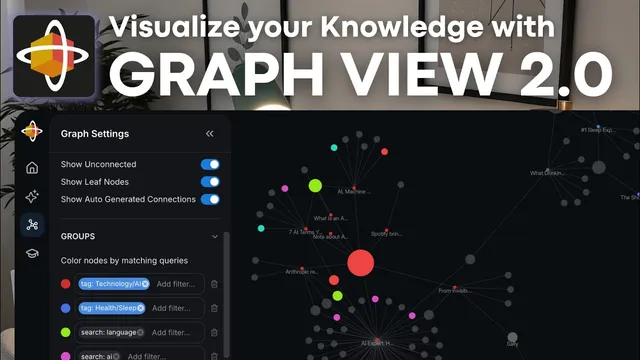
Where Recall differentiates most sharply is Graph View 2.0, built to make relationships visible and customizable. Nodes represent concepts, resources, and tags; the more connections a node has, the larger it appears, helping users spot “hot” themes at a glance. Directed links (arrows) reflect how one resource points to another through stored connections—so an article about sleep may connect to sleep directly, while also linking onward to sources like CNN when that article originated there. Graph View 2.0 adds practical controls: filtering by tag, source, name, or search (including the ability to remove items with a minus sign), showing unconnected or leaf nodes, and grouping nodes by matching queries so entire clusters light up (for example, everything related to technology or AI).
The interface also offers deeper graph mechanics: timeline views show when cards were added; layout settings adjust node spacing, link lengths, link force, and pull toward the center; and visual options control label visibility, arrow display, and link thickness. A “pathfinder” tool lets users click two nodes and reveal the connecting route—surfacing intermediate concepts and the specific cards that bridge them. Users can color-code by tag, lock the graph to keep a manual arrangement, and save a customized view as a preset so different perspectives (journal-only, a single topic, or a tag-focused layout) can be recalled later.
Finally, Recall treats people and recommendations as first-class connections. A user can create an entity like “Sally,” record that she recommended a particular article, tag her as a contact, and later trace her influence across the graph—seeing Sally connected to multiple nodes. A mobile app rounds out the workflow by enabling sharing a podcast directly into Recall for later reading and study. The overall message is clear: Recall aims to turn passive saving into an evolving, connected system for discovery and spaced learning, with Graph View 2.0 as the centerpiece for finding new paths through accumulated knowledge.
Cornell Notes
Recall is a tool for building an AI-powered knowledge base from saved web content, Wikipedia/knowledge graph sources, and handwritten notes. It emphasizes linking: highlighting text and connecting it to concepts instantly organizes related cards under shared nodes and tags. Users can chat with their knowledge base using @mentions and tag filters, then study via a Review area that generates space-repetition style questions. The Chrome extension streamlines capture by producing AI summaries, timestamped note-taking, transcript access, and AI quizzes that feed into Review. Graph View 2.0 is the standout feature, visualizing nodes and directed connections, offering filtering/grouping, pathfinding between concepts, and saving customized graph presets.
How does Recall turn scattered saved items into an organized knowledge base without heavy manual tagging?
What learning loop does Recall support beyond search—especially for studying efficiently?
How does the Chrome extension change the workflow for saving and studying video or web content?
What makes Graph View 2.0 different from a simple list of notes?
How does pathfinding help users discover connections they might miss?
How can people and recommendations become part of the knowledge graph?
Review Questions
- Describe the end-to-end workflow from saving a YouTube video to studying it in Review using Recall’s tools.
- In Graph View 2.0, how do node size and arrow direction help interpret relationships between resources?
- What graph controls (filtering, grouping, layout, presets, or pathfinding) would you use to answer a question like “How does concept A relate to concept B through intermediate topics?”
Key Points
- 1
Recall automatically organizes stored resources using tags and filters, reducing the need for manual tagging.
- 2
Users can add knowledge from URLs, Wikipedia, Google Knowledge Graph, Wikidata, or by writing entries directly.
- 3
Highlight-and-connect linking turns notes into a connected network where new cards appear under relevant concept nodes.
- 4
AI chat supports retrieval across the knowledge base using @mentions and tag-based narrowing.
- 5
The Review area provides space-repetition style practice using generated questions tied to selected cards.
- 6
The Chrome extension streamlines capture with AI summaries, timestamped note-taking, transcript access, and AI quiz generation.
- 7
Graph View 2.0 visualizes nodes and directed connections, supports filtering/grouping, pathfinding between concepts, and saving customized presets.