Webinar - Mendeley for Engineers (2011-08-25)
Based on Mendeley's video on YouTube. If you like this content, support the original creators by watching, liking and subscribing to their content.
Mendeley synchronizes the same library across desktop, web, and mobile so papers and reading stay available across devices.
Briefing
Mendeley is positioned as an all-in-one reference manager that keeps researchers’ libraries synchronized across desktop, web, and mobile—then layers organization, full-text search, collaboration, and analytics on top. The core pitch is practical: import papers quickly, extract metadata automatically, search across the full text of PDFs, and write with citations that update your bibliography as you draft. That combination matters because it reduces the two biggest time sinks in research workflows—building a clean bibliography and finding relevant material once a library grows into the hundreds or thousands of documents.
The webinar breaks down how papers enter a Mendeley library. The fastest path is drag-and-drop: drop a PDF or folder into the desktop app and Mendeley attempts to extract metadata such as title, abstract, authors, publisher, and page numbers. When automatic extraction fails—often with unusual journal formats or scanned PDFs—Mendeley flags the record as needing review and can fill missing fields by searching online using identifiers like DOI, PubMed ID, or arXiv ID. If no identifier is available, it can still search by title (including via Google Scholar) to complete the record. For ongoing intake, a “watch folder” feature monitors designated folders and automatically imports new PDFs whenever Mendeley opens (or stays open), extracting metadata and updating the library without repeated manual steps.
Once papers are in, Mendeley’s desktop interface organizes them through folders, subfolders, favorites, recently added items, and a “needs review” bucket for incomplete metadata. A key productivity feature is search ranking: queries can search across the library or within a selected folder, and when a PDF is opened, search becomes context-specific—limited to that document’s full text with navigation through occurrences. The built-in PDF viewer supports highlighting and notes, including post-it style annotations and document-wide notes. Those annotations can be shared in group settings, where multiple people can work on the same PDF and each contributor’s highlights appear in distinct colors.
Collaboration comes in two main forms: public groups and private groups. Public groups focus on sharing references (not necessarily PDFs), with options ranging from open participation to invite-only moderation. Private groups enable sharing full-text PDFs and annotations, plus a group dashboard that supports ongoing discussion through comments and activity feeds. Beyond group work, Mendeley’s “discovery” layer aggregates metadata from users’ libraries into a searchable research catalog, enabling cross-disciplinary search and surfacing readership statistics, related papers, and lightweight previews. When available through a university subscription, Mendeley can use an open URL resolver to help users reach full text in one click.
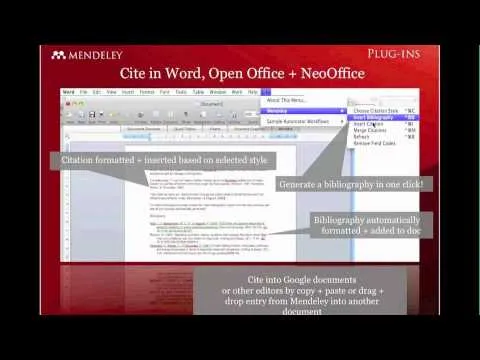
For writing, Mendeley integrates with word processors via a citation plugin for Microsoft Office on Windows and Mac (and supports OpenOffice/LibreOffice). Researchers can insert citations, generate bibliographies, and choose from many citation styles (with a large library of styles available to install). For LaTeX workflows, Mendeley can export BibTeX-compatible files and generate synchronized text files per collection.
Finally, the webinar highlights extensibility through an open API that exposes the research catalog and related information. Developers can build tools, wrappers, or even new applications on top of Mendeley’s aggregated data. The session also points to community feedback channels and a competition (Binary Battle) encouraging API-based projects, with prizes and judging by major industry names.
Cornell Notes
Mendeley is presented as a synchronized reference manager that streamlines importing papers, organizing libraries, searching content, and writing citations. It extracts metadata automatically from PDFs (title, authors, abstract, publisher, page numbers) and flags incomplete records for review; missing details can be completed using DOI, PubMed ID, arXiv ID, or title searches. Full-text indexing enables searching inside PDFs, not just titles or abstracts, and the built-in PDF viewer supports highlights and post-it notes. Collaboration is handled through public groups (references) and private groups (PDFs plus shared annotations), with dashboards and activity feeds. A discovery layer aggregates metadata into a searchable research catalog with readership statistics and recommendations, and an open API allows developers to build new tools.
What are the main ways to add papers to a Mendeley library, and how does metadata get completed when PDFs are messy?
How does Mendeley’s search work once a library contains hundreds or thousands of papers?
What collaboration features distinguish public groups from private groups?
How does Mendeley support writing with citations across common research document workflows?
What does “discovery” mean in Mendeley, and how does it help researchers find papers outside their usual databases?
How can developers extend Mendeley beyond the built-in interface?
Review Questions
- Describe the full workflow from importing a PDF to getting a complete citation in a manuscript, including what happens when metadata extraction fails.
- Explain how Mendeley’s search ranking changes depending on whether the query is across the library, within a folder, or inside a specific PDF.
- Compare public and private Mendeley groups in terms of what gets shared and how annotation collaboration works.
Key Points
- 1
Mendeley synchronizes the same library across desktop, web, and mobile so papers and reading stay available across devices.
- 2
Drag-and-drop, watch folders, and imports from BibTeX/RIS/EndNote XML reduce manual entry and speed up building a reference library.
- 3
Automatic metadata extraction can be completed using DOI, PubMed ID, arXiv ID, or title searches when PDFs are scanned or formatted unusually.
- 4
Full-text indexing and a built-in PDF viewer enable search within a single document, with navigation through query matches.
- 5
Highlights and post-it notes support structured reading, and private groups allow shared annotations with color-coded contributions.
- 6
Citation plugins generate bibliographies automatically in supported word processors, while BibTeX/LaTeX exports support TeX-based writing.
- 7
An open API enables developers to build new tools using aggregated research-catalog data, supported by community feedback channels and competitions.