Webinar - Mendeley for Librarians (2011-07-26)
Based on Mendeley's video on YouTube. If you like this content, support the original creators by watching, liking and subscribing to their content.
Mendeley aims to cut researcher time by turning individual paper organization, annotations, and sharing into shared discovery signals.
Briefing
Mendeley is built to reduce the repetitive work of managing research by turning the way researchers organize, annotate, and share papers into a shared, searchable knowledge layer. Instead of treating reference management as a private filing task, the platform aims to capture “latent information” from individual libraries—what people read, how they tag and annotate it, and what they share—then use that aggregate signal to help others find relevant work faster and more accurately.
The service traces its origin to two graduate students frustrated by how hard it was to manage dissertation materials, and it has grown into a UK-headquartered company with an office in New York and strong adoption at major US universities such as Harvard, Princeton, and MIT. The product design centers on individual researchers rather than institutional procurement, which shapes everything from how documents are imported to how search and collaboration work.
Mendeley’s core is split into two interconnected parts: a cloud catalog (Mendeley Web) and a desktop client (Mendeley Desktop). The desktop app provides a three-pane interface for organizing folders and groups, viewing detailed metadata, and—crucially—searching “find as you type” across the full text of an entire library. That search is positioned as an antidote to folder anxiety: instead of spending time deciding where each paper belongs, users can treat search results as an “ad hoc dynamic folder” built from queries.
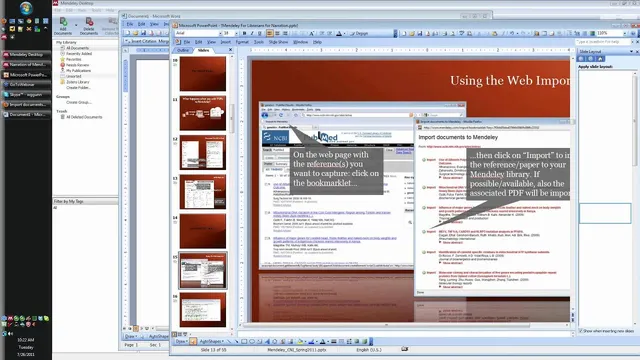
Getting papers into the library is designed to be low-friction. Users can drag and drop PDF folders, let the software watch a folder for automatic imports, or use a browser bookmarklet to pull metadata from web pages and database results (including PubMed). For researchers coming from other reference managers, Mendeley can import common formats like EndNote XML, BibTeX, and RIS, with direct sync preferred when possible. When importing PDFs, Mendeley uses a multi-step metadata pipeline: it checks for duplicates using a file hash plus title/author matching, extracts embedded XMP metadata when available, falls back to DOI or PMID/other identifiers, and finally uses title/author/year matching via Google Scholar. The system reports that this approach correctly retrieves metadata for about 98% of documents, with automatic correction and manual fixes available when needed.
Once papers are in place, Mendeley supports collaborative reading and writing workflows. Users can annotate PDFs inside the viewer, with notes synced to the account and separated from documents when sharing—so personal annotations can remain private. In groups, multiple people can annotate the same PDF with distinct colors and timestamped, signed notes. For writing, Mendeley integrates with Word and OpenOffice on PC, Mac, and Linux, inserting citations and generating bibliographies in thousands of styles via a Word add-on. It also relies on Citation Style Language (CSL), an open standard that lets styles be defined and shared through a community repository rather than forcing each tool to reinvent citation formatting.
On the discovery side, Mendeley Web functions as a crowd-sourced catalog and social network organized around document collections and groups (topical, conference, or journal club). The catalog is public, indexed by Google Scholar, and ranks results using signals from readership and sharing activity to improve serendipity—finding related work users didn’t know to search for. The platform also exposes an API for programmatic access to citation and readership data, with hundreds of applications in development and a $10,000 award for the best one. Future plans emphasize open formats, export options, and long-term compatibility with post-PDF publishing and linked data, aiming to avoid vendor lock-in while expanding how researchers discover, collaborate, and cite.
Cornell Notes
Mendeley is positioned as a reference manager that also learns from how researchers organize and share papers. By combining Mendeley Desktop (import, metadata cleanup, full-text search, annotation, and citation insertion) with Mendeley Web (a public catalog, groups, and discovery signals), it aims to cut the time spent filing, retyping citations, and hunting for relevant literature. Document import uses duplicate detection (file hash + title/author), embedded metadata extraction (XMP), identifier lookups (DOI/PMID), and Google Scholar matching when needed, with automatic correction and manual edits. Collaboration works through groups where annotations can be shared with clear attribution and timestamps. For writing, Mendeley integrates with Word/OpenOffice using Citation Style Language (CSL), an open standard that supports thousands of citation styles without proprietary lock-in.
What problem does Mendeley try to solve beyond basic reference storage?
How does Mendeley Desktop handle importing PDFs and avoiding duplicates?
Why is search treated as more important than folder organization?
How do annotations and sharing differ between personal use and groups?
What role does Citation Style Language (CSL) play in writing workflows?
How does Mendeley Web improve discovery compared with search engines or citation indexes?
Review Questions
- What multi-step strategy does Mendeley use to extract correct metadata during PDF import, and what triggers each fallback step?
- How does Mendeley’s group annotation model handle attribution, timestamps, and the difference between personal notes and shared annotations?
- Why does Mendeley emphasize full-text search as a replacement for strict folder organization, and what search features support that approach?
Key Points
- 1
Mendeley aims to cut researcher time by turning individual paper organization, annotations, and sharing into shared discovery signals.
- 2
Mendeley Desktop and Mendeley Web work together: Desktop manages imports, metadata cleanup, full-text search, and citations; Web powers a public catalog, groups, and discovery.
- 3
Document import uses duplicate detection (file hash + title/author), embedded XMP metadata extraction, identifier lookups (DOI/PMID), and Google Scholar matching when needed, with automatic and manual correction.
- 4
Search is designed to replace folder filing by providing “find as you type” full-text results and advanced query operators that act like dynamic folders.
- 5
Collaboration centers on groups where annotations can be shared with per-user colors and timestamped, signed notes, while personal annotations remain private unless added to a group.
- 6
Writing support comes from Word/OpenOffice integration that inserts citations and generates bibliographies in thousands of styles using Citation Style Language (CSL).
- 7
Mendeley Web improves serendipity by ranking and relating documents using readership and sharing signals, and it exposes an API for third-party applications.