What Nobody Tells You About Organizing Folders in Obsidian
Based on Linking Your Thinking with Nick Milo's video on YouTube. If you like this content, support the original creators by watching, liking and subscribing to their content.
Start with no folders in Obsidian and add structure only when note volume makes retrieval decisions painful.
Briefing
Folder organization in Obsidian works best when it starts from your actual workflow needs—not from rigid folder recipes—and when it grows “from the bottom up” as your note collection expands. The core idea is to begin with essentially no folders, capture notes freely, and only introduce folder structure once searching and decision-making become painful. That approach matters because folder sprawl can quickly become its own source of anxiety, while over-structuring early can steal time from the real value of a knowledge system: linking ideas and building relationships.
The process begins with a simple premise about human memory limits: people can hold only a handful of items in mind at once, so notes act as an external extension of attention. In the early stages—think a new vault with just a welcome note—organization is trivial. But as notes accumulate (the transcript uses examples like 2 notes, then 22, then imagines 200 or 2,000), the friction shifts from “capturing” to “finding.” At that point, folders, links, and other structures become useful tools for reducing the micro-pain of not knowing where something went.
A key warning emerges from the “random attempts” example: forcing ideas and knowledge into neat folder labels often breaks down because those categories are fuzzy. Short concepts like “Yin and Yang” and broader themes like “Upstream Downstream effects” don’t fit cleanly into “Atomic,” “Evergreen,” or other overly specific buckets. The transcript argues that folder names should be as fuzzy as the content they hold—using a catch-all folder like “Umami” as a stand-in for that principle.
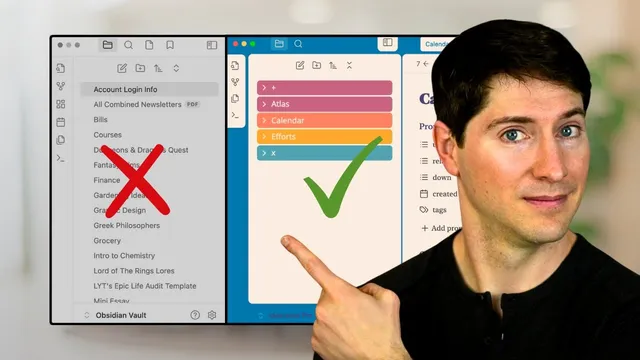
From there, two popular frameworks are tested against the same set of notes. Thiago Forte’s PARA method organizes notes into Projects, Areas, Resources, and Archives. In the example, book highlights and concepts land in Resources, actionable work lands in Projects, and time-based items like daily notes are handled by adding a calendar-style folder outside the core PARA categories. The ACE framework (Atlas, Calendar, Efforts) takes a different tack: it uses three “headspaces”—thinking/knowledge (Atlas), time-based notes (Calendar), and action-oriented work (Efforts). It also introduces operational folders like an Inbox (“A” folder) for new notes and an “X” folder for extras such as templates, images, PDFs, and other non-standard materials.
The transcript then moves from frameworks to a personal system built over years, emphasizing that most people shouldn’t copy the extreme version. Still, the underlying pattern is consistent: start simple, then flatten or refine structure only after you understand how you actually search and connect. In the final recommended mindset, folders are not set in stone; they evolve as needs change. Just as importantly, time spent organizing folders is time not spent making connections—so the goal is clarity and confidence, not complexity for its own sake.
Cornell Notes
The transcript’s central claim is that Obsidian folders should be built “bottom up” from real needs, not copied from someone else’s ideal structure. It recommends starting with no folders, capturing notes freely, and only adding structure when searching becomes difficult as the vault grows. It tests two mainstream systems—PARA (Projects, Areas, Resources, Archives) and ACE (Atlas, Calendar, Efforts)—against the same mixed set of notes, showing how each handles fuzzy “idea/knowledge” material and time-based notes. The practical takeaway is to use frameworks as scaffolding, then adjust folder fuzziness and granularity to match how your notes actually behave. Finally, it warns that over-organizing can steal time from the higher-value work: linking ideas and building insight.
Why does the transcript insist on starting with “no folders at all”?
What goes wrong when “ideas” and “knowledge” are forced into rigid folder labels?
How does PARA handle different note types in the example set?
How does ACE differ, and what problem does it solve for time-based notes?
What does the transcript recommend after using a framework?
What’s the tradeoff the transcript highlights about folder work?
Review Questions
- If your vault is still small, what specific trigger does the transcript use to justify adding folders?
- In the transcript’s “fuzzy ideas” example, what principle is used to decide how to name a folder for ambiguous content?
- Compare PARA and ACE: which one explicitly includes a Calendar concept, and how does that affect where daily notes go?
Key Points
- 1
Start with no folders in Obsidian and add structure only when note volume makes retrieval decisions painful.
- 2
Use folder names that match the fuzziness of the content; rigid labels often fail for ideas and knowledge notes.
- 3
PARA (Projects, Areas, Resources, Archives) works well for separating action and reference material, but time-based notes typically require an extra calendar-style folder.
- 4
ACE (Atlas, Calendar, Efforts) handles time-based notes more directly by assigning them to Calendar, while Atlas and Efforts cover thinking and action.
- 5
Operational folders like Inbox (A) and Extras (X) help keep new and non-standard items from cluttering your main knowledge structure.
- 6
Personalize after testing: remove unused folders and adjust granularity based on how you actually search and link notes.
- 7
Treat folder organization as a means to clarity—avoid spending so much time on structure that it crowds out linking and insight-building.