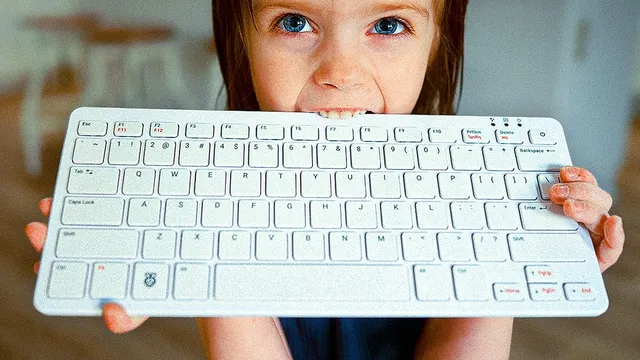
who is this even for?? (Raspberry Pi 500)
Based on NetworkChuck's video on YouTube. If you like this content, support the original creators by watching, liking and subscribing to their content.
Raspberry Pi 500 integrates a Raspberry Pi 5-class computer into a keyboard to reduce setup friction for beginners and families.
Briefing
Raspberry Pi 500 packages a Raspberry Pi 5-class computer inside a built-in keyboard, aiming squarely at people who want a Linux desktop without the usual setup grind—especially families and kids. The pitch is simple: plug it in, connect a monitor and mouse, and get to work. That “just works” approach matters because most Raspberry Pi purchases still require users to flash an SD card, choose an OS, and troubleshoot boot and configuration issues.
At the hardware level, Raspberry Pi 500 closely tracks Raspberry Pi 400, but with meaningful upgrades. It uses a quad-core 64-bit Arm Cortex-A76 processor at 2.4GHz (versus the 400’s A72 at 1.8GHz). Memory is the biggest change: 8GB of LP DDR4X RAM replaces the 400’s 4GB LP DDR4, with the “X” variant tied to improved energy efficiency, better heat management, and longer lifespan. The 500 also comes in 2GB and 4GB configurations. Connectivity remains familiar: two micro HDMI ports supporting up to 4K 60, USB 3.0 plus a USB 2.0 port, gigabit Ethernet, a microSD slot, a 40-pin GPIO header, Wi‑Fi 802.11ac, and Bluetooth 5.0.
The out-of-the-box advantage is software. Raspberry Pi 500 ships preloaded with an SD card running Bookworm OS, while the Raspberry Pi 400 is described as leaving buyers to handle more of the setup themselves. That difference feeds directly into who it’s for: beginners who don’t want to manage images and flashing, and tinkerers who want a compact Linux machine they can deploy quickly.
Pricing reinforces the accessibility message. The base Raspberry Pi 500 is $90, while a $120 “desktop kit” adds a mouse, a 27W USB‑C power supply, and a 2-meter micro HDMI to HDMI cable, plus a beginner’s guide. The Raspberry Pi 400 is cheaper at $70 for the base and $100 for its desktop kit, but the 500’s bundled experience is positioned as the easier path.
A major part of the hands-on experience comes from the included ecosystem: a Raspberry Pi monitor. The 15.6-inch 1080p IPS LCD with anti-glare coating is light but not flimsy, includes built-in speakers (two 1.2W units), and uses a stand with wide viewing angles. When powered via USB from the Raspberry Pi 500, brightness and volume cap at 60% and 50% respectively; full output requires a separate power supply (the desktop kit’s 27W adapter is presented as the fix). During testing, the monitor occasionally flickered after power changes, and the setup required a Wi‑Fi connection and a user account for a child.
The practical takeaway is that Raspberry Pi 500 is designed to remove friction for everyday use—school tasks, browsing, and Linux tinkering—while the monitor targets portability and compatibility. The one notable limitation surfaced: Roblox doesn’t run on Raspberry Pi in the way the tester expected, turning the “kid-friendly desktop” promise into a lesson about software platform constraints. Still, the overall pairing—keyboard-computer-in-one plus a matching monitor—lands as a compelling starter system for people who want Raspberry Pi without the usual assembly work.
Cornell Notes
Raspberry Pi 500 turns a Raspberry Pi 5-class computer into a keyboard-first desktop, targeting buyers who want Linux without SD-card flashing and OS setup. It runs a quad-core Arm Cortex-A76 at 2.4GHz and comes with 8GB LP DDR4X RAM (also offered in 2GB and 4GB variants), improving efficiency and heat behavior versus the Raspberry Pi 400. The biggest convenience win is that it ships with a preloaded SD card running Bookworm OS. A matching 15.6-inch Raspberry Pi monitor adds portability, built-in speakers, and a stand, but USB power caps brightness and volume unless a 27W supply is used. The system feels kid-friendly and fast for general tasks, though Roblox isn’t available on Raspberry Pi as expected.
What hardware upgrades make Raspberry Pi 500 meaningfully different from Raspberry Pi 400?
Why does the preloaded Bookworm OS matter for first-time buyers?
How does the desktop kit change the real-world experience compared with the base $90 unit?
What monitor features support portability, and what power limitation shows up in practice?
What software constraint undermined the “kid-friendly Roblox” goal?
Review Questions
- How do the processor and RAM changes in Raspberry Pi 500 (A76 2.4GHz and LP DDR4X 8GB) compare to the Raspberry Pi 400?
- What practical setup steps does the preloaded Bookworm OS remove, and why is that important for beginners?
- What brightness/volume limits appear when the Raspberry Pi monitor is powered via USB, and how does the 27W supply change that?
Key Points
- 1
Raspberry Pi 500 integrates a Raspberry Pi 5-class computer into a keyboard to reduce setup friction for beginners and families.
- 2
Raspberry Pi 500 runs a quad-core Arm Cortex-A76 at 2.4GHz and pairs it with 8GB LP DDR4X RAM (also available in 2GB and 4GB).
- 3
Raspberry Pi 500 ships with a preloaded SD card running Bookworm OS, unlike the Raspberry Pi 400’s more hands-on setup path.
- 4
The $120 desktop kit adds a mouse, a 27W USB‑C power supply, and the needed micro HDMI to HDMI cable, improving out-of-the-box usability.
- 5
The Raspberry Pi monitor is a 15.6-inch 1080p IPS display with built-in speakers and a stand, designed for portability.
- 6
When the monitor is powered via USB from Raspberry Pi 500, brightness and volume cap at 60% and 50%; full output requires a separate power supply.
- 7
General desktop tasks feel fast and responsive, but Roblox doesn’t run on Raspberry Pi as expected, limiting kid-focused app plans.