Why Every PhD Student Should Be Using This NEW ChatGPT Feature
Based on Andy Stapleton's video on YouTube. If you like this content, support the original creators by watching, liking and subscribing to their content.
ChatGPT’s new image generation can convert pasted research abstracts into graphical abstracts, cover-style artwork, and poster-ready visuals.
Briefing
A new ChatGPT image-generation feature is making it practical for PhD work to turn text-only research ideas into shareable visuals—graphical abstracts, cover-style artwork, and poster elements—often with readable text and recognizable scientific components. The biggest shift is prompt understanding: detailed, long-form prompts can produce images that include structured elements (like labeled probes, layered materials, and correctly placed annotations) rather than vague, blurry outputs. For researchers, that matters because visuals can speed up communication, improve presentation quality, and potentially make submissions more compelling to editors and audiences.
Early tests focus on graphical abstracts, where the workflow is straightforward: paste a peer-reviewed abstract into ChatGPT’s “create image” tool and request a graphical abstract. The results are described as a major improvement over earlier image models, including crisp, actual text (not smeared lettering) and scientific specificity—an AFM probe is rendered as an AFM probe, graphene is recognized, and layered structures such as an absorbent layer and substrate are reflected in the composition. Even when the output isn’t perfect, it’s positioned as a strong starting point that can be refined in design tools like Canva or Photoshop.
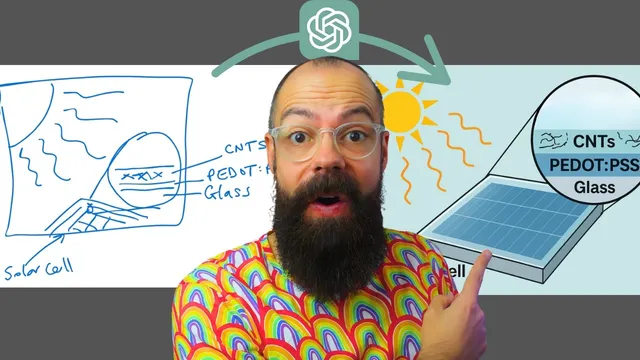
Pushing the limits with a more complex abstract yields a multi-part scientific diagram for a roll-to-roll solar cell concept. The model generates a layout that includes quantitative-style details (such as transmission and efficiency figures) and stability-related labels. Some elements are inaccurate or “made up” (for example, unexpected materials), but the output still captures many of the abstract’s key metrics and places them in plausible locations. The creator notes that editing is not always seamless: targeted changes—like forcing carbon nanotube lines into a specific magnified region—may not land exactly as requested, so the practical approach is iterative prompting.
That iteration is tied to the feature’s “best of eight” behavior: multiple candidate images are produced, and selecting the best one is part of the process. Roughly 8–10 iterations may be needed to get a version suitable for submission, after which the image can be polished. Canva’s AI tools, especially “magic eraser,” are used to remove unwanted parts and then redraw missing elements, transforming an initially messy, hand-sketched concept into a cleaner graphical abstract.
Beyond graphical abstracts, the same prompt-to-image approach is used for cover artwork and poster visuals. Cover outputs can be less satisfying when the goal is “mystical” or visually engaging art, and the transcript suggests improving results by uploading example images to steer the style. For posters, the model can generate conference-attracting graphics derived from abstracts, and individual elements can be extracted and reused via Canva’s “magic grab.”
Limitations show up when trying to feed the model a full PDF: it struggles to extract the right information from uploaded documents, producing unrelated journal-style cover art. Copy-pasting the abstract text works reliably, while PDF-based extraction does not. There’s also a playful test of headshot editing—swapping a supplied face into a professional conference-ready look—which works to a degree but isn’t considered submission-ready. Overall, the feature is framed as powerful but not foolproof: strong text-to-visual generation, best-of-eight iteration, and downstream editing are the winning combination.
Cornell Notes
ChatGPT’s new image-generation capability can turn research abstracts into usable visuals—especially graphical abstracts—by understanding detailed prompts and producing images with readable text and recognizable scientific elements. The workflow is simple: paste an abstract into “create image,” request a graphical abstract or cover-style artwork, then iterate through multiple candidates (“best of eight”) to find the strongest result. While outputs can include incorrect or invented details, they often capture key structure and metrics well enough to serve as a starting point. Refinement in tools like Canva (e.g., magic eraser and magic grab) can remove unwanted parts and let researchers redraw missing components. The feature works best with pasted text; uploaded PDFs may not be parsed correctly.
What makes the image feature particularly useful for academic work like graphical abstracts?
How does “best of eight” affect the way researchers should use the tool?
Why is downstream editing (e.g., Canva) emphasized instead of relying on one perfect generation?
What’s the difference between using pasted text versus uploading a PDF?
How can the same image workflow support posters and presentations beyond journal submissions?
Review Questions
- When would you choose to iterate through multiple “best of eight” outputs instead of trying to perfect a single prompt?
- What kinds of errors are most likely to appear in scientific graphical abstracts generated from abstracts, and how can you correct them using external tools?
- Why might a PDF-based workflow produce irrelevant cover art even when the abstract text works correctly?
Key Points
- 1
ChatGPT’s new image generation can convert pasted research abstracts into graphical abstracts, cover-style artwork, and poster-ready visuals.
- 2
Prompt understanding improves the likelihood of getting structured scientific elements and readable text rather than blurry labels.
- 3
The “best of eight” behavior makes iteration and selection a core part of producing submission-quality graphics.
- 4
External editing tools like Canva can fix common issues by removing unwanted parts (magic eraser) and adding missing details manually.
- 5
Cover artwork quality improves when style guidance is provided via uploaded example images rather than relying on generic prompts.
- 6
PDF uploads may not be parsed correctly for extracting relevant content; copy-pasting text is more reliable.
- 7
Image manipulation can be imperfect for precise placement, so researchers should expect to refine outputs rather than treat them as final.