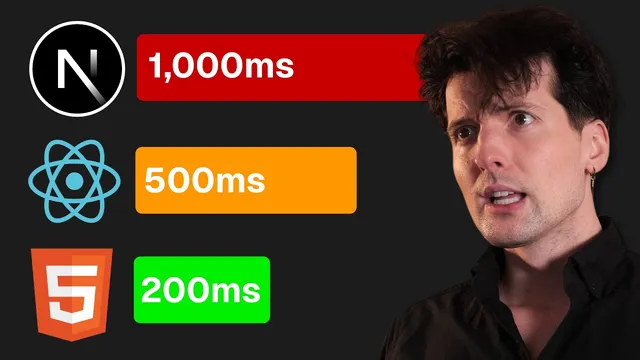
Why is Next.js so slow??
Based on Theo - t3․gg's video on YouTube. If you like this content, support the original creators by watching, liking and subscribing to their content.
Server component apps feel slow when navigation waits for server-generated content without an immediate UI acknowledgment of the click.
Briefing
Next.js “server component” apps feel slow when navigation waits on server work without giving users immediate feedback. The core issue isn’t that server components are inherently sluggish; it’s that teams often treat server-rendered navigation like client-side data fetching—showing nothing (or relying on browser loading) until the server finishes generating the next route. That creates a long “time to first bite” window where users click and nothing visibly happens, which the brain reads as unresponsiveness.
To explain why, the transcript walks through how web performance expectations formed. Traditional multi-page apps (MPAs) load new HTML from the server on every navigation. That can be fast to complete, but users typically see no meaningful change until the full response arrives. Single-page apps (SPAs) flip the model: the browser loads one HTML shell and JavaScript once, then client-side routing updates the UI instantly on clicks. SPAs often take longer overall to show fully correct content because data still comes from APIs, but the interaction feels immediate because the app can react within milliseconds.
Server components introduce a hybrid: route-specific HTML can be generated on the server, with caching for static cases, and streaming for dynamic ones. That means the URL again matters—unlike SPAs where the same shell HTML serves every route. But the hybrid behavior only delivers SPA-like “instant navigation” if the build and runtime can produce a static shell (or partial pre-render) and then fill in dynamic parts later. Without the right caching layer (e.g., a CDN smart enough to serve cached route output and fall back to the origin), server component apps can behave like “server-first” pages: first loads may be acceptable, but navigations can require a round trip before anything changes.
The transcript then demonstrates the failure mode with a mock dashboard. Some routes appear to navigate instantly because they’re effectively static and already present in the client bundle. Another route is forced dynamic, and navigation to it stalls: the UI doesn’t update immediately, so the sidebar highlight waits, producing a dead-feeling gap around ~600ms—enough to cross the threshold where users start to doubt the site is responding. The fix is surprisingly specific to Next.js’s server component rendering pipeline: add a route-level `loading.tsx` (or equivalent Suspense boundary) so Next.js can ship a static “loading shell” immediately, then stream the dynamic content when ready. The key is placing the loading boundary above the dynamic async work so the route can render something right away.
The transcript also highlights gotchas: Suspense placement in layouts may not trigger the desired static fallback because layouts don’t rerun on the client. Moving Suspense to the page component (or using `loading.tsx`, which Next.js wires automatically) restores immediate navigation feedback. It further mentions newer Next.js mechanisms like Partial Pre-Rendering (PPR) and Dynamic IO, which aim to make dynamic routes render static HTML up to the first async boundary, then stream the rest.
Ultimately, the argument is about balancing two user-perceived metrics: “time to first bite” (TTFB) and “full content paint” (FCP). Server components done right can reduce the bad loading window (where users see nothing) while still getting the benefits of server-side data fetching. Done wrong, they collapse TTFB and FCP into the same slow moment—recreating the unpleasant navigation delay seen in older server-rendered patterns. The transcript closes by contrasting this with HTMX: server round trips are normal, but UX improves when the app controls click-local loading states instead of relying on browser loading behavior.
Cornell Notes
Server components in Next.js aren’t automatically slow; they become slow-feeling when navigation waits for server-rendered content without showing an immediate “something happened” state. The transcript contrasts three paradigms: MPAs (no UI change until the full HTML arrives), SPAs (instant client-side navigation feedback, even if data finishes later), and server components (hybrid streaming that can match SPA responsiveness only if the app provides a loading shell early). The practical fix emphasized is adding `loading.tsx` (or a Suspense boundary placed above dynamic async work) so Next.js can pre-render a static fallback and then stream dynamic content. Without that boundary—especially when layouts or async boundaries are placed incorrectly—TTFB and FCP merge, producing a dead-feeling gap around ~600ms or more.
Why do server component apps often feel slower during navigation even when total work might be similar?
How does the transcript connect SPA speed to user perception rather than raw server speed?
What role does a CDN play in server component performance?
What is the simplest Next.js-specific fix shown for improving navigation feedback?
Why can Suspense placement in layouts fail to produce the desired immediate behavior?
What do PPR and Dynamic IO aim to improve, and why are they described as “new” or not fully stable?
Review Questions
- In the transcript’s framing, what specific UX failure happens when TTFB and FCP become the same moment, and how does `loading.tsx` prevent that?
- Describe how the transcript’s mock dashboard distinguishes between routes that feel instant and routes that feel slow. What determines that difference?
- Where should a loading boundary be placed in Next.js server component rendering to ensure a static fallback is generated, and why might placing it in a layout not work?
Key Points
- 1
Server component apps feel slow when navigation waits for server-generated content without an immediate UI acknowledgment of the click.
- 2
SPAs feel fast because client-side routing can update the UI within milliseconds, even if data finishes later.
- 3
Server components only deliver SPA-like responsiveness when the app can render a static loading shell first and stream dynamic content afterward.
- 4
A smart CDN layer matters: cached route output should be served when available, with fallback to origin generation when not.
- 5
In Next.js, adding a route-level `loading.tsx` (or a Suspense boundary above dynamic async work) is the most direct way to restore immediate navigation feedback.
- 6
Suspense boundaries placed in layouts can fail because layouts don’t rerun on the client the way page components do.
- 7
The performance goal is to shorten the “bad” loading window (TTFB) while allowing full content (FCP) to arrive later via streaming.