Why Notion is still in trouble, even though MS Loop isn't a clone
Based on Tools on Tech's video on YouTube. If you like this content, support the original creators by watching, liking and subscribing to their content.
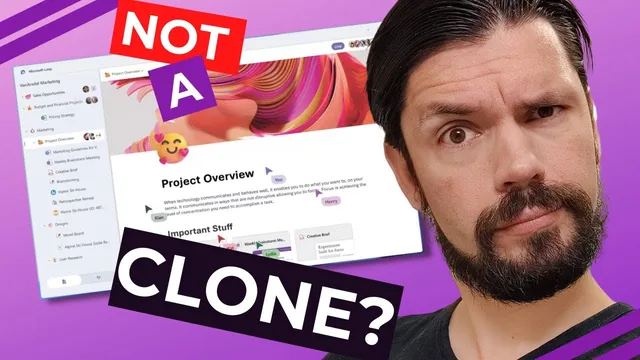
Loop’s Notion-like feel comes from combining several conventions at once: block-based editing, left navigation trees, top-right presence indicators, and Notion-adjacent cover/page icon styling.
Briefing
Microsoft Loop is poised to deliver a Notion-like, block-based workspace inside the Microsoft ecosystem—an upgrade that could finally make corporate documentation and knowledge management feel modern. The core twist is that Loop’s resemblance to Notion won’t just be a design coincidence; it threatens Notion’s ability to win over large enterprises, where procurement, compliance, and “default tool” dynamics matter more than features alone.
Loop’s similarity to Notion comes from familiar building blocks: a block-based editor with draggable, column-friendly layout; a left-side tree navigation structure; and a top-right “who’s viewing” collaboration indicator. Even the visual cues—cover images and page icons—mirror the patterns users associate with Notion. The argument isn’t that Microsoft copied a single interface element; it’s that Loop aligns multiple UI conventions at once, making it feel instantly recognizable to anyone who has seen Notion.
That matters because Notion’s biggest corporate hurdle isn’t just technical capability—it’s getting approved and adopted in environments already standardized on Microsoft. In large organizations, teams often need an internal justification to replace or supplement existing systems. Loop undercuts that justification by offering a comparable workflow inside the tools companies already pay for, especially where Office integration is a selling point. The transcript also highlights compliance and data residency concerns as an example of why Notion can struggle in regulated settings: Notion’s data storage outside Europe is cited as a blocker for sensitive data in places like Amsterdam.
Loop’s enterprise advantage is framed as Microsoft’s long-standing strength: proximity data centers, regulatory compliance, and deep integration with corporate infrastructure. In that context, Loop becomes the “new default” for block-style knowledge work—good news for employees who currently wrestle with SharePoint’s limitations for documentation and internal knowledge.
Still, the outlook for Notion isn’t purely negative. The transcript warns that Loop’s success hinges on whether Microsoft delivers real usability rather than a watered-down version. Past experience with Microsoft Teams is used as a cautionary tale: Teams chat and collaboration are described as inferior to Slack’s culture and workflow features, and the fear is that Loop could inherit similar shortcomings.
Several collaboration features are treated as promising signals—shared mouse pointers for remote co-editing, and sidebar avatars showing who’s working where. Those capabilities are portrayed as subtle until they’re needed, especially for remote teams trying to coordinate around the same page.
The biggest risk, though, is complexity from over-integration. Loop’s attempt to unify PDFs, Word documents, PowerPoints, and other assets is compared to SharePoint’s “everything in one place” problem: heavy embedded viewers, harder searching, and documentation that becomes harder to edit and maintain. The transcript also questions whether Loop’s gallery-style views are truly database-like and composable in the way Notion’s are, or whether they amount to simpler image/document collections.
Bottom line: Loop’s arrival is expected to pull attention toward Notion immediately—because mainstream coverage will compare them—but it may also make it harder for Notion to win new enterprise seats once Loop becomes available. For companies locked into Microsoft, Loop could improve day-to-day work; for Notion, it raises the stakes to prove it’s more than a lookalike.
Cornell Notes
Microsoft Loop is expected to feel Notion-like because it combines a block-based editor, familiar navigation patterns, and Notion-adjacent visual conventions (cover images and page icons). The bigger impact is enterprise adoption: Loop’s Microsoft integration and compliance posture make it easier for large companies to standardize on Loop instead of approving Notion. The transcript argues that Notion’s approval hurdles—especially around corporate procurement and data residency—could be bypassed when Loop offers similar workflows inside Office-aligned infrastructure. Still, Loop’s success depends on whether Microsoft delivers collaboration and editing quality rather than a “Teams-style” watered-down experience. If Loop’s integration becomes too complex (heavy embedded viewers, harder search, less composable gallery/database behavior), employees may still prefer Notion for flexible knowledge work.
Why does Loop’s UI resemblance to Notion matter beyond aesthetics?
What makes Loop a stronger pitch for large enterprises than Notion?
How does the transcript connect Loop to the SharePoint problem?
Which collaboration features are treated as genuinely useful, and why?
What is the main worry that could prevent Loop from matching Notion’s value?
How does the transcript evaluate Loop’s gallery/database capabilities?
Review Questions
- What enterprise factors (beyond feature parity) determine whether Notion can win in large organizations, according to the transcript?
- Which Loop features are described as “subtle until you have them,” and what remote-work problem does each solve?
- What specific risks does the transcript associate with Loop’s broad integration of file types, and how could that affect usability?
Key Points
- 1
Loop’s Notion-like feel comes from combining several conventions at once: block-based editing, left navigation trees, top-right presence indicators, and Notion-adjacent cover/page icon styling.
- 2
Loop’s Microsoft integration and compliance posture make it easier for large enterprises to standardize on it instead of approving Notion.
- 3
Notion’s corporate adoption hurdles include procurement friction and data residency constraints, which can block sensitive-data use in certain regions.
- 4
Loop’s collaboration features—shared mouse pointers and presence avatars—could materially improve remote coordination if implemented well.
- 5
The transcript warns that over-integration (PDF/Word/PowerPoint viewers inside one workspace) can recreate SharePoint-style problems: heavy loading, harder searching, and less editable structure.
- 6
Loop’s success depends on whether Microsoft delivers real usability rather than a Teams-like “good on paper, weaker in practice” experience.
- 7
Mainstream comparisons between Loop and Notion may boost Notion’s visibility short-term, but Loop’s eventual availability could reduce Notion’s enterprise growth if it becomes the default tool.