Why You NEED a NAS (More Than Just Storage)
Based on FromSergio's video on YouTube. If you like this content, support the original creators by watching, liking and subscribing to their content.
A NAS functions as an always-on home server that can automate backups, monitor drive health, and provide redundancy through RAID.
Briefing
A NAS (network-attached storage) is more than a bigger place to dump files: it’s a always-on home server that can back up devices, protect data against drive failures, run media and home-automation services, and keep sensitive footage local. The core pitch is that a NAS replaces the “buy a bigger external drive” mindset with a system that behaves like personal infrastructure—accessible from anywhere, but controlled inside the home.
The argument starts with reliability and maintenance. External hard drives eventually fail, and they don’t function like computers that can run monitoring, automation, and redundancy. With a NAS, multiple drives can be configured in RAID for redundancy, so losing one (or more, depending on the RAID level) doesn’t automatically mean losing everything. NAS software can also run automated drive health checks and send status updates, plus schedule backups for computers and smartphones across the household. Storage can be expanded later by adding drives rather than replacing the whole device.
Speed is presented as another major advantage over cloud storage. Even with a fast download connection, cloud services often bottleneck upload speeds and may cap transfer rates. Because a NAS stays on the local network, it can saturate the available bandwidth—especially when paired with faster networking hardware. The transcript highlights that a basic NAS can fill a gigabit link both up and down, and that a NAS with a 10 gigabit port plus the right 10G networking gear can push far higher throughput.
Beyond storage, the NAS becomes a platform for services that only make sense when they’re always running. Media libraries can be organized and streamed through Plex Media Server, while home automation can be handled with tools like Home Assistant and Homebridge. Surveillance footage can be recorded to the NAS using an NVR app for roughly a dozen cameras, avoiding recurring cloud subscription costs and keeping video local. The transcript also points to lightweight utilities such as change detection, and notes that many of these services run in Docker containers.
Privacy and recovery are framed as where NAS setups outperform typical cloud workflows. The transcript emphasizes snapshots and file versioning—going “back in time” to restore earlier states—plus longer retention than cloud providers’ common deleted-file windows. It also stresses that RAID is not a backup: if the NAS itself is destroyed or the house is damaged, redundancy won’t save the data. The solution is a backup strategy, including encrypted backups and offsite copies. Synology’s DSM is cited as making automated backup tasks easy, including integration with multiple cloud providers and backups to another PC or another Synology unit. Backblaze and Backblaze-like services are mentioned as low-cost offsite options.
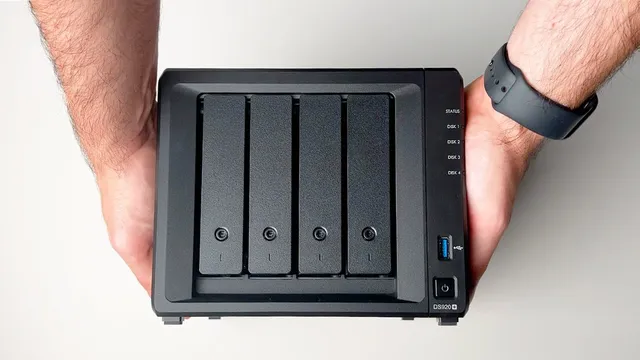
Finally, the transcript turns to buying decisions. It recommends all-in-one NAS systems for most people, praising Synology’s software for ease of use and reliability. It lays out entry points: the Synology s220j for a basic file server, the ds920 plus for file + media server use with integrated graphics for transcoding, and the 4-bay ds920 plus/420 plus class for Docker-based experimentation. For higher networking performance, it suggests models like the ds-1522 plus to saturate 10 gigabit Ethernet, while noting that SSD drives cost more per terabyte. The takeaway is that a NAS is a controllable, expandable home server that can serve as storage, backup, media hub, automation brain, and local video archive—provided backups are handled separately from RAID.
Cornell Notes
A NAS is pitched as a home server that does far more than store files: it automates backups, adds redundancy through RAID, improves transfer speeds by keeping data local, and runs always-on services like Plex, home automation tools, and NVR recording for multiple cameras. The transcript contrasts NAS advantages with external drives (failure risk, limited automation) and cloud storage (upload bottlenecks, speed caps, and shorter recovery windows). Privacy and recovery are strengthened with snapshots and file versioning, letting users restore earlier states quickly. RAID is emphasized as not being a backup, so an offsite and encrypted backup strategy—often via Synology DSM integrations or services like Backblaze—is presented as essential. For buying, the transcript recommends Synology all-in-one models for most people, with different tiers for file serving, media transcoding, and Docker-based experimentation.
Why does the transcript treat a NAS as more than “storage,” and what concrete functions does it highlight?
How does the transcript argue that NAS performance can beat cloud storage?
What role do RAID, snapshots, and file versioning play in data protection—and what misconception does it warn against?
What backup strategy does the transcript recommend beyond RAID?
How does the transcript guide someone choosing between Synology models and custom builds?
What networking approach does the transcript mention for secure remote access?
Review Questions
- What specific limitations of external hard drives and cloud storage does the transcript use to justify a NAS, and how do NAS features address them?
- How do RAID and snapshots differ in purpose, and why does the transcript insist that RAID is not a backup?
- Which Synology model tiers are recommended for (1) basic file serving, (2) media transcoding, and (3) Docker experimentation, and what feature drives each recommendation?
Key Points
- 1
A NAS functions as an always-on home server that can automate backups, monitor drive health, and provide redundancy through RAID.
- 2
Local access can outperform cloud storage because NAS transfers avoid upload bottlenecks and cloud speed caps, especially on gigabit and 10 gigabit networks.
- 3
Always-on services turn a NAS into a personal infrastructure hub, including Plex Media Server for streaming, Home Assistant/Homebridge for automation, and NVR recording for multiple cameras.
- 4
Snapshots and file versioning enable quick recovery to earlier states, offering a “go back in time” capability that many cloud workflows make harder.
- 5
RAID protects against drive failure, not against NAS destruction or household disasters—offsite backups are still required.
- 6
Synology DSM is presented as making backup scheduling, encryption, and cloud or device-to-device backup integrations straightforward.
- 7
For most buyers, all-in-one Synology NAS units are recommended, with model selection based on whether the goal is file serving, media transcoding, Docker-based services, or 10 gigabit networking.