Why you should always overfit a single batch to debug your deep learning model
Based on The Full Stack's video on YouTube. If you like this content, support the original creators by watching, liking and subscribing to their content.
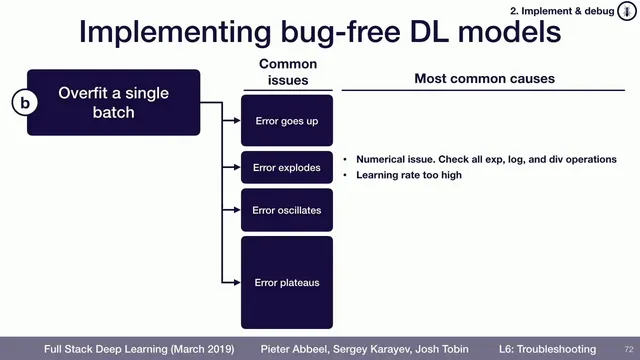
After confirming a model can run training end-to-end, test whether it can overfit a single batch to near-zero loss as a high-signal debugging step.
Briefing
Debugging a deep learning model becomes dramatically easier once training runs end-to-end and the system can overfit a single batch. The core idea is simple: if a model can’t drive the loss arbitrarily close to zero on one small, fixed batch, then something fundamental is wrong—often in implementation details—long before the model’s architecture or training strategy matters. Overfitting one batch acts like a high-signal diagnostic that collapses the search space of possible bugs.
In practice, the goal isn’t merely “loss goes down.” Instead, the loss should be able to approach zero on that batch, and it should do so in a stable, controllable way. Several failure modes point to specific categories of problems. If the error increases rather than decreases, a common culprit is an objective sign error—such as minimizing log probability when the training code expects the negative log probability. If the error explodes, numerical instability is often to blame, for example when code takes an exponent or logs a negative value. If the loss oscillates—dropping and rising repeatedly—the first fix to try is lowering the learning rate, since an overly aggressive step size can prevent convergence.
If the loss plateaus above zero (for instance, it falls to around 0.01 and then stops improving), the transcript highlights two frequent causes. One is over-regularization: regularization terms can cap performance on a tiny dataset, making true memorization impossible. Another is an overly conservative learning rate; in that case, increasing the learning rate can restore progress. When the usual learning-rate and regularization adjustments don’t resolve the issue, the next step is to inspect the loss function itself—confirming the correct inputs are being fed and that the loss is computed as intended.
Finally, if the model still resists overfitting, the data pipeline deserves close attention. Labels may be out of order, data may be corrupted, or preprocessing steps may not match what the model expects. The overarching workflow is: get training running, verify the model can overfit a single batch to near-zero loss, and only then move on to comparing against known results to build confidence that the model behaves correctly.
This approach matters because it turns vague “it doesn’t work” debugging into targeted checks. When overfitting a single batch fails, it usually reveals a concrete bug—sign errors, numerical issues, learning-rate problems, regularization mismatches, or data/label corruption—before time is wasted tuning hyperparameters or questioning the model design.
Cornell Notes
Once a deep learning model runs end-to-end, the fastest debugging test is to overfit a single batch until the loss can get arbitrarily close to zero. This should happen because the model must be able to memorize a tiny fixed dataset; failure usually indicates a concrete implementation or data problem rather than a subtle modeling issue. Different loss behaviors map to likely causes: sign mistakes can make error rise, numerical problems can cause explosions, oscillations often mean the learning rate is too high, and plateaus commonly come from over-regularization or an overly small learning rate. If learning-rate/regularization tweaks don’t work, inspect the loss function inputs and computation, then verify label ordering and data integrity in the pipeline.
Why does overfitting a single batch help debugging more than waiting for training to converge on a full dataset?
What does it mean when loss increases instead of decreasing during single-batch overfitting?
What are the likely causes of exploding loss during the overfit-a-batch test?
How should someone respond if loss oscillates while trying to overfit one batch?
What explains a loss plateau (e.g., stopping around 0.01) when overfitting a single batch?
If learning-rate and regularization changes don’t fix the inability to overfit a batch, what should be checked next?
Review Questions
- During single-batch overfitting, what loss behavior would most strongly suggest a sign error in the objective?
- If loss oscillates while trying to memorize one batch, what hyperparameter change is the first thing to try and why?
- What two categories of issues are most often responsible for a plateau that won’t go below a small value like 0.01?
Key Points
- 1
After confirming a model can run training end-to-end, test whether it can overfit a single batch to near-zero loss as a high-signal debugging step.
- 2
Aim for loss to approach arbitrarily close to zero on one batch; “loss decreases a bit” is not enough to validate correctness.
- 3
If loss increases, check for objective sign mistakes such as minimizing log probability instead of negative log probability.
- 4
If loss explodes, look for numerical instability such as taking an exponent or logging a negative value.
- 5
If loss oscillates, reduce the learning rate first; if it plateaus, consider increasing the learning rate and removing excessive regularization.
- 6
When learning-rate and regularization tweaks fail, inspect the loss function inputs and computation, then audit the data pipeline for label ordering and corruption issues.
- 7
Only after successful single-batch overfitting should comparisons to known results be used to build confidence in model correctness.