Write articles by chatting with your notes (using AI)
Based on Reflect Notes's video on YouTube. If you like this content, support the original creators by watching, liking and subscribing to their content.
Generate a topic-specific outline first so the later research and drafting follow a clear structure.
Briefing
AI-assisted note research can turn a pile of sources into a usable article draft in under an hour—by combining three steps: generating an outline, pulling reputable references, and then letting an AI write from highlighted notes.
The workflow starts with choosing a topic and prompting an AI chat to produce a structured outline tailored to the writer’s needs. For insomnia, the outline is designed to include an introduction that frames the condition, a section on the problems insomnia can cause, and a deeper breakdown of underlying causes and solutions. The requested solutions are organized into practical categories—physical exercises, mental exercises, and things to avoid—ending with a structured sleep plan as a conclusion.
Next comes source selection. Because the Reflect AI chat used in the workflow can’t directly browse the open web like ChatGPT can, the process splits: Reflect generates the outline and then requests reputable sources, while ChatGPT (browser version) is used to perform the online research and return links. The user copies the outline and the source list into a new note inside Reflect, then instructs ChatGPT to research each outline section using only the provided reputable sources. The output is a set of targeted research results—organized around insomnia symptoms, causes, and treatments—meant to guide what to read and save.
The “human” part is then executed inside Reflect using a Chrome extension for capture and organization. Each linked article (for example, from Sleep Foundation and Mayo Clinic) is opened, key passages are highlighted—especially definitions, symptoms, causes, and lifestyle or treatment guidance—and those highlights are automatically stored under the note’s links. The goal isn’t to archive entire pages; it’s to extract the key information the eventual draft will need. After reviewing multiple sources (about 10 minutes in this run), the notes are tagged and filtered using Reflect’s advanced search so that the AI can answer only from the curated set of highlights.
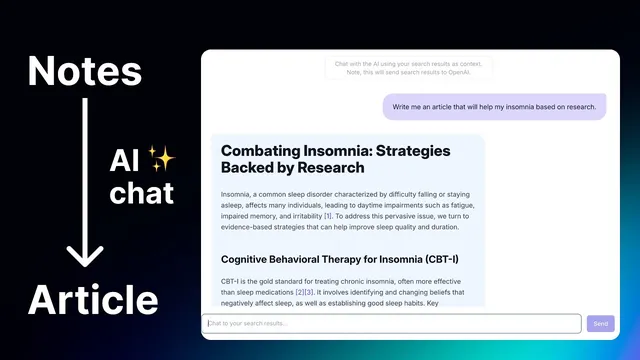
With the research locked in, the article draft is produced by pasting the saved outline into Reflect’s “chat with my results” mode. The first draft often needs editing: the writing style may be uneven, and some note content can be missing. The user improves the draft through iterative prompts—asking for more information, adding sources, and requesting rewrites—until the output better matches the captured highlights. The result is a short, readable first draft that includes the desired sections and avoids irrelevant material the user didn’t highlight.
Finally, the draft can be saved as a new note (tagged as an article draft) and refined further inside Reflect. Even with multiple iterations, the end-to-end process—from outline to research to draft—takes roughly 30 minutes in this demonstration. The takeaway is less about publishing a finished piece immediately and more about using AI chat as a fast research-to-draft engine that turns curated notes into a coherent article skeleton ready for human polishing.
Cornell Notes
The workflow uses AI chat plus curated note highlights to generate an article draft from reputable sources. First, an AI creates a detailed outline for the chosen topic (insomnia), including introduction, causes, solutions, and a concluding sleep plan. Next, ChatGPT is used to gather links from reputable sources, since Reflect AI can’t browse the web directly. The user opens each source, highlights key passages with a Chrome extension, and stores them in Reflect under tagged notes. Finally, Reflect’s “chat with my results” writes an article draft from the highlighted material; iterative prompts help fill gaps and expand missing sections. This matters because it compresses research and drafting into a fast, controllable loop.
How does the outline guide the rest of the process for an insomnia article?
Why does the workflow use both Reflect AI chat and ChatGPT browser research?
What role do highlights and the Chrome extension play in controlling the draft’s accuracy?
How does “chat with my results” limit what the AI can use?
What kinds of prompts improve the first AI draft when it’s missing information?
Why might the user paste the outline into the drafting step instead of generating it earlier from notes?
Review Questions
- When Reflect AI can’t browse the web, what component is used to gather reputable links, and how are those links turned into usable note content?
- What is the purpose of tagging and advanced search before using “chat with my results”?
- How do iterative prompts change the draft over multiple attempts, and what limitation appears when trying to make the article longer?
Key Points
- 1
Generate a topic-specific outline first so the later research and drafting follow a clear structure.
- 2
Use ChatGPT browser research to fetch reputable links when Reflect AI chat can’t search the web directly.
- 3
Open each reputable source and highlight key passages so the AI later writes from curated notes rather than raw pages.
- 4
Tag and filter notes with advanced search so “chat with my results” draws only from the selected research set.
- 5
Paste the saved outline into Reflect’s drafting chat to produce a first draft quickly, then iterate with targeted prompts when content is missing.
- 6
Treat the AI output as a draft: expect style tweaks and completeness checks before publishing or sharing.
- 7
The end-to-end loop (outline → sources → highlights → draft) can be completed in about 30 minutes when the workflow is streamlined.