Write the Docs Portland 2017: Treating Documentation like Code: a Practical Account by Jodie Putrino
Based on Write the Docs's video on YouTube. If you like this content, support the original creators by watching, liking and subscribing to their content.
Documentation is treated as release-critical engineering work by placing it in the same repo and delivery pipeline as product code.
Briefing
Treating documentation like code matters because it keeps release-critical instructions synchronized with product development—so teams don’t scramble at the last minute when engineers ship but users can’t figure out how to use what they just received. Jodie Putrino, a senior technical writer at F5 Networks, describes a workflow built around the idea that docs should live in the same repository as the code, move through the same review gates, and deploy through continuous delivery. That approach prevents the common failure mode where “the product is ready” while documentation lags behind, forcing frantic fixes and delayed clarity.
The practical payoff goes beyond timing. Building docs during development keeps subject-matter experts engaged while their knowledge is fresh, rather than months later when they’ve moved on. It also ensures the instructions stay tightly coupled to the product features they describe, reducing drift between what’s implemented and what’s written. Putrino frames the work as a shift from documentation being an afterthought to documentation being part of the development loop.
Getting there wasn’t straightforward at F5. Putrino joined with limited software tooling experience and found that public resources often discussed the concept in theory but didn’t provide concrete “how-to” guidance—what tools to use, how to test, and where to publish. The opportunity came while planning brand-new products, which allowed the team to design a documentation system from scratch rather than retrofit an existing one.
The resulting roadmap centers on four operational choices: tool selection, automation, collaboration, and versioning. For publishing, the team chose Sphinx (because the work involved Python) and initially used Read the Docs before moving to AWS S3 for hosting due to stringent security requirements. Automation is treated as essential: tests and deployment run automatically, while humans focus on content quality and review. Collaboration is formalized through pull requests and code-review-style workflows, with developers and technical writers sharing responsibility based on expertise.
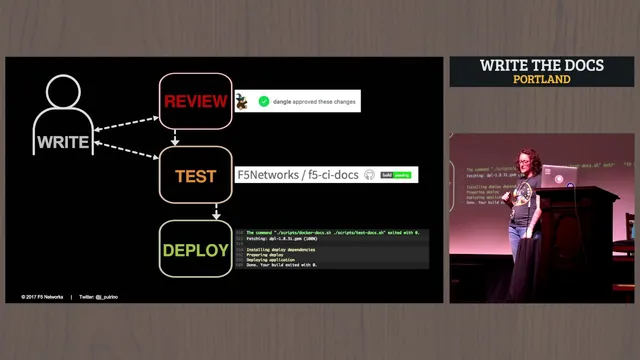
The workflow is built around Git-based development and CI/CD. Changes are written in either Markdown for simpler projects or reStructuredText (rst) for the full Sphinx feature set. Pull requests trigger automated test runs, and reviewers are assigned based on who knows the feature best—sometimes a developer, sometimes a support-focused reviewer. Testing happens inside an internally built Docker container that packages all documentation dependencies, so contributors don’t need to install toolchains or worry about conflicts. The CI pipeline runs Sphinx commands such as building HTML, checking links, and using tools like a style/grammar checker; failing doc tests block merges.
Deployment uses Travis CI to publish to an S3-hosted website called Cloud Docs at f5.com. Each project deploys only to its designated S3 location for security. The team deploys from version branches rather than tags, enabling quick doc fixes without waiting for long release cycles. Finally, the docs experience is organized by audience: product documentation for installation and command-line details, and solution documentation that provides task-oriented context for how multiple products work together—especially in relation to F5’s flagship BIG-IP. Putrino closes by emphasizing that users don’t care which tools or publication mechanisms power the site; they care that information is findable, relevant, and ready when they need it.
Cornell Notes
Jodie Putrino describes an end-to-end workflow that treats documentation like code at F5 Networks: docs sit alongside code, changes go through pull requests and reviews, and publishing happens via continuous delivery. The system uses Sphinx for documentation, Git-based collaboration, and CI pipelines that run automated doc tests (HTML build, link checking, and style/grammar checks) inside a Docker container to keep environments consistent. Deployments land in an AWS S3-hosted site called Cloud Docs at f5.com, with security controls that restrict each project to its own S3 path. Versioning is handled with release-aligned doc updates for product docs and separate solution-doc versioning, enabling timely fixes without waiting for long release cycles. The result is documentation that stays in lockstep with product changes and reduces last-minute release scramble.
What does “treat documentation like code” mean in operational terms, not slogans?
Why did the team move from Read the Docs to AWS S3?
How does the workflow keep doc testing consistent across contributors?
What happens during writing, review, testing, and deployment?
How does versioning avoid tying every doc change to a single product release?
What user-facing goal drives the structure of the documentation sets?
Review Questions
- How do pull requests and automated doc tests change the incentives for keeping documentation current during product development?
- Why does containerized testing matter for documentation workflows, and what specific Sphinx checks are mentioned?
- What deployment and versioning choices help teams ship doc fixes quickly without waiting for long release cycles?
Key Points
- 1
Documentation is treated as release-critical engineering work by placing it in the same repo and delivery pipeline as product code.
- 2
Keeping docs in lockstep with development reduces last-minute release scramble when users need instructions immediately.
- 3
Sphinx plus a Git-based pull request workflow enables consistent writing, review, and automated quality gates.
- 4
Running doc tests inside a Docker container standardizes dependencies and prevents environment drift across contributors.
- 5
CI blocks merges when documentation checks fail, so broken links or style/grammar issues don’t reach published sites.
- 6
Automated deployment to an AWS S3-hosted site (Cloud Docs at f5.com) uses per-project path restrictions for security.
- 7
Versioning separates product-doc alignment from solution-doc versioning to avoid forcing every doc update to match product release numbers.