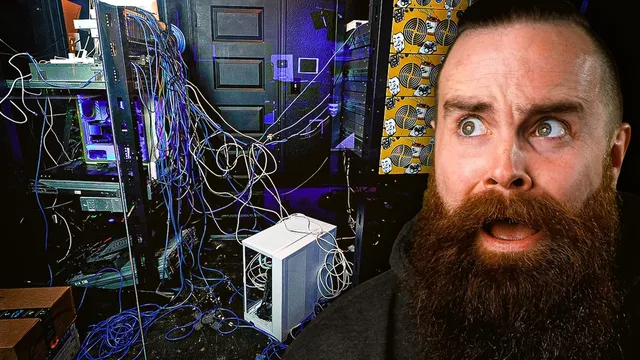
Your Cable Management SUCKS!! (Fixing My Server Room)
Based on NetworkChuck's video on YouTube. If you like this content, support the original creators by watching, liking and subscribing to their content.
Cable management directly affects troubleshooting time; messy patching and unracked wall drops turn failures into hours of tracing.
Briefing
A chaotic server room isn’t just ugly—it turns routine troubleshooting into a multi-day scavenger hunt. After years of “patch this, rewire that” habits, NetworkChuck tore down his own rack setup, rebuilt patch panel wiring, installed a Patch Box cable-management system, and reorganized switching so his network could be maintained without a cable maze. The payoff: two racks connected by only a couple of clean high-speed links, a patching workflow that’s faster to change, and a server room he can actually walk into without fear of stepping on something.
The cleanup started with the most basic failure: messy patch panels and unmanaged cabling. He had multiple patch panels, wall drops that weren’t properly racked, servers sitting on the floor, and cables running through the room with no clear path. He rewired roughly 20 Ethernet drops by cutting and terminating cables into a new patch panel using a punch-down tool—an approach that sounded straightforward on the dining table but became brutal in the cold, cramped server room. Once the patch panels were functional, the next bottleneck was physical: moving and re-racking equipment without unplugging everything during business hours. He relocated switches and servers while trying not to disrupt ongoing work, dropping screws and fighting cable slack, which made the project drag from an “afternoon” into a week-plus ordeal.
The central upgrade came from Patch Box, which arrived as a kit of rails, cable-management components, and pre-terminated “cassettes” designed to connect devices without constant tracing and re-termination. He also tested Patch Box’s “dev mounts” (his nickname for cage-nut replacements) and a “third hand” style mounting aid to make rack mounting less painful. After installing the rails and mounting the patch box, he connected his first links—initially with some awkward cabling mistakes—then corrected routing so the patch box’s top and bottom cable paths aligned cleanly to the switch and patch panel. The result was a rack face that looked dramatically different from the earlier spaghetti: retractable cable management, cleaner slack control, and fewer “where does this go?” moments.
Network changes followed the physical cleanup. He replaced an underpowered, awkwardly port-limited unmanaged Cisco switch and swapped in a more capable Cisco Catalyst switch after regaining access credentials via a Bluetooth console tool called EnterTooth. For high-speed connectivity, he moved from a “cable rainbow” across the room to a MicroTik-based design using two QSFP+ 40G links and port-channeling to create an 80G connection between racks. The new setup initially underperformed during testing, but a reboot restored expected transfer speeds.
By the end, the server room shifted from fear and frustration to control: clean floors, tidy cable runs (including fiber and camera connections), and a patching system that lets him extend or reroute without hunting through the rack. He also solicited viewer photos of their own setups—many were worse than his before, reinforcing the core lesson: cable management isn’t cosmetic. It’s operational resilience.
Cornell Notes
The project reframed cable management as a troubleshooting and maintenance problem, not a cosmetic one. After years of ad-hoc patching, NetworkChuck rewired wall drops into a new patch panel, installed Patch Box to make patching and reconfiguration faster, and replaced problematic switching gear. He also reorganized high-speed connectivity by moving from many cross-room cables to MicroTik switches using QSFP+ 40G links and an 80G port-channel between racks. The biggest practical win was reducing “trace-and-reterminate” work: Patch Box’s retractable, cassette-based connections let him change ports without digging through a cable maze. The final result was a cleaner rack, a safer server room, and a network layout designed for future changes.
Why did the server room become so hard to troubleshoot, even when the hardware was working?
What made the patch panel rebuild unusually painful?
How did Patch Box change the day-to-day patching workflow?
What was the “cable rainbow” problem, and how was it fixed?
Why did the new 80G connection initially perform poorly?
How did he regain access to an older Cisco switch without a console cable?
Review Questions
- What specific physical cable-management failures made troubleshooting slow, and how did the rebuild address them?
- How did Patch Box’s cassette/rail design reduce the effort required to move or extend network connections?
- What role did MicroTik QSFP+ 40G links and port-channeling play in replacing the earlier cross-room “cable rainbow” setup?
Key Points
- 1
Cable management directly affects troubleshooting time; messy patching and unracked wall drops turn failures into hours of tracing.
- 2
Rewiring a patch panel is often easier on a table than in a cold, cramped server room—environment and access can dominate the difficulty.
- 3
Patch Box’s retractable, cassette-based connections reduce “trace-and-reterminate” work when ports need to move.
- 4
Switch placement and link design matter: replacing many cross-room cables with a small number of high-speed inter-rack links can dramatically simplify the rack layout.
- 5
MicroTik QSFP+ 40G links can be combined into an 80G port-channel, but performance issues may require rebooting after configuration changes.
- 6
Recovering console access for older switches can be solved with wireless console tools like EnterTooth when traditional cables aren’t available.
- 7
Planning cable routing (top vs. bottom paths, slack, and patch panel placement) prevents rework when installing cable-management systems.