Zettlr Development: Writing a Feature
Based on Zettlr's video on YouTube. If you like this content, support the original creators by watching, liking and subscribing to their content.
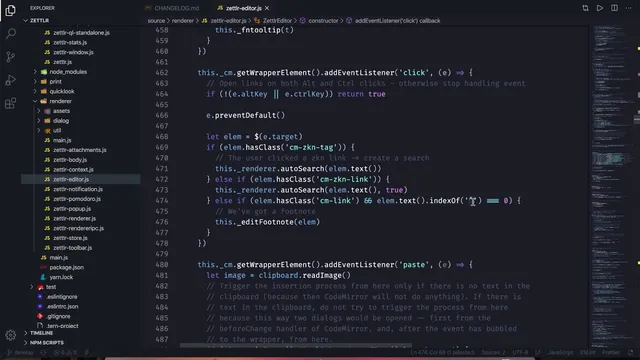
Alt/Option-clicking a link triggers an editor-side auto-search that extracts the link text and sends an IPC request to the main process with a force-open behavior.
Briefing
A practical feature request—“open a note by clicking an ID, and create it if it doesn’t exist”—turns into a tour of how Zettlr’s internals are wired together. The core finding is that the existing “link click → exact search → open result” pipeline already has almost everything needed; the missing piece is deciding where to insert “create file when not found,” and then threading a user-controlled preference through the renderer, IPC layer, and main process.
The workflow begins with the current behavior: holding Alt/Option while clicking an underlined link triggers an editor-side auto-search. That click path extracts the link text from CodeMirror-highlighted elements and sends it to the main process via IPC as a “find exact” request with a force-open flag. In the main process, the exact-match logic tries to resolve the term to a file by checking the current directory for allowed extensions (the app’s displayable types are limited to Markdown, text, and TeX-like files). If a match exists, the app opens it; if not, nothing happens.
To add auto-creation, the contributor reorganizes the code so the relevant behavior lives in the right place. Instead of inventing a new mechanism, the solution adds a new IPC command that mirrors the existing “first open” flow: it receives the term, attempts to find the exact file, and—only when the file is missing—optionally creates it. The creation step deliberately reuses existing file-system abstractions (the module responsible for file operations) and reuses an existing “file new” command to avoid duplicating sanitization and safety logic. This preserves Zettlr’s conventions for naming, ID handling, and error handling.
Because auto-creation should not surprise users, the feature is gated behind a preference. The implementation adds a new configuration key to the Handlebars-based preferences templates, then extends the corresponding renderer dialogue to read the checkbox state and send it to the main process. The preference is validated through the existing config template system, which filters invalid values when users edit configuration files. The UI wording is treated as part of the technical contract: the option is framed specifically as “create linked files,” not “create files on any search,” to reduce ambiguity.
Once the preference and command wiring are in place, the feature behaves as intended: clicking a link whose target doesn’t exist can create the corresponding Markdown/text/TeX file and open it. The implementation also surfaces real-world integration friction—debug artifacts like duplicated console output, promise rejection noise, and an observed interaction where the auto-search flow can interfere with the file list during creation. The takeaway is less about the final checkbox and more about the engineering pattern: identify the existing click/search/open pipeline, add one targeted command branch for “not found,” and route user intent through preferences so the app remains predictable.
Overall, the change is framed as a blueprint for contributing to Zettlr: understand the editor event path, trace the IPC call into the main process, reuse existing commands and file-system actions, and keep preferences and localization identifiers aligned with the project’s conventions before shipping a pull request to beta or release channels on GitHub and the forum.
Cornell Notes
Zettlr already supports “Alt/Option-click a link → extract link text → send exact-search/open request to the main process.” The missing feature is what happens when the target file doesn’t exist. The solution adds a new IPC command that performs the same exact-match lookup, but—when no file is found—optionally creates the file and then opens it. File creation is implemented by reusing Zettlr’s existing file-system abstraction and the existing “file new” command to avoid unsafe duplication of sanitization logic. A new preference checkbox (“create linked files”) gates the behavior, with the renderer dialogue reading the checkbox and the main process honoring it.
What exact click path triggers link opening in Zettlr, and where does the “force open” behavior come from?
How does Zettlr decide which file corresponds to a clicked link term?
Why add a new IPC command instead of changing the existing exact-open logic directly?
How does the preference checkbox get from the UI to the main process?
Why reuse the existing “file new” command for creation rather than writing a direct file-creation snippet?
What integration issue appeared during testing, and what does it imply about coupling between search UI and file creation?
Review Questions
- Trace the flow from Alt/Option-clicking a link to the main-process function that performs exact matching. Where would you insert “create if missing”?
- What are the allowed file types Zettlr uses for exact resolution, and how does the resolver behave when the clicked term has no extension?
- How should a new preference be implemented so its value is validated, localized, and available to the main process when an IPC command runs?
Key Points
- 1
Alt/Option-clicking a link triggers an editor-side auto-search that extracts the link text and sends an IPC request to the main process with a force-open behavior.
- 2
Exact file resolution in the main process tries ID/name matching and then appends allowed extensions (Markdown, text, TeX-like) when needed.
- 3
A new IPC command can mirror the existing exact-open flow but add a conditional branch for “file not found,” gated by a preference.
- 4
File creation should reuse Zettlr’s file-system abstraction and the existing “file new” command to avoid unsafe duplication of sanitization and metadata logic.
- 5
A new preference checkbox (“create linked files”) must be added to Handlebars templates, wired through the renderer dialogue, and validated via the config template system.
- 6
Testing revealed that search UI state can interact unexpectedly with file creation, so contributors should watch for race conditions and UI artifacts.