4 More Ways You can Use Queries in Capacities
Based on Capacities's video on YouTube. If you like this content, support the original creators by watching, liking and subscribing to their content.
Queries group Capacities objects using rules and can be reused anywhere the user can place an object.
Briefing
Queries in Capacities let users build rule-based “views” of objects and then reuse those views anywhere—on tag pages, in weekly reviews, on person pages, or inside custom dashboards. The core payoff is speed and context: instead of manually searching across links, quotes, meetings, milestones, or projects, a saved query keeps the right items grouped and ready wherever the user needs to work.
The first practical use is tag queries. Tags can be applied flexibly—to web links, quotes, and even blocks—so a tag page becomes an entry point into a theme. Rather than only viewing items that share one tag, related tags can be combined into a single query-based view. For example, pulling together items tagged with “curiosity” and “learning” creates a reusable list that can be embedded into other objects. That embedded query can then be reviewed in context, including while writing in a side panel by opening the query object and continuing work without losing the filtered set.
Next comes query-driven reviews, using the weekly review template as a model. A “Sunday review” template can contain a query that returns objects of a chosen type created within a specific date range for that week. The transcript walks through adjusting the date window (e.g., selecting a week where the created-at date falls on or after a given start date and on or before the Sunday of that week) and sorting results by the oldest first. The key advantage is that the review setup is pre-wired: once the template is in place, the query is already waiting to populate the review with the relevant objects.
Users can create their own review queries by starting with an object-type query, selecting what they want to review (meetings, people notes, milestones, and more), and then filtering by created-at dates. The query can be embedded into a week object via template settings so it updates automatically. Still, the calendar sidebar remains the “big overview” option when a full weekly sweep is the goal.
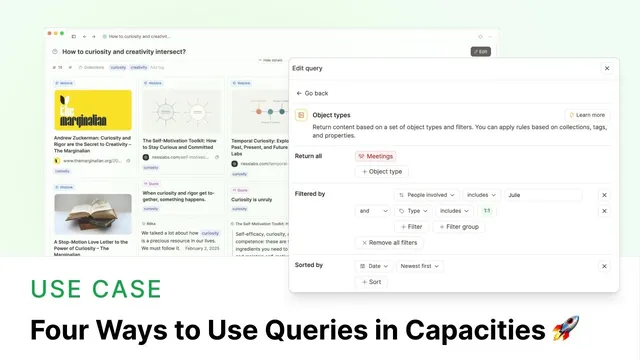
A third example targets colleagues through person-page queries. A query can pull meetings where a text property (the people involved field) includes a specific colleague such as Julie, sorted newest first. When the query is specific enough, it can surface a “new” button that creates a new meeting pre-filled with the colleague’s name and the meeting type—though this behavior may not work when tied to a calendar integration.
Finally, multiple queries can be embedded into a single context page. A “2025” demo dashboard acts like a north star by combining queries for open projects filtered by status (e.g., “in progress”) and a milestone timeline sorted by achievement date. The shared principle across all examples is consistent: once a query is built, it behaves like an object and can be placed wherever it supports the user’s workflow—on tags, in reviews, on people pages, or in year-long planning views.
Cornell Notes
Capacities queries turn rule-based filters into reusable views of your objects. Tag queries help group related content (like items tagged with “curiosity” and “learning”) into a single entry point for deeper work. Weekly review templates can embed object-type queries that automatically pull items created within a chosen date range, making reviews faster to start and easier to keep consistent. Person-page queries can collect colleague-specific interactions (such as meetings involving Julie) and, in some cases, provide a “new” button that pre-fills fields like the colleague’s name and meeting type. Multiple queries can also be combined into a dashboard-style page (e.g., a 2025 planning view) to keep projects and milestones aligned with a yearly context.
How do tag queries change the way someone navigates notes and content?
What makes query-based weekly reviews efficient in Capacities?
How can someone build their own review query from scratch?
What is the colleague-focused use case for queries, and what special action can appear?
How do multiple queries work together on a single dashboard page?
Review Questions
- When would a tag page be enough on its own, and when does combining related tags into a query add value?
- What date filters and sorting choices are typically used to make a weekly review query reliable?
- What conditions determine whether a person-page query offers a “new” button that pre-fills fields?
Key Points
- 1
Queries group Capacities objects using rules and can be reused anywhere the user can place an object.
- 2
Tag queries turn “related tags” into a single filtered view, creating a different entry point for reviewing content.
- 3
Weekly review templates can embed object-type queries with created-at date ranges so reviews populate automatically.
- 4
Custom review queries can be created by selecting object types, filtering by date, and pasting the query into a week template.
- 5
Person-page queries can collect colleague-specific meetings by filtering on a text property like “people involved,” often sorted newest-first.
- 6
Some person-page queries reveal a “new” button that pre-fills fields such as the colleague’s name and meeting type, though calendar integration may limit this.
- 7
Dashboards can embed multiple queries at once to build context-specific views like a yearly “north star” page.