A Comprehensive Tutorial on Correlation Analysis using SPSS Combined
Based on Research With Fawad's video on YouTube. If you like this content, support the original creators by watching, liking and subscribing to their content.
Pearson correlation coefficient (R) quantifies the direction (sign) and strength (magnitude) of a linear relationship between two quantitative variables.
Briefing
Correlation analysis in SPSS hinges on one core statistic: the Pearson correlation coefficient (R), which quantifies both the direction and strength of a linear relationship between two quantitative variables. A positive R means higher values in one variable tend to align with higher values in the other; a negative R means the opposite. Because scatter plots can suggest patterns but can’t reliably measure strength, R provides the numerical yardstick—while significance testing (via p-values) determines whether the observed relationship is likely to reflect a real association rather than sampling noise.
Interpretation starts with practical guidelines for R’s magnitude. Values near 0 indicate very weak relationships, while values closer to 1 (or -1) indicate stronger linear association. The tutorial lays out a commonly used scale: |R| ≤ 0.1 is very weak, 0.1–0.3 weak, 0.3–0.5 moderate, 0.5–0.7 strong, and above 0.7 very strong. It also flags a key caution: very high correlations (around 0.85 or more) can signal multi-collinearity—when two constructs are essentially measuring the same underlying concept.
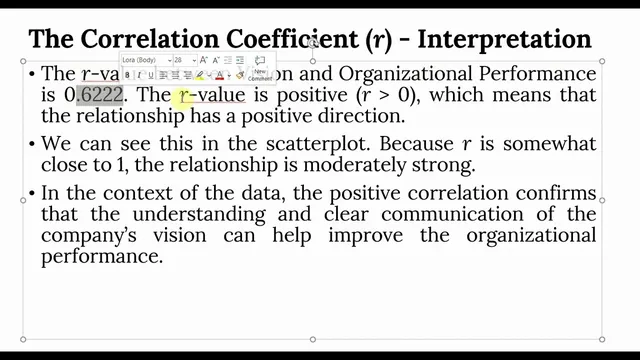
A worked example demonstrates how to run Pearson correlations in SPSS. Using composite variables (computed as means of multiple items) for “vision” and “organizational performance,” the output reports an R value (shown as 0.622 in the narrative) and a p-value below the 0.05 threshold, leading to the conclusion that the relationship is statistically significant. The tutorial emphasizes that significance is assessed first (p < 0.05 in social science research), and then strength is interpreted using the R magnitude. It also notes that correlation alone doesn’t confirm linearity: researchers should pair R with a scatter plot and check whether points cluster around a fitted line. In the example, the scatter plot shows an upward tendency consistent with a positive linear relationship.
For reporting, the tutorial distinguishes between bivariate correlation and multi-variable correlation matrices. With more than two variables, SPSS produces a matrix of Pearson correlations, and researchers can choose one-tailed or two-tailed significance depending on whether the direction of the relationship is theoretically expected. The results are then formatted into a clean table for publication, typically removing redundant cells and reporting only meaningful correlations. When confidence intervals are needed, SPSS’s correlation procedure with confidence intervals uses bootstrapping (with 1,000 samples by default in the walkthrough) to produce lower and upper bounds around the correlation estimate—allowing researchers to state a plausible range for the true population correlation (e.g., a 95% interval).
Finally, the tutorial addresses comparing correlations across groups. It shows how to split the dataset by gender, compute correlations separately for male and female, and then test whether the difference between two correlation coefficients is statistically significant. Using a “significance of difference between two correlations” calculator (Daniel Steiger’s method referenced), the example finds that the male vs. female difference is insignificant (p > 0.05), implying the strength of the relationship between organizational commitment and collaborative culture is effectively the same across genders.
Cornell Notes
Pearson correlation coefficient (R) measures the direction and strength of a linear relationship between two quantitative variables. The sign of R indicates direction (positive vs. negative), while the magnitude indicates strength, using common cutoffs such as very weak (≤0.1), weak (0.1–0.3), moderate (0.3–0.5), strong (0.5–0.7), and very strong (>0.7). Statistical significance is judged using p-values (typically p < 0.05 in social science research), and linearity should be checked with a scatter plot and fitted line because R alone doesn’t confirm linear form. For multiple variables, SPSS outputs a correlation matrix; for uncertainty, confidence intervals via bootstrapping provide lower and upper bounds for the true population correlation. Correlations can also be compared across groups by splitting data and testing whether the difference between correlation coefficients is significant.
How should R be interpreted in terms of direction and strength?
Why isn’t a significant correlation enough to claim a linear relationship?
What does p < 0.05 mean in correlation analysis, and how does it connect to hypotheses?
How do you handle correlation analysis when there are more than two variables?
What is the purpose of confidence intervals in correlation output?
How can correlations be compared across two groups, and what does “insignificant difference” imply?
Review Questions
- If R is -0.55 and p < 0.05, how would you describe both the direction and strength of the relationship, and what would you conclude about significance?
- What checks should be performed alongside R to assess whether the relationship is truly linear?
- When would you choose a one-tailed vs. two-tailed significance test for a correlation matrix?
Key Points
- 1
Pearson correlation coefficient (R) quantifies the direction (sign) and strength (magnitude) of a linear relationship between two quantitative variables.
- 2
Use p-values to judge statistical significance, typically treating p < 0.05 as evidence of a non-zero association in social science research.
- 3
Interpret R magnitude with common cutoffs (very weak ≤ 0.1, weak 0.1–0.3, moderate 0.3–0.5, strong 0.5–0.7, very strong > 0.7), while remembering these are guidelines.
- 4
Confirm linearity with scatter plots and a fitted line; R alone does not guarantee the relationship is linear.
- 5
For multiple variables, report results from a correlation matrix and choose one-tailed vs. two-tailed tests based on theoretical expectations.
- 6
Confidence intervals (via bootstrapping) provide a plausible range for the true population correlation, improving interpretation beyond a single R value.
- 7
To compare correlations across groups, split the data, compute subgroup correlations, and test whether the difference between correlation coefficients is significant (p > 0.05 implies no significant difference).