A New Step for AI Art - But is it the right one?
Based on MattVidPro's video on YouTube. If you like this content, support the original creators by watching, liking and subscribing to their content.
Midjourney V5 (Alpha) is built to follow prompts more closely, especially when prompts are longer and more specific.
Briefing
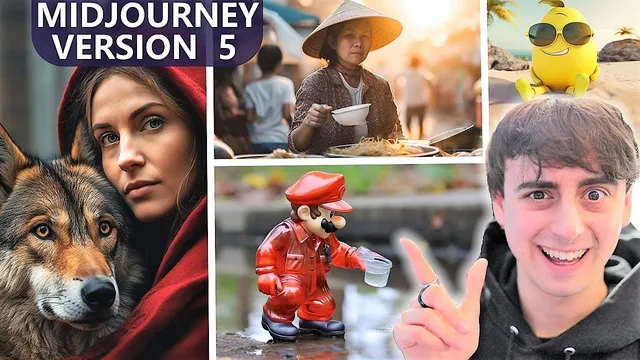
Midjourney V5 arrives as a more “pro” image model that leans harder into prompt-following and realism—while still letting users switch back to the more stylized, one-word Midjourney look later in the rollout. Early public testing (V5 in Alpha) shows strikingly photo-like people, products, vehicles, and cinematic scenes, with noticeably sharper fine detail and faster upscaling than V4.
A key shift from V4 is how V5 handles prompts. Instead of drifting toward broadly aesthetic outputs, V5 is designed to follow instructions more closely and produce a wider range of styles when prompts are specific. Midjourney’s guidance in the rollout emphasizes that shorter prompts tend to underperform; longer, targeted prompts—sometimes several sentences—typically yield better results. In practice, the community feed and user examples repeatedly show more accurate materials, lighting, reflections, and background texture. Faces often look more convincing at a glance, with fewer “creepy” artifacts than earlier generations, though occasional issues remain (notably warped hands, odd eye behavior, and occasional broken text).
The realism jump is also tied to technical changes. V5 generates images at roughly twice the resolution of V4, which translates into more detail and, in many cases, more accurate detail placement. Users highlight improvements in small elements like fingers, watch markings, product surfaces, and background objects—though the model still sometimes produces impossible geometry or garbled elements when prompts are too minimal or overly complex. Upscaling is another practical upgrade: users report that V5 upscales are effectively instant, whereas V4 could take significantly longer.
Midjourney V5 also expands creative controls that were previously limited. Aspect ratios and tileable outputs work right away with V5, and the model supports Midjourney’s command set (including dash dash stylize for pushing toward the classic Midjourney look). In the Alpha, the “pro” mode can feel less forgiving for casual, one-word prompting; however, the final default release is expected to include a toggle so users can choose between a more stylistic default (closer to V4 behavior) and the prompt-sensitive pro option.
Community comparisons across V4 and V5 repeatedly point to differences in contrast, dynamic range, and “camera-like” naturalness. V5 outputs often look less like heavy post-processing and more like real photography, with softer contrast and richer detail in both bright and dark regions. At the same time, V4 can look more polished or more stylized depending on the prompt, and V5 can still miss on text spelling and number accuracy.
Beyond realism, V5 also revives the “DALL·E-style” comedy and surreal prompts that feel like they belong in impossible real-world scenarios—elves in a New York bodega, Geralt at Radio Shack, and recognizable public figures at events—often with improved character fidelity. The overall takeaway from early testing: Midjourney V5 is a major step toward prompt-driven, high-detail realism, with meaningful workflow improvements, but it still rewards careful prompting and isn’t fully reliable on text and some complex anatomy.
Cornell Notes
Midjourney V5 (currently in Alpha) shifts Midjourney toward stronger prompt-following and more photo-real detail. Users report that V5 handles longer, more specific prompts better than short ones, producing more accurate materials, lighting, reflections, and background texture. A major technical factor is roughly double the resolution versus V4, which helps fine details look sharper and more correct. Upscaling also becomes dramatically faster, changing the workflow compared with V4. While V5 can still struggle with perfect text/number rendering and occasional anatomy errors, the community sees clear gains in realism, dynamic range, and cinematic output—plus improved support for aspect ratios, tiling, image-to-image, and prompt stylization toggles.
What’s the biggest practical change from Midjourney V4 to V5 in early testing?
Why do V5 images often look sharper and more “camera-like” than V4?
How do commands and controls affect what V5 produces?
What workflow improvements matter most for users right now?
Where does V5 still struggle despite the realism gains?
What kinds of outputs show V5’s strengths beyond realism?
Review Questions
- How does prompt length and specificity change outcomes in Midjourney V5 compared with V4?
- What technical and workflow changes (resolution, upscaling speed) contribute most to the perceived realism jump?
- Which failure modes—text, numbers, hands, or complex objects—show up most often in early V5 testing?
Key Points
- 1
Midjourney V5 (Alpha) is built to follow prompts more closely, especially when prompts are longer and more specific.
- 2
V5 generates at roughly twice the resolution of V4, improving sharpness and often the accuracy of fine details.
- 3
Upscaling in V5 is reported as dramatically faster than in V4, making iteration quicker.
- 4
V5 supports aspect ratios, tileable outputs (dash dash tile), and stylization controls (dash dash stylize), but the Alpha pro mode can feel less forgiving for one-word prompts.
- 5
The final rollout is expected to include a toggle between a more stylized default (closer to V4) and the prompt-sensitive pro option.
- 6
Early community tests show improved realism and dynamic range, but text spelling/number accuracy and some anatomy (e.g., warped hands) still fail intermittently.