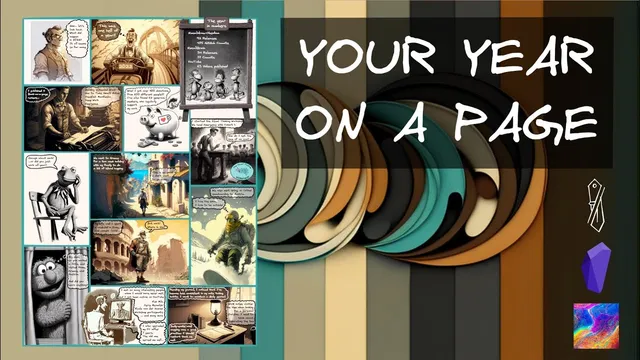
A step-by-step guide for crafting your 2022-On-A-Page with Midjourney, Excalidraw, and Obsidian
Based on Zsolt's Visual Personal Knowledge Management's video on YouTube. If you like this content, support the original creators by watching, liking and subscribing to their content.
Use Obsidian daily notes as the raw input, then convert diary entries into grouped mind-map nodes before touching any AI art.
Briefing
A year-end comic strip built from AI art becomes a practical blueprint for turning daily journaling into a consistent, publishable “one-page” visual summary. The core workflow links Obsidian daily notes to an Excalidraw canvas, then uses Midjourney prompts (with strict aspect-ratio and quality controls) to generate a grid of image tiles that can be assembled into a coherent storyline—complete with callouts, metadata, and final layout tweaks.
The process starts with idea harvesting. A new Excalidraw mind map serves as a canvas for collecting themes, then the creator reviews an Obsidian daily notes page for January 1, 2022 and follows “tomorrow” links day by day. Each day’s diary entries are scanned for events and angles worth including in the comic; promising items get captured as nodes in the mind map. After the review, the notes are tallied (e.g., counts of YouTube videos and X (formerly Twitter) collateral releases) and then grouped into topic clusters that become the basis for the comic’s panels.
Layout planning comes next, using a 200 by 200 grid inside Excalidraw to keep panel placement consistent. The comic is drafted in a portrait-oriented 7 by 10 sheet, with tiles sized as 2 by 2, 2 by 3, or 3 by 2 rectangles to mix square, portrait, and landscape compositions. Each tile gets a topic label and draft Midjourney prompts plus callout text—so the narrative structure exists before any final art is generated.
The biggest technical hurdle is consistency across multiple AI images. To address it, a reusable five-part Midjourney prompt structure is used: (1) setting, (2) character traits (reused nearly verbatim to keep the character recognizable), (3) action and emotion, (4) atmosphere plus style cues, and (5) Midjourney parameters. Key parameters include “--ar” for aspect ratio, “--no” to exclude unwanted elements, “--q 0.5” to cut GPU time while keeping quality acceptable, and “--v4” (or “--niji”) to select the stable diffusion model variant. The workflow also emphasizes checking aspect ratio carefully to avoid wasted generations.
Each tile is produced through a repeatable 11-step loop: copy the prompt, run “/imagine” in Discord, generate four variants, upscale the best one, re-upscale if needed, open the origin link, optionally convert to transparency via LunaPic, paste into Excalidraw, size using the grid, then use Excalidraw’s deconstruct image script to move the image and callouts into a new “deconstructed” drawing. Metadata is added in markdown (including the Midjourney prompt and a source link) to preserve provenance.
Finally, the comic is refined with divider lines, callout edits, and formatting controls like “row padding 0” to prevent white padding when embedded. Practical tips address Excalidraw quirks (embedded images reverting to 100% size), speech-cloud creation without a pen, and color transparency via opacity sliders or hex alpha values. The payoff is both creative and reflective: the comic becomes a structured way to identify unfinished themes for 2023 while motivating renewed daily journaling and mind-mapping.
Cornell Notes
The workflow turns Obsidian daily journaling into a structured “2022 on one page” comic built in Excalidraw, with AI-generated art produced tile-by-tile in Midjourney. A 200×200 grid and a portrait 7×10 layout keep panel placement consistent, while a reusable five-part Midjourney prompt template (setting, character traits, action/emotion, style/atmosphere, and parameters) improves visual continuity. GPU time is managed using “--q 0.5,” and aspect ratio is controlled via “--ar” to match each tile’s shape. After generation, LunaPic is used for transparent backgrounds when needed, and Excalidraw’s deconstruct image script helps assemble images and callouts cleanly. Metadata (prompt and source links) is stored for later review and reproducibility.
How does daily journaling translate into a comic strip plan rather than just a collection of notes?
What layout system keeps many AI-generated tiles from becoming visually chaotic?
Why is AI consistency hard in multi-panel comics, and what prompt structure helps?
Which Midjourney parameters are used to control both look and compute cost?
How are generated images integrated into Excalidraw so they behave correctly during editing?
What practical fixes prevent common Excalidraw and styling problems in the final comic?
Review Questions
- How would you decide the “--ar” aspect ratio for each panel tile, and what happens if it’s overlooked?
- What parts of the five-part Midjourney prompt should be reused verbatim to keep a character consistent across panels?
- Why is storing the Midjourney prompt and source link in markdown metadata useful later, and how does it support iteration?
Key Points
- 1
Use Obsidian daily notes as the raw input, then convert diary entries into grouped mind-map nodes before touching any AI art.
- 2
Draft the comic layout first using a locked 200×200 grid and a 7×10 portrait structure with 2×2, 2×3, and 3×2 tiles.
- 3
Improve multi-panel visual consistency by using a reusable five-part Midjourney prompt template, especially repeating the character traits section.
- 4
Control compute cost and output reliability with “--q 0.5” and by carefully matching each tile’s aspect ratio using “--ar.”
- 5
Use “--no” to exclude recurring unwanted elements and select the model with “--v4” or “--niji” depending on the desired style.
- 6
Integrate images into Excalidraw through a repeatable pipeline: generate in Discord, upscale, optionally make transparency via LunaPic, paste, size on the grid, then deconstruct for editing.
- 7
Prevent layout and styling glitches by handling Excalidraw’s 100% embedded-image behavior and using opacity controls for semi-transparent callouts.