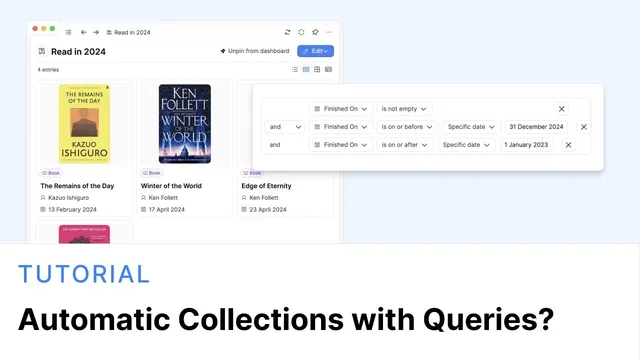
Automatic collections with queries?
Based on Capacities's video on YouTube. If you like this content, support the original creators by watching, liking and subscribing to their content.
Add a dedicated rule-driving property (like “finished on”) to the object type so queries have something concrete to filter on.
Briefing
Automatic collections built from saved queries can keep lists current without manual updates—whether tracking what’s been finished, which meetings belong to a project, or what videos are queued to watch. The core move is adding a property that can be used as a rule trigger, then saving a query so new items that match the rule appear automatically.
The walkthrough starts with a reading system using a Book object type. A single date-time property called “finished on” is added to each book. When a book’s “finished on” value falls within a chosen range, it becomes eligible for inclusion; if the property is empty, the book is treated as unread. A filter is then configured to capture books read in 2024 by selecting items where “finished on” is on or before December 31 and on or after January 1. At first, this filter is just applied to a view, but saving it as a query turns it into a reusable, pinned collection. Because the query is rule-based, it updates behind the scenes: finishing a new book in 2024 makes it appear in the “Read in 2024” list automatically. A parallel “Read in 2023” query is created by duplicating the saved query and adjusting the date boundaries.
A second query creates a “reading list” by filtering for books where “finished on” is empty. This produces an automatically updating queue of unread books, pinned to the dashboard under the Book object type. The transcript also notes that the same pattern works with other object types (like a Media object type), with the key requirement being the right filter property.
The second example shifts from time-based tracking to relationship-based tracking: meetings associated with a specific project. A Project object type is added, and a multi-select property on Meeting called something like “part of which projects” is created so meetings can be linked to the correct project. From the project page itself, a query block is created that filters meetings by the selected project. The list updates automatically when a meeting is added to or removed from that project. Beyond basic filtering, the query block can be sorted (for example, newest meetings first), displayed in different layouts (wall view, wide layout), and rearranged within the project page—effectively giving each project a focused “meetings hub” without cluttering or constantly editing backlinks.
The final example builds an automatically updating video watch list using the web extension. Links saved into Capacities are assigned tags, including a “video” type tag and a “to watch” tag. A query called “watch list” filters for items whose tags include “video,” and the list only shows items that also match the “to watch” condition. Removing “to watch” from a link makes it disappear from the watch list, while the underlying web link remains for note-taking. Adding new items with the right tags makes them appear automatically, keeping the queue accurate as viewing plans change.
Cornell Notes
Saved queries turn filters into automatically updating collections. By adding a rule-driving property—like a “finished on” date-time field—items that match a time window (e.g., books finished in 2024) appear in a pinned query without manual refresh. A second query can invert the logic by selecting items where the property is empty to produce a live reading list. The same approach works for relationship data: meetings are linked to projects via a multi-select property, and a project-page query block filters meetings to that project and updates when assignments change. For video tracking, a web extension plus tags (“video” and “to watch”) powers a watch list query that stays current as tags are added or removed.
Why does adding a “finished on” property enable an automatic reading list?
How does saving a filter as a query change what users can do with it?
What’s the key setup for linking meetings to projects so a project-specific list can update?
How can a project meetings query provide more value than backlinks?
How does the video watch list stay accurate without manual maintenance?
Review Questions
- What two different query rules are used to distinguish “read in 2024” from a “reading list,” and how do they rely on the same “finished on” property?
- In the meetings-by-project example, what property type and selection source are required so the query can filter meetings to a specific project?
- For the watch list, which tags and tag-based filters determine whether a web link appears, and what happens when those tags are removed?
Key Points
- 1
Add a dedicated rule-driving property (like “finished on”) to the object type so queries have something concrete to filter on.
- 2
Use date-range filters (on/after January 1 and on/before December 31) to build year-specific automatic collections.
- 3
Save filters as queries and pin them to dashboards to make them reusable and automatically updating.
- 4
Create a complementary query for empty properties (e.g., “finished on” is empty) to generate live queues like reading lists.
- 5
Link related objects with a multi-select property that selects from the correct object type (e.g., Meeting → Project) to enable relationship-based queries.
- 6
Embed query blocks on object pages (like project pages) to create focused, sortable, rearrangeable sections without editing backlinks.
- 7
Use tags plus the web extension to power a watch list query where adding/removing tags updates the queue while preserving the underlying link for notes.