Build projects from Smart Notes in Obsidian
Based on Joshua Duffney's video on YouTube. If you like this content, support the original creators by watching, liking and subscribing to their content.
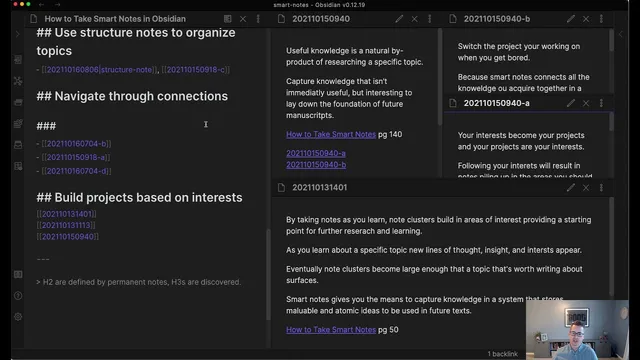
Create a dedicated “projects” folder in Obsidian and build project notes as a Markdown outline using heading levels (## for H2, ### for H3).
Briefing
The core move is turning “Smart Notes” into a practical Obsidian workflow by using a dedicated project outline inside Obsidian—then keeping reference and long-term knowledge separate from the actual writing. The approach matters because it prevents the system from becoming cluttered: notes collected for learning and synthesis stay organized, while writing stays focused and manageable.
The workflow starts from Graph View and uses a “project note” as the entry point. A folder named “projects” becomes the container for project-specific material, including a traditional header-based outline written in Markdown. In this structure, headings map directly to hierarchy: “##” functions as an H2, “###” as an H3, and so on. The outline includes sections such as an introduction and a “configure environment” area that reflects the course’s guiding principle—simplicity prevents complexity, and exceptional results come from a simple system. The emphasis is deliberate: the setup avoids heavy plugin use and fancy markup so the system doesn’t distract from the underlying method.
Within the outline, the workflow translates Smart Notes concepts into Obsidian components. “Fleeting” notes become daily notes, while “reference” and the “slip box” are treated as folders. The example shows a progression through the system: capture fleeting notes, organize them under the right headings, and then accumulate permanent notes that can later feed writing. The project outline is used as an organizing scaffold—essentially an outline for drafting—while the slip box remains a separate long-term knowledge store.
A key practical detail is how the notes are used while writing. The creator describes working with two screens (or macOS workspaces) so that the writing tool stays open while Obsidian’s project outline is visible for quick reference. Ulysses is used as the editor for drafting, with Obsidian serving as the reference system and slip box. This separation is presented as a quality-of-life improvement: Ulysses exports to PDF and other book formats more smoothly, while Obsidian remains optimized for Markdown-based note management.
The transcript also addresses a common failure mode: taking too many notes. The example graph suggests only a subset of captured notes were actually used—around 30—implying that earlier note-taking produced more quantity than needed. The guidance is to expect that: quantity comes before quality. If a vault needs restarting, that’s framed as normal—using a “scorched earth” approach to begin fresh, carry forward only the lessons (and later, only a subset of notes), and avoid dragging forward everything from earlier experiments. Over time, the notes become shorter and more selective, improving their usefulness for writing.
In short, Smart Notes become a writing engine when Obsidian is structured into reference and slip-box folders, while project notes act as the drafting outline—and writing happens in a dedicated editor like Ulysses to keep the workflow clean and export-friendly.
Cornell Notes
The workflow builds projects from Smart Notes by using Obsidian as the reference system and slip box, while keeping project notes as a Markdown outline that feeds drafting. A “projects” folder holds project-specific notes organized with Markdown headings (## for H2, ### for H3). Smart Notes concepts map to Obsidian structures: fleeting notes align with daily notes, and permanent knowledge lives in folders for reference and the slip box. Writing is kept separate in Ulysses (especially for book/PDF export), with Obsidian used for quick outline and knowledge retrieval. The approach also normalizes restarting vaults and taking many notes early—quality improves as notes get shorter and more selective.
How does the system structure a project inside Obsidian so Smart Notes can feed writing?
What is the mapping between Smart Notes categories and Obsidian components?
Why keep Obsidian’s project outline separate from the slip box?
What role does Ulysses play, and why not write directly in Obsidian?
How does the transcript address the problem of taking too many notes?
What does “scorched earth” mean in this context, and when should someone restart a vault?
Review Questions
- When building a project note in Obsidian, what heading levels are used to create the outline hierarchy, and how does that outline function during drafting?
- What folder roles correspond to fleeting notes, reference notes, and the slip box, and why does separation matter for retrieval?
- What practical reasons are given for using Ulysses as the writing editor instead of writing directly in Obsidian?
Key Points
- 1
Create a dedicated “projects” folder in Obsidian and build project notes as a Markdown outline using heading levels (## for H2, ### for H3).
- 2
Use Obsidian to separate fleeting notes (daily notes), reference material (reference folder), and long-term knowledge (slip box folder).
- 3
Treat the project note as a drafting scaffold, not as the long-term knowledge store.
- 4
Draft in a dedicated editor like Ulysses to improve export workflows (PDF and book formats), while keeping Obsidian for reference and retrieval.
- 5
Expect early note-taking to be heavy; quantity comes before quality, and only a subset will likely be used.
- 6
Keep notes short and selective over time so permanent notes remain usable rather than overwhelming.
- 7
When the system needs improvement, restart the vault rather than migrating everything—carry forward lessons and later, only a subset of notes.