CALENDAR BLOCKING // Time Management for Students
Based on Mariana Vieira's video on YouTube. If you like this content, support the original creators by watching, liking and subscribing to their content.
Build a color-coded weekly template by scheduling routine wake/sleep times first, then copy it across all days.
Briefing
Calendar blocking is presented as a practical way for students to turn goals into scheduled, doable actions by assigning study, routines, and personal obligations to specific time slots—then tracking completion visually. The core payoff is simple: once tasks live on the calendar, they become harder to postpone and easier to follow through on, especially for busy weeks that include classes, workouts, errands, and life events.
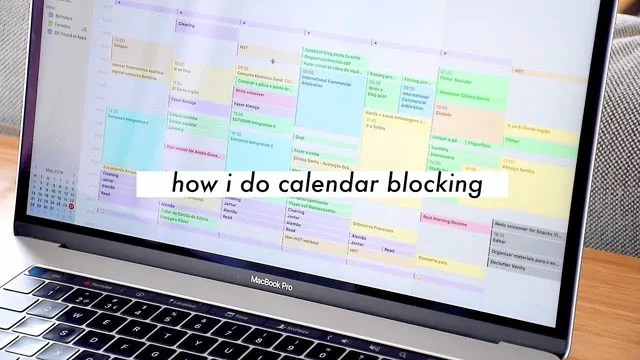
The workflow starts with building a color-coded weekly structure. The routine—like marking wake-up time—is entered first and copied across all days, creating an immediate visual map of available hours. Next comes workouts, scheduled early in the morning before classes, with the type of workout adjusted to the day (walks, HIIT training, or the gym). After that, classes are added using a semester or year-long schedule, with color coding used to distinguish between different programs (in this case, two master’s tracks). The result is a calendar that shows not just what must happen, but also what time remains for everything else.
Tasks then move from a traditional to-do list into active time on the calendar. The approach emphasizes taking tasks—whether they come from a bullet journal, note-taking apps like Evernote, or a favorites list—and placing them into specific slots so they become “achievable things” with a dedicated window to complete them. This is framed as a shift from relying on mood-based task picking (doing only the easiest items from a to-do list) to committing to what’s scheduled for a particular time.
Personal obligations and flexible events are handled with the same system. Doctor’s appointments, lunch plans, and concerts get time slots. For items that don’t require a specific hour—like a friend’s birthday—an all-day entry is used so the calendar reflects the commitment without consuming active study time. For work that repeats on a schedule, like YouTube production, separate calendar entries are used to reserve the usual publishing window for videos and sponsorship-related calls or meetings.
A key feature is tracking completion through a psychological trigger: tasks start in a “to-do” color and then change color once finished. The transcript describes maintaining two task calendars—one for pending items and one for completed items—then editing tasks to switch them from the to-do list to the completed state (e.g., changing from black to green). The visible checkmark effect, recreated digitally, is positioned as motivation for staying on track.
Finally, the method extends beyond academics into self-care and accountability—face masks, meal prepping, and other lifestyle tasks that people often forget. By scheduling meal prep and workout-related time, students can plan healthier routines with less reliance on memory or last-minute decisions. The overall recommendation is to try calendar blocking for a week, whether using paper or a digital setup, and to adopt multiple color-coded calendars for different parts of life. Credit is given to Amy Landino, who coined the term, with an invitation to check her channel for additional ideas not covered in this walkthrough.
Cornell Notes
Calendar blocking is a time-management method that schedules routines, classes, workouts, errands, and personal tasks into specific calendar slots—so goals become concrete actions with a dedicated time window. The approach starts by color-coding wake-up and sleep routines, then adding workouts and semester-long classes. Tasks are transferred from to-do lists into the calendar, and completion is reinforced by changing task colors (e.g., moving items from a “to-do” state to a “completed” state). Events that don’t need a specific hour are placed in all-day slots, while recurring work like YouTube uploads can be reserved in the usual time blocks. The method matters because it reduces procrastination and increases follow-through by making planned work visible and trackable.
How does calendar blocking change the way tasks get handled compared with a normal to-do list?
What does the scheduling process look like from start to finish in the example week?
How are tasks marked as completed, and why is that important?
What’s the difference between scheduling something at a specific hour versus using an all-day slot?
How does the method incorporate non-academic life, such as self-care and meal prep?
What digital setup is used to make calendar blocking easier?
Review Questions
- When should tasks be moved from a to-do list into the calendar, and what benefit does that provide?
- How does color-coding and switching tasks from “to-do” to “completed” reinforce behavior change?
- What types of events should go into all-day slots versus specific time slots?
Key Points
- 1
Build a color-coded weekly template by scheduling routine wake/sleep times first, then copy it across all days.
- 2
Schedule workouts before classes so exercise time is protected and not squeezed out later.
- 3
Add semester or year-long classes using color coding to distinguish different programs or enrollment tracks.
- 4
Transfer tasks from notes or bullet journals into specific calendar time slots to make goals actionable.
- 5
Use all-day entries for commitments that don’t require a specific hour, like birthdays, to avoid wasting active time blocks.
- 6
Track progress by changing task status (and color) from “to-do” to “completed” to create a visible completion signal.
- 7
Include self-care and lifestyle tasks—like meal prepping and face masks—so the calendar supports more than academics.