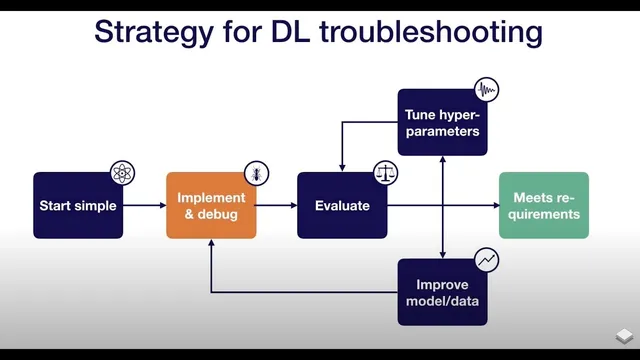
Debug (3) - Troubleshooting - Full Stack Deep Learning
Based on The Full Stack's video on YouTube. If you like this content, support the original creators by watching, liking and subscribing to their content.
Get the model to run end-to-end first, then validate learning behavior with a single-batch overfit test before scaling up.
Briefing
Debugging deep learning starts with a practical goal: make the model run end-to-end, then prove it can learn by forcing it to overfit a single batch, and finally validate behavior against a known reference. That sequence matters because many failures—shape errors, preprocessing mistakes, loss mismatches, and numerical blowups—surface early, while “it trains” can still hide serious bugs that only appear after weeks of work.
A common reason models fail to run is incorrect tensor shapes. Automatic differentiation frameworks can broadcast tensors silently, so mismatched dimensions may not crash immediately but can corrupt computations downstream. Preprocessing errors are another frequent culprit: forgetting normalization, double-normalizing, or applying the wrong scaling (for example, dividing images by 255 when a library already scaled them to 0–1) can make learning effectively impossible. Data augmentation can also break training if it becomes too aggressive, turning the task unsolvable. Loss-function wiring is equally important—especially with softmax—because losses in TensorFlow and PyTorch expect specific input formats (raw logits versus post-softmax probabilities). Another classic trap is training/evaluation mode: batch normalization depends on whether the model is updating batch statistics (train mode) or using stored statistics (test mode), and forgetting to set the correct mode can derail results. Finally, numerical instability shows up as NaNs, often caused by exponentials, logarithms, or divisions in the network.
To get past the “model won’t run” stage, the recommended approach is to start small and debug methodically. Keep the first implementation lightweight—roughly under 200 lines of new model code—while relying on off-the-shelf components (like Keras dense layers) to avoid reinventing numerics and stability issues. Avoid complex data pipelines at the beginning; load data into memory first so the debugging surface stays small. When errors appear, step through model construction line-by-line in a debugger, checking tensor shapes and data types as each layer is added. For out-of-memory problems, reduce memory pressure iteratively: shrink large matrices or halve the batch size until the failure disappears. For TensorFlow specifically, debugging can be trickier because graph creation and execution are separate; inspecting graph-building steps and tensor properties during training, or using TFDB-style tooling that pauses on session runs, can help.
Once the model runs, confidence comes from overfitting a single batch. The target is not “good enough,” but driving training error arbitrarily close to zero. If overfitting fails, the failure mode points to likely causes: exploding error can indicate a sign flip (minimizing log probability instead of maximizing it) or numerical issues, while oscillating error often suggests an overly high learning rate. If error plateaus, removing regularization and adjusting learning rate can help break through, but persistent plateaus also warrant checking the loss definition and the data pipeline for label shuffling or augmentation bugs.
The last step is comparison to a known result—preferably an official implementation evaluated on a similar dataset. Side-by-side differences can reveal where pipelines diverge. If no official code exists, benchmark results or even a simple baseline (like predicting the average label or fitting a linear regression) can expose whether the neural model is actually learning beyond trivial patterns. Caution is advised with random GitHub implementations, since bugs are common there too. Overall, the workflow is designed to catch fundamental issues early: get it running, prove it can memorize, then verify it matches expectations.
Cornell Notes
The debugging workflow for deep learning is three-step: (1) get the model to run end-to-end, (2) overfit a single batch until training error approaches zero, and (3) compare results to a known reference. Many “it runs” failures come from silent tensor broadcasting due to shape mismatches, incorrect input scaling/normalization, overly destructive data augmentation, loss-function input mismatches (e.g., softmax logits vs probabilities), wrong train/test mode for batch normalization, or numerical instability producing NaNs. The fastest way to diagnose run-time issues is stepping through model creation in a debugger while checking tensor shapes and data types, and reducing memory usage by shrinking batch size or large tensors. Overfitting a single batch catches absurdly many training bugs early, and comparison to official or benchmark results adds confidence that performance is real.
What are the most common reasons a deep learning model fails to run or behaves strangely even when it trains?
How should someone debug “model won’t run” issues in practice?
Why overfit a single batch, and what does failure usually indicate?
How can someone validate that training results are trustworthy beyond “it learns”?
What’s the role of batch normalization in debugging?
Review Questions
- When overfitting a single batch, what training-error patterns suggest a learning-rate problem versus a sign/numerical issue?
- List at least four categories of bugs that can cause silent failures in deep learning training (not just crashes).
- Why is comparing to an official or benchmark result more informative than relying on training loss alone?
Key Points
- 1
Get the model to run end-to-end first, then validate learning behavior with a single-batch overfit test before scaling up.
- 2
Treat tensor shape mismatches as high-risk because silent broadcasting can corrupt computations without obvious crashes.
- 3
Verify preprocessing and scaling end-to-end; double-normalization (e.g., dividing by 255 when already scaled to 0–1) can make learning fail.
- 4
Match loss-function expectations precisely (e.g., softmax losses may require raw logits rather than probabilities).
- 5
Set train/test mode correctly for batch normalization; wrong mode can derail training even when code runs.
- 6
Use a debugger to inspect tensor shapes and data types during model construction, and reduce batch size or tensor sizes to isolate out-of-memory issues.
- 7
Validate results by comparing to official implementations or benchmarks, and use simple baselines when no reference code is available.