Dump, Lump, Jump: The Ultimate Visual Thinking Tool for Turning Ideas into Action
Based on Zsolt's Visual Personal Knowledge Management's video on YouTube. If you like this content, support the original creators by watching, liking and subscribing to their content.
Dump everything relevant from the mind, inbox, agenda, or desk onto paper to stop mental clutter from driving attention.
Briefing
“Dump, Lump, Jump” is a three-step visual thinking method for turning scattered ideas into clear next actions—especially when inboxes, agendas, desks, or minds feel overloaded. The core move is simple: get everything out of your head, group it into meaningful clusters, then prioritize what to do next based on urgency and how tasks depend on one another. It matters because the approach replaces vague goal-chasing with a concrete workflow that produces an actionable plan.
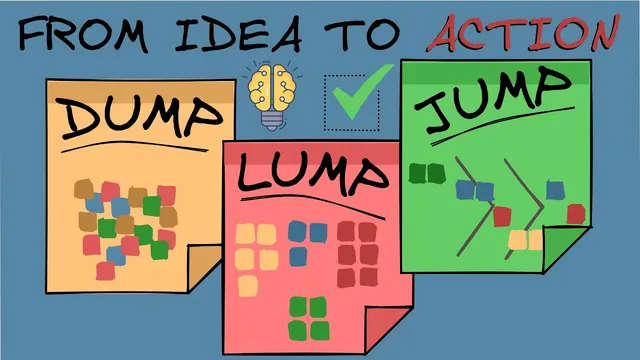
The process starts with “Dump,” which is about externalizing clutter. All relevant thoughts—commitments, questions, concerns, and potential tasks—are captured on paper so they stop competing for attention in the mind. In the Japan trip example, the dump includes items like booking flights, choosing places to visit, arranging accommodation, listing things to do, and tracking unanswered questions and worries. The transcript emphasizes that the method works with many tools—mind mapping apps, Post-it notes, or the Excalibur plugin in Obsidian—because the key is the act of collecting everything in one place, not the specific software.
Next comes “Lump,” where the raw dump gets organized into categories. Ideas are grouped by labeling themes that naturally emerge from the brainstorm, helping the bigger picture come into focus. For the Japan trip, four lumps are created: pre-trip planning, destination planning, culture and customs, and logistics. This clustering step is positioned as the “clarity engine,” turning a chaotic list of thoughts into a structured set of focus areas.
The final step, “Jump,” converts thinking into action by prioritizing tasks. Actions are sorted according to urgency and interdependency—what must happen first and what relies on other steps. The example uses three priority labels: “do now,” “do soon,” and “do later.” Colors are used to mark tasks, but the method also supports adding dates to Post-it notes or arranging notes into a Gantt chart-style schedule. The goal is to identify the most important and urgent next steps that move the project forward.
The takeaway is that “Dump, Lump, Jump” functions as a repeatable reset button: it clears mental noise, organizes ideas into workable themes, and produces a prioritized action plan. With consistent use—described as spanning more than 15 years—the method helps people refocus on priorities and decide what to do next when everything feels equally urgent.
Cornell Notes
Dump, Lump, Jump is a three-step visual thinking workflow for converting messy ideas into prioritized action. First, “Dump” captures everything from the inbox, agenda, desk, or mind onto paper so mental clutter stops blocking progress. Second, “Lump” groups the dumped items into themed categories (e.g., pre-trip planning, destination planning, culture and customs, logistics) to reveal the bigger picture. Third, “Jump” prioritizes tasks by urgency and interdependency using labels like “do now,” “do soon,” and “do later,” optionally adding dates or arranging notes into a Gantt-like schedule. The method matters because it turns vague goals into concrete next steps.
What does “Dump” accomplish, and what kinds of items belong in it?
How does “Lump” turn a brainstorm into usable structure?
What does “Jump” prioritize, and why does interdependency matter?
What are practical ways to represent priorities during “Jump”?
Why is the method described as a refocus tool when goals feel overwhelming?
Review Questions
- If someone only did the “Dump” step, what problems would likely remain, and what would “Lump” add to fix them?
- Give an example of a task dependency you might capture during “Jump.” How would you decide whether it belongs in “do now” or “do soon”?
- How would you group items into “lumps” for a project you’re currently working on, and what criteria would you use to form those categories?
Key Points
- 1
Dump everything relevant from the mind, inbox, agenda, or desk onto paper to stop mental clutter from driving attention.
- 2
Use any tool that supports capture (mind maps, Post-it notes, or Obsidian with the Excalibur plugin), but keep the workflow consistent.
- 3
Create “lumps” by labeling themes that naturally emerge from the dump to reveal the project’s structure.
- 4
Prioritize actions in “Jump” using urgency and interdependency, not just personal preference.
- 5
Use clear priority buckets such as “do now,” “do soon,” and “do later” to decide what happens next.
- 6
Represent priorities visually with colors, dates, or a Gantt chart-like layout to make next steps easy to execute.
- 7
Repeat the cycle whenever goals feel overwhelming to regain focus and produce an actionable plan.