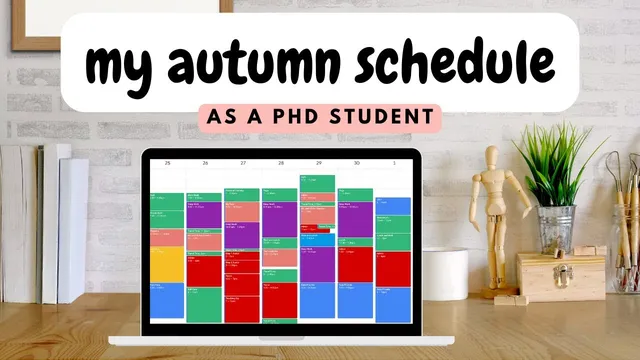
Fall Semester Schedule as a Final Year PhD Student with 4 Jobs - Time Management Tips - Timeblock
Based on Ciara Feely's video on YouTube. If you like this content, support the original creators by watching, liking and subscribing to their content.
Start in Google Calendar by entering fixed commitments first—especially teaching hours and travel—because those constraints are hardest to move.
Briefing
A final-year PhD student juggling four jobs builds an autumn schedule around time blocking—first locking in fixed teaching and travel commitments, then carving out long, uninterrupted “deep work” sessions for thesis research, and finally layering self-care, admin, and personal obligations on top. The core takeaway is that the calendar becomes a system for protecting focus: long blocks are scheduled early because constant task-switching can drain attention, and the schedule is designed to make “good work” fit into a realistic weekly workload.
The planning starts in Google Calendar using time blocking, guided by the deep-work framework popularized by Cal Newport. The student estimates that roughly 60 hours of high-quality work can be achieved in 40 hours when scheduling reduces frequent context switching—since switching tasks can cost about 17 minutes of focus each time. With that in mind, the first step is to enter everything that cannot move: teaching hours (both university-related and business-related), plus travel time for in-person appointments. Travel is treated as productive personal time—walking or bus rides paired with podcasts or reading—rather than a gap for scrolling.
Next comes the “deep work” layer. The calendar is scanned for openings large enough to support multi-hour focus sessions (typically three to four hours). For the upcoming term, deep work is reserved for PhD work only, with the explicit decision to avoid major external projects beyond the doctorate for the foreseeable year. This sequencing matters: once long research blocks are placed, other obligations can be fitted into the remaining “messier” spaces.
After research time is protected, the schedule allocates time for other commitments. Personal care is treated as non-negotiable and scheduled early: meal times, exercise (yoga and gym), rest, and recovery before long workdays. Housework and meal prep are also folded in as a well-being support system. Teaching prep time is added where needed, and drama-school admin is blocked—especially around operational demands like opening two new venues on Fridays and handling coverage needs when other teachers are unavailable.
Time for relationships is built into the remaining evenings, with additional structure driven by family logistics. The student plans monthly trips to Galway to visit a father there, keeping Fridays and Saturdays relatively clear when possible. YouTube and Instagram work is placed last—mostly on Sundays—so filming and editing can be batched, with posts scheduled to publish during travel time. Dog care for Lola is also scheduled about two days per week (Wednesday and Thursday), aligning with days when the student is already at the family home.
The workload is quantified to show feasibility: about 18 hours of deep focused PhD work, roughly 12 hours of university teaching, around 25 hours for the drama school (including teaching and admin), and about four hours for social media—totaling close to 60 hours across four jobs. For day-to-day use, the student doesn’t fully sync everything in Notion; instead, a general weekly guideline is screenshot into Notion, while the actual Google Calendar holds fixed reminders, deadlines, and appointments. Each day starts with the calendar, then the general plan, then task lists—so the system supports both structure and flexibility when unexpected appointments appear.
Cornell Notes
The schedule is built to protect long, uninterrupted research focus while managing four simultaneous roles: final-year PhD work, university teaching, running a Dublin speech and drama school, and social media. Planning begins in Google Calendar by time blocking fixed commitments (teaching hours and travel) and then placing multi-hour “deep work” sessions early, using the deep-work idea that frequent switching can cost focus (about 17 minutes per switch). After research blocks are secured, the calendar absorbs self-care, exercise, meal prep, teaching prep, drama-school admin (including venue openings), relationship time, family travel to Galway, dog care, and batched Sunday content creation. The result is a repeatable weekly system that totals about 60 hours of work across all roles while still leaving room for recovery and personal life.
Why does the schedule start with fixed commitments and deep work blocks rather than filling the calendar randomly?
How does the deep-work concept influence time blocking here?
What counts as “personal time” in this system, and how is it scheduled?
How are drama-school operational demands handled without derailing the PhD calendar?
Why is social media work placed last, and how is it batched?
What’s the day-to-day workflow for using Google Calendar and Notion together?
Review Questions
- How does placing deep work blocks early change the rest of the week’s scheduling options?
- What specific categories of commitments are treated as fixed versus flexible in this system?
- How does the planner use travel time differently than typical “free time” (and what does that enable)?
Key Points
- 1
Start in Google Calendar by entering fixed commitments first—especially teaching hours and travel—because those constraints are hardest to move.
- 2
Place multi-hour deep work blocks (about three to four hours) early to protect thesis research time from fragmentation.
- 3
Reserve deep work for PhD work during the term by avoiding major external projects that would compete for focus.
- 4
Schedule self-care and recovery explicitly (meals, exercise, rest, and pre-long-day downtime) so personal needs don’t get squeezed out.
- 5
Convert operational demands into admin and availability blocks (e.g., drama-school venue openings and coverage windows) to prevent weekly disruption.
- 6
Batch flexible work like social media on Sundays and schedule posts to publish during travel time.
- 7
Use a two-layer system: Notion for a general weekly guideline and Google Calendar for day-specific reminders, deadlines, and appointments.