How I Organize My Notes & Automate Tags In Notion
Based on Red Gregory's video on YouTube. If you like this content, support the original creators by watching, liking and subscribing to their content.
Use an X-Y tagging scheme: X is the focus topic (often formatted with a period), and Y is the drawer umbrella.
Briefing
A simple two-part tagging system—pairing “focus” and “broad” tags with Notion relations—lets notes automatically sort into drawers and order themselves by how strongly they connect to other notes. The method starts with an “X-Y-Z” logic: each note gets an X focus tag (like Time Management), a Y broad drawer (like Productivity), and a set of Z relationships that determine where it lands within that drawer. The payoff is practical: new notes can be filed and prioritized without manual reordering, because the drawer position is driven by relation counts.
In this setup, X tags represent the specific topic inside a larger category. Y tags represent the drawer umbrella. When a note includes an X tag, the corresponding Y drawer is assumed automatically; when a note only fits a broad category (no X tag), it receives only the Y tag. That keeps the system from breaking when notes don’t neatly match a focus label. Once notes are assigned to a drawer, the Z element—implemented via Notion relations—controls ordering. Notes with more relations appear earlier in the drawer; fewer relations sink toward the back. The system even handles ties implicitly by using the relation count as the primary sort key.
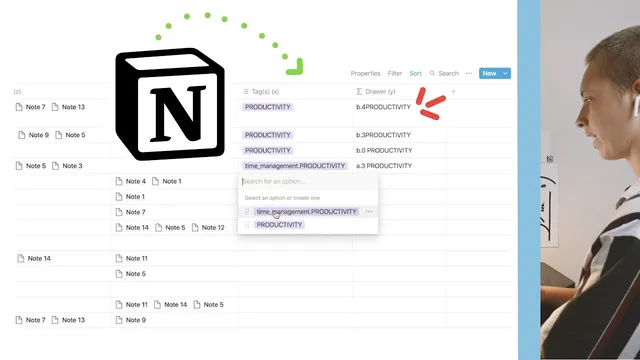
The automation is built with Notion database properties and formulas. Relations are modeled using a parent/child relationship: a “children” relation property is created, set to sync both ways, and renamed to “parent” on the other side. For each note, a multi-select “tags” property stores values like “time management . productivity” (with consistent formatting such as capitalization and punctuation). A formula then extracts the drawer label by parsing the tag string: it detects whether the tag contains a period (signaling an X tag) and whether the note has child relations.
To position notes correctly, the formula outputs a sortable prefix that encodes both drawer type and relation count. For X tags, the output uses an “a” prefix plus the number of related children (e.g., a0, a1, a2…), where the number is computed by counting commas in the relation field and adding one. For broad Y-only tags (no focus tag), the output uses a “b” prefix plus the relation count, but with a key twist: broad tags are forced to sort after focus-tagged notes by using a different prefix scheme (b0, b3, b4, etc.). This ensures that “productivity” broad notes don’t crowd out more specific focus notes.
Finally, the system uses a filtered view per drawer (e.g., Productivity, Diet) and sorts by the computed drawer key in descending order. The result is a repeatable workflow: add tags and relations, and Notion handles both filing into the right drawer and ordering within it based on connection strength—without requiring manual drag-and-drop sorting each time a note is added or linked.
Cornell Notes
The system organizes Notion notes using two layers: tags to assign each note to a drawer (X focus → Y broad) and relations to order notes inside that drawer. X tags are detected by whether the tag contains a period (e.g., “time management . productivity”), while broad Y-only notes get a different sortable prefix. A formula counts how many child relations a note has by counting commas in the relation property and adding one. Filtered database views (like Productivity or Diet) then sort by the computed key so notes with more relations appear earlier, with focus-tagged notes kept ahead of broad-tag notes. This reduces manual sorting and makes the system scale as more notes get linked.
How does the X-Y drawer logic work when a note has a focus tag versus only a broad tag?
What role do Notion relations play in ordering notes inside a drawer?
How does the formula detect whether a tag is an X focus tag or a broad Y-only tag?
How is the number of relations counted inside the formula?
Why use different sortable prefixes like “a” and “b” for focus-tagged versus broad-tagged notes?
How are drawer views created and kept consistent across categories like Productivity and Diet?
Review Questions
- If a note has the tag “nutrition . diet” but no child relations, what drawer key pattern should it produce, and where would it likely appear within the Diet drawer?
- What exact string feature distinguishes an X focus tag from a broad Y-only tag in this system, and how does that affect sorting?
- Why does counting commas (and adding one) work for relation counts in this formula-based approach?
Key Points
- 1
Use an X-Y tagging scheme: X is the focus topic (often formatted with a period), and Y is the drawer umbrella.
- 2
Assign only Y when a note lacks an X focus tag, so every note still lands in a drawer.
- 3
Model connections with Notion relations (parent/child) and treat the number of child relations as the ordering signal.
- 4
Compute a sortable drawer key with formulas that detect periods in tags and count relations by counting commas in the relation field.
- 5
Separate focus-tag notes from broad-tag notes using different sortable prefixes (e.g., “a” vs “b”) so broad notes don’t crowd out specific ones.
- 6
Create filtered views per drawer (Productivity, Diet, etc.) and sort by the computed key in descending order for consistent automatic ordering.