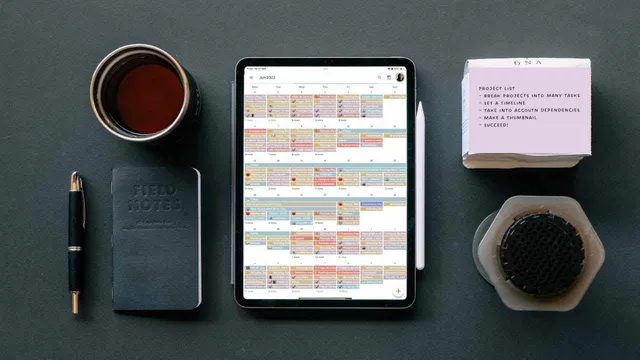
How I Use My Calendar to Manage Projects
Based on Mariana Vieira's video on YouTube. If you like this content, support the original creators by watching, liking and subscribing to their content.
Use one dedicated calendar per project to isolate timelines, simplify sharing, and make progress easy to spot by color.
Briefing
Managing a full project inside a digital calendar can be faster and cheaper than using dedicated project management software—if the calendar is treated like a project system rather than a simple reminder tool. The core approach is a five-step framework built around isolating each project, breaking work into trackable tasks and milestones, and using calendar-friendly metadata (dependencies, buffers, and review cycles) so deadlines don’t arrive as surprises.
The process starts with choosing a calendar that fits the workflow. Google Calendar is positioned as a free option with enough workarounds, while TickTick is offered as an affordable alternative. Comfort matters more than brand loyalty, but the calendar must support the essentials: multiple calendars, reliable reminders, and enough structure to encode project logic.
Next comes the key structural rule: keep one calendar per project. That separation makes it easier to hide overlapping work from other projects, quickly spot the timeline for a single initiative by color, and share the full schedule with collaborators to reduce assignment and milestone misunderstandings. With the right calendar shared, teammates can verify that major milestones and deadlines are recorded correctly.
Scheduling then follows a simple but strict logic: every task gets two dates—one for when it must be completed and another for when work should begin. That dual scheduling prevents the common failure mode of only tracking due dates. Before populating the calendar, the task list should already exist with subtasks, ordered by completion date and numbered so the calendar view itself preserves the project’s sequence. Dependencies are encoded directly in task names using emojis: an arrow marks tasks that depend on earlier completion, while another symbol indicates tasks that can start independently.
Milestones receive special treatment. Approval checkpoints and phase completions (like initial testing sign-offs) are marked with a dedicated milestone symbol so the calendar highlights the moments that advance the project. Beyond milestone breakdowns, the framework insists on support work: buffers between tasks (to absorb delays) and a final buffer at the end of the project. It also calls for recurring weekly or monthly reviews, with more frequent review needed as projects grow more complex.
To make tasks actionable without project management software, each calendar entry should use a reusable description template. The template includes estimated duration, the task objective, dependencies, required resources (tools, software, documents, information), detailed instructions, deliverables, and links or references. Finally, the workflow acknowledges that calendar-only collaboration can still work when task descriptions are rich enough for teammates to act on them.
For people who want to centralize everything, ACU flow is introduced as a productivity hub that consolidates tasks and information from apps like Notion, Slack, email, and meeting tools (including Zoom Trav notifications) into one inbox. The pitch is that fewer context switches reduce the risk of missing tasks scattered across platforms, and tasks can be captured quickly via a command bar and organized with lists and tags—making the calendar framework easier to maintain in practice.
Cornell Notes
The framework treats a digital calendar as a complete project management system by encoding project structure directly into calendar entries. It starts by using one calendar per project, then schedules each task with both a start date and a completion date so work begins on time. Tasks are numbered and broken into subtasks, with dependencies and milestones marked using consistent symbols/emojis to preserve the project’s sequence. A reusable task description template adds duration, objectives, dependencies, resources, deliverables, and references so teammates can act without extra tools. Finally, the plan includes buffers and recurring weekly or monthly reviews to handle delays and keep progress visible.
Why use one calendar per project instead of mixing everything into a single calendar?
What scheduling rule prevents missed task initiation when using only a calendar?
How should tasks be organized so the calendar view preserves project order and dependencies?
What role do milestones and buffers play in the calendar system?
What should a task description template include to make calendar entries usable for a whole team?
How does ACU flow fit into this calendar-based workflow?
Review Questions
- How would you encode a task dependency in a calendar entry so it’s clear what must be completed first?
- What are the consequences of scheduling only task due dates (without separate start dates) in a calendar-based project plan?
- Design a task description template for a project milestone: what fields would you include to ensure deliverables and dependencies are unambiguous?
Key Points
- 1
Use one dedicated calendar per project to isolate timelines, simplify sharing, and make progress easy to spot by color.
- 2
Schedule every task with both a start date and a completion date so reminders trigger initiation, not just deadlines.
- 3
Number tasks and order subtasks by completion date to preserve the project sequence directly in the calendar view.
- 4
Mark dependencies and milestones using consistent symbols/emojis so the calendar communicates project logic at a glance.
- 5
Add buffers between tasks and at the end of the project to absorb delays instead of packing work back-to-back.
- 6
Create weekly or monthly review blocks to evaluate completed work, move tasks forward, and monitor progress based on project complexity.
- 7
Use a reusable task description template (duration, objective, dependencies, resources, instructions, deliverables, and references) so teammates can act without extra tooling.