How I use Notion as a Second Brain
Based on Systematic Mastery's video on YouTube. If you like this content, support the original creators by watching, liking and subscribing to their content.
Use a minimal command center with three task views—open tasks due today, finished tasks, and missed deadlines—to drive daily execution and end-of-day re-planning.
Briefing
Notion is being used less as a sprawling “everything dashboard” and more as a tightly connected system for daily execution, habit feedback, and knowledge capture—so the setup produces clearer decisions and measurable self-improvement. The core idea is a minimal command center that surfaces only what matters today (open tasks, finished work, and missed deadlines), while deeper pages track routines, supplements, training, and long-term projects. That structure matters because it turns information into action: tasks get re-planned when deadlines slip, habits reveal weak spots, and project timelines provide a continuous view of what’s done versus still in progress.
The command center is built around a daily dashboard with “blocks of days” and three task views filtered from a small number of databases. One view lists open tasks due today (unchecked items), another shows finished tasks (checked items), and a third isolates missed deadlines—items with deadlines before today that still aren’t completed. A key implementation detail is that tasks are organized in a database setup that can be pulled across different Notion workspaces (for example, client and personal workspaces), letting the same task structure aggregate work without duplicating the underlying system. The result is a quick scan of what requires attention now, plus an end-of-day mechanism for catching what fell through.
Meeting notes and personal affirmations sit alongside the task dashboard, but the system’s real differentiator is how it feeds back into performance. A dedicated log tracks habits, routine, supplements, and microdosing experiments. The habit tracker is reviewed regularly (notably on Sundays) to identify patterns—such as inconsistent Wim Hof method practice, fasting consistency, and irregular wake times that point to a poor sleep schedule. Performance is then interpreted through subjective energy ratings, which are used to trigger behavior changes like resting more and going to bed earlier.
Supplements and microdosing logs extend that same feedback loop by linking what’s taken to how it affects mood, focus, and energy. Coffee is tracked as a “demon” because the system captures the tradeoff: sharpness and a rush versus jittery downsides, with the implication that consumption should be reduced when the data suggests it. Microdosing tracking is framed as a short-term experiment to find an optimal psilocybin dose by correlating dose with outcomes.
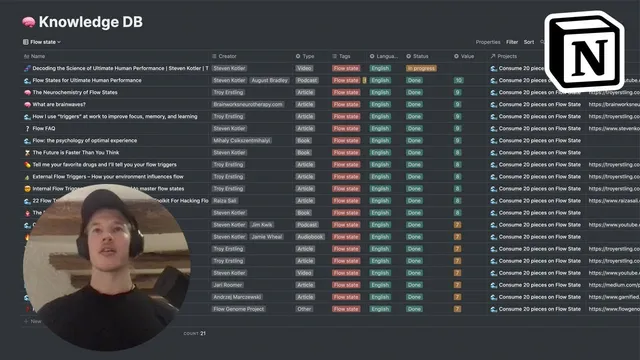
For long-range planning and learning, the setup uses Notion’s timeline view to visualize projects across the year, and it organizes knowledge through a relational knowledge database. Notes, articles, videos, and podcast materials are filtered into topic-specific views (like flow states) so the user can maintain an overview that typical platforms (such as YouTube) don’t provide. Projects are managed using PARA (Projects, Areas, Resources, Archive), where projects have deadlines and goals, areas are ongoing focuses, and tasks are linked to projects so the same database can power both task execution and timeline roadmaps.
Finally, a “Synthesize”/custom linking workflow (Zettelkasten-style) connects previously unlinked ideas using backlinks, producing new insights—illustrated by linking flow-related claims to broader arguments about consciousness. Overall, the system’s strength comes from disciplined minimalism at the front end and structured relationships behind it, turning notes into decisions, and decisions into better habits and progress.
Cornell Notes
The setup uses Notion as a second brain by combining a minimal daily command center with deeper tracking and relational knowledge management. Daily execution is driven by task views for open items, completed work, and missed deadlines, all filtered from a small number of databases and even pulled across multiple workspaces. Habit, supplement, and microdosing logs create a feedback loop by connecting behaviors to subjective energy, mood, and focus, with weekly reviews to decide what to change. Long-term clarity comes from timeline views for projects and a knowledge database organized with topic filters and PARA-style project/area/resource structure. A Zettelkasten-style linking workflow then turns stored ideas into new insights through backlinks.
How does the command center prevent information overload while still keeping work organized?
What role do cross-workspace database pulls play in the system?
How does the habit and performance log turn tracking into behavior change?
What’s the purpose of tracking supplements and microdosing in the same system?
How does the knowledge database support long-term learning and topic mastery?
How does PARA and timeline visualization connect projects to tasks?
Review Questions
- Which three task views in the command center help catch both current work and past slips, and what filters distinguish them?
- How does the system use weekly review of habit/performance data to decide what to change next?
- What mechanisms connect knowledge notes to projects so learning feeds into concrete deliverables?
Key Points
- 1
Use a minimal command center with three task views—open tasks due today, finished tasks, and missed deadlines—to drive daily execution and end-of-day re-planning.
- 2
Store tasks in one or two databases and generate multiple views through filters rather than building many separate dashboards.
- 3
Aggregate work across multiple Notion workspaces by pulling databases into a personal workspace hub without duplicating the system.
- 4
Track habits, sleep patterns, supplements, and microdosing with the explicit goal of linking behaviors to outcomes like energy, mood, and focus.
- 5
Review logs on a regular cadence (notably Sundays) to identify patterns and trigger concrete changes such as earlier bedtime or reduced coffee.
- 6
Plan long-term work with PARA (Projects, Areas, Resources, Archive) and use timeline views to visualize what’s done versus still in progress.
- 7
Turn stored knowledge into new insights by linking previously unconnected ideas using backlinks in a Zettelkasten-style workflow.