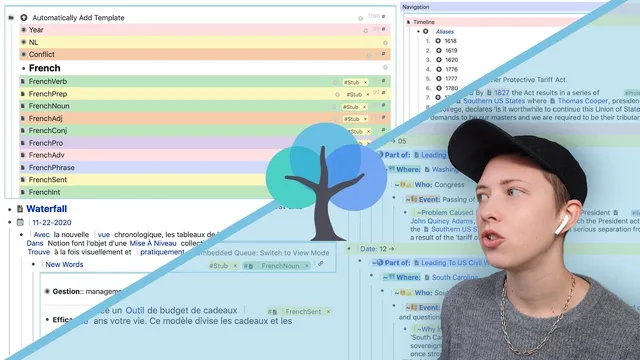
How I Use RemNote (2021): The New Alias Feature And Other Tips
Based on Red Gregory's video on YouTube. If you like this content, support the original creators by watching, liking and subscribing to their content.
Use a “word bank” page with part-of-speech tags to store known vocabulary, then rely on portals to create filtered, clickable views (e.g., only “French verb” entries).
Briefing
RemNote can function as more than a flashcard app: it can run as a structured knowledge base for language learning and historical timelines by combining portals, templates, aliases, and (optionally) spaced-repetition queues. The core workflow pairs a “word bank” for known vocabulary with a separate capture area for new words, then routes those new items into flashcard review—so translation practice stays fast without forcing every new term into the same system.
For translation, the setup starts with a main “word bank” page containing a long, lightly organized list of French words. Each entry includes the French term, its English meaning, and a part-of-speech tag (adverb, verb, adjective, noun). Portals act as dynamic views: a portal can be created from an “automatically add template” page, then filtered using nested hashtags (for example, showing only instances of “French verb” within the “word bank”). This lets the user jump from a translation sentence to the exact vocabulary items already stored.
Translation practice then becomes a two-track process. When a sentence contains words already in the word bank, clicking a linked word creates a portal to that entry. For words that don’t exist yet, the workflow creates a new rem (using hashtags and templates) and places the new term into a “new words” area that feeds a spaced-repetition flashcard queue. The method relies on templates that auto-generate slots: a parent rem tagged to trigger “automatically add template” can include a child slot named “new words,” and that slot can itself contain portals for translation and part-of-speech tagging. The result is a quick loop: translate a sentence, link known words, capture unknown words, and immediately queue them for review.
The second workflow uses RemNote’s Pro-only “alias” feature to build timelines. Aliases collect related pages—like years—into a sortable, navigable sequence. The timeline structure is driven by portals and tags: years are aliased so they appear in order, and each year can be searched to reveal associated “date part,” “who,” and “event” information, with notes nested underneath. Broader time periods (centuries) are organized as headings, with years nested beneath them, and navigation arrows (aliases) link adjacent eras.
Aliases also connect timeline entities to other knowledge areas. Locations in an “atlas” page can be aliased into the timeline’s “where” field, and people in a “who’s who” page can be aliased into the timeline’s “who” field. When creating a new event, the workflow uses templates and prebuilt slot sets (such as a “history” rem with 24 descriptor slots) to standardize notes like “why it’s interesting,” “argument for,” “doesn’t work if,” and “best sources.” Sources can be inserted via quick search shortcuts that jump to Wikipedia pages.
Pricing is addressed directly: the Pro plan’s $6/month cost is framed as appropriate for the value gained from alias-driven navigation and template/portal automation, with the speaker suggesting it could even be higher (8–10) while still being justified. The overall message is that RemNote’s combination of portals, templates, and aliases can replace multiple tools—turning translation practice and historical research into one interconnected system.
Cornell Notes
RemNote can be used as a traditional knowledge base by combining portals, templates, and aliases—without abandoning flashcards entirely. For language learning, a “word bank” stores known vocabulary with part-of-speech tags, while unknown words are captured into a “new words” area that routes into the spaced-repetition queue. Portals then provide filtered, clickable views (e.g., showing only “French verb” entries inside the word bank) so translation stays fast. For history, the Pro-only alias feature links years, locations, and people across pages, letting timelines sort and navigate through nested events. Standardized note slots (like a “history” rem with descriptor slots) keep event writing consistent and searchable.
How does the “word bank + portals” setup speed up translation practice?
What’s the difference between handling known words and unknown words during translation?
How do templates and slots make capturing new vocabulary faster?
What does the alias feature change for building timelines?
How does the timeline event-writing workflow stay consistent across different events?
Why are portals used inside the timeline, not just in the translation workflow?
Review Questions
- When translating, what triggers the creation of a new vocabulary item, and how is that item routed into review?
- How do portals and nested hashtags work together to filter results inside the word bank?
- What role do aliases play in linking years, locations, and people across the timeline, atlas, and who’s who pages?
Key Points
- 1
Use a “word bank” page with part-of-speech tags to store known vocabulary, then rely on portals to create filtered, clickable views (e.g., only “French verb” entries).
- 2
Handle unknown translation words by creating new rems via templates that populate a “new words” slot and send them into the spaced repetition flashcard queue.
- 3
Build translation capture speed with “automatically add template” and slot-based structure, so new terms don’t require manual layout every time.
- 4
For timelines, use the Pro-only alias feature to link years and keep them sortable in a continuous sequence.
- 5
Connect timeline fields to other knowledge areas by aliasing locations from an “atlas” page and people from a “who’s who” page into event pages.
- 6
Standardize event notes with a “history” rem that contains many descriptor slots, then insert it into new events to keep writing consistent.
- 7
Pro pricing at $6/month is treated as justified by the added navigation and automation value from aliases and template-driven workflows.