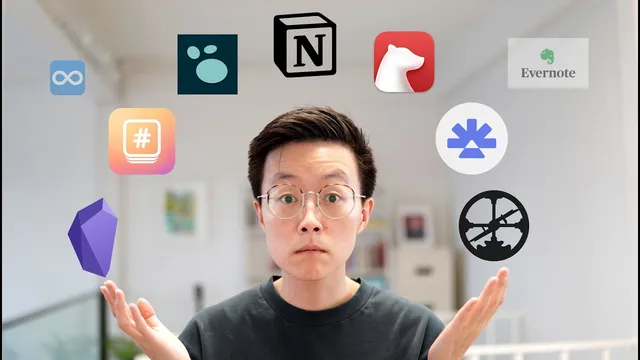
How to choose a Zettelkasten application?
Based on Darin Suthapong's video on YouTube. If you like this content, support the original creators by watching, liking and subscribing to their content.
A Zettelkasten app should prioritize two capabilities: creating notes and linking notes together.
Briefing
Choosing a Zettelkasten app comes down to matching the tool to how someone wants to create notes and connect ideas. The “perfect” app is the one that makes it easy to (1) write notes and (2) link notes together—extra features can help, but they aren’t required. From there, speed and responsiveness matter, along with whether the app works on the user’s devices (iOS, Android, macOS, Windows). The transcript also flags format as a practical divider: some apps behave like documents (node-style text), while others are outliners built on collapsible bullet hierarchies. Ownership is another make-or-break factor for long-term personal knowledge management—users should know whether notes live locally or in the cloud. Finally, extendability (plugins/customization) and price determine whether the system can grow with the user.
With those criteria set, the recommendations sort into a few clear buckets. For an all-around choice, Obsidian stands out as fast, free, cross-platform, and centered on owning one’s notes. It supports linking, basic outlining, and deep customization through plugins. The main caveat is usability for people who aren’t comfortable with more technical setups; it can feel difficult even with learning resources available.
For users who want simplicity—especially those fully inside Apple’s ecosystem—the recommendation shifts to Bear. Bear is positioned as beautiful and straightforward, with note linking described as stronger than Obsidian’s. It’s free to start and inexpensive if payment is required, but it offers limited customization beyond the interface.
For those outside Apple’s ecosystem, the transcript points to Hypernotes (described as relatively new). It’s framed as fast, simple, cross-platform, free to begin, and strong on linking with an “awesome graph view.” The tradeoff is practical: fewer community resources because it’s not widely adopted yet. Notion is offered as a popular alternative with abundant tutorials for Zettelkasten and “second brain” workflows, but it’s criticized for sluggish note creation and loading at times.
Students get a different emphasis: active recall and repetition. RemNote is recommended for its flashcard features (including single- and double-sided cards) and built-in support for spaced repetition. The transcript notes that RemNote was previously missing an app and had some bugginess, but it’s still presented as promising for learners.
For “casual” personal knowledge management—lifelong learners balancing work and self-development—the guidance is to choose based on writing style. Obsidian fits users who want to move between paragraphs and bullets, while Logseq is suggested for those who mainly outline. The transcript cautions against switching constantly between Obsidian and Logseq; it recommends picking a primary app and using the other only as a supplement.
For people willing to pay and experiment, Rome Research is recommended for serious personal knowledge management, especially for researchers and non-fiction writers. Rome is praised for block referencing that surpasses Obsidian, plus built-in features aimed at academic workflows, with a stated cost of $15 per month justified for full-time use.
The closing advice is pragmatic: avoid over-optimizing. Start with a tool, test it, and switch later if it doesn’t fit—because the system only works if notes and links actually get created and maintained.
Cornell Notes
A Zettelkasten app’s “must-haves” are simple: it needs to let users create notes and link notes together. After that, the best fit depends on speed, device availability, note format (document-style vs outliner), ownership (local vs cloud), extendability (plugins/customization), and price. Obsidian is recommended as the all-around option for fast, cross-platform use with strong linking and plugin support, though it can be harder for non-technical users. Bear is suggested for Apple users who want a clean, simple experience with strong linking. For students, RemNote is highlighted for flashcards and active recall, while Rome Research is positioned for serious academic workflows with advanced block referencing.
What two capabilities define whether an app is suitable for Zettelkasten?
How do speed, availability, and ownership affect long-term knowledge management?
Why does the transcript separate “node/document” apps from “outliner” apps?
What’s the recommended path for different user types (student vs lifelong learner vs researcher)?
What tradeoffs separate Obsidian, Bear, Hypernotes, and Notion?
Why does the transcript warn against switching between Obsidian and Logseq constantly?
Review Questions
- Which criteria beyond note creation and linking most influence the app choice in the transcript (name at least three)?
- How do the transcript’s recommendations differ between a student’s needs and a researcher’s needs?
- What are the practical reasons the transcript gives for preferring one primary app over switching between Obsidian and Logseq?
Key Points
- 1
A Zettelkasten app should prioritize two capabilities: creating notes and linking notes together.
- 2
Speed, device availability, and note ownership (local vs cloud control) are critical for a usable long-term system.
- 3
Choose note format intentionally: document-style nodes support text-first workflows, while outliners support hierarchical bullet structures.
- 4
Obsidian is the all-around recommendation for fast, cross-platform use with strong linking, ownership, and plugin-based extendability.
- 5
Bear is recommended for Apple users who want simplicity and strong linking, with limited customization.
- 6
RemNote is positioned as a strong student option because flashcards support active recall and spaced repetition.
- 7
Rome Research is recommended for serious academic workflows due to advanced block referencing and built-in features, at a stated $15/month cost.