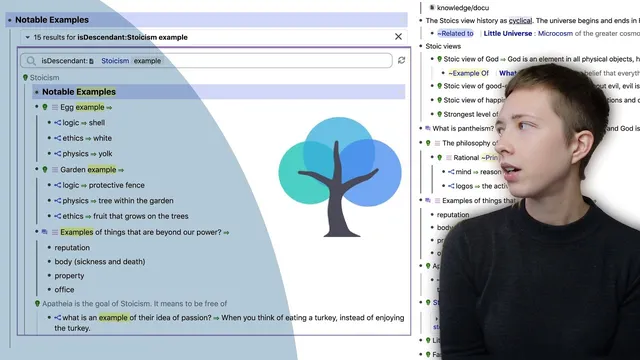
How To Connect Ideas In RemNote (Portals, Universal Descriptors, etc.)
Based on Red Gregory's video on YouTube. If you like this content, support the original creators by watching, liking and subscribing to their content.
Linking a frequently used phrase creates a dedicated page with automatic backlinks, turning repeated text into a navigable knowledge cluster.
Briefing
RemNote’s “portals” and “universal descriptors” are presented as a practical system for turning a flat list of notes into a connected knowledge base—so retrieval becomes automatic and relationships between ideas stay visible. The core workflow starts with linking key phrases to dedicated pages (so repeated terms become navigable groupings), then uses search portals to surface all matching instances inside a section, and finally relies on universal descriptors (built-in templates) to standardize common research patterns like “answer,” “example,” “related to,” and “reminds me of.” The payoff is deeper understanding through structure: related concepts cluster naturally, contradictions become easier to spot, and the system reduces the need for manual organization.
The walkthrough begins with a Stoicism notes page that’s essentially a “waterfall” of bullet points—no tags, no references, no portals. The first step is creating explicit links. A phrase like “Roman empire” is highlighted and converted into its own RemNote page, producing backlinks that automatically list where the phrase appears. That same phrase can also be turned into a hashtag page (e.g., “#place” and then a more specific “#empire”), giving another layer of grouping that doesn’t require folders.
Next comes the search portal. A “notable examples” section is built at the top of a page, and a search portal is added so that every instance of a term (like “example”) within that page is pulled into the portal automatically. This is paired with more linking: Zeno’s name becomes its own page, and a portal is embedded inside Zeno’s page to show a specific child rem (copied as “rem as portal”). Hashtags like “#person” and “#philosopher” further create workspace-wide retrieval: clicking the hashtag page or using it in text makes every occurrence appear in one place.
Universal descriptors function like reusable templates for recurring note roles. Instead of repeatedly typing the same labels (e.g., “result,” “abstract,” “answer,” “opinion”), the system uses prebuilt descriptor rems that behave like normal rems: clicking them reveals all instances across the workspace. The transcript emphasizes how this supports connection-building. For example, inside a “knowledge” child rem, the user searches for the universal descriptor “reminds me of” to link to a prior note, then creates a portal that embeds the relevant children. Portals are treated as editable windows into other notes—expandable up the parent chain (e.g., from a specific effect to the Dunning–Kruger effect) and able to show attached media.
Finally, the method extends to faster discovery. Highlighting a word can enable automatic searching so every instance of that term appears in relevant views, and universal descriptors like “answer” and “related to” are used to connect new child rems to existing concepts (including showing full context for definitions). The workflow is intentionally “in the moment”: connections, portals, and descriptors are created as notes are written, because revisiting later is unlikely. A small customization tip closes the loop: custom CSS blocks can remove the default blue highlight on search portal results, making the interface feel less visually noisy. The overall message is that RemNote’s linking, portals, and descriptor templates together create a retrieval-first structure that turns scattered notes into an interconnected system.
Cornell Notes
RemNote’s linking, portals, and universal descriptors are used to convert a flat list of notes into a connected knowledge base. Linking a phrase (like “Roman empire”) creates a dedicated page with backlinks, so repeated mentions automatically aggregate in one place. Search portals then pull all instances of a term (like “example”) into a section, acting as a live window into matching notes. Universal descriptors work as reusable templates (e.g., “answer,” “related to,” “reminds me of,” “example”), and clicking them reveals every place they’re used across the workspace. This matters because it makes retrieval and relationship-building feel automatic, reducing manual organization and improving understanding through structure.
How does linking a phrase like “Roman empire” change how information is retrieved later?
What’s the difference between a normal link and a search portal in RemNote?
How do portals help embed context without copying static text?
What problem do universal descriptors solve compared with repeatedly typing labels?
Why does the transcript emphasize creating connections “in the moment” rather than later?
How can the default blue highlight on search portal results be customized?
Review Questions
- When should a search portal be used instead of a normal link, and what does each one retrieve?
- How do universal descriptors like “answer” and “related to” change the way you navigate a workspace compared with manual tagging?
- What does it mean that portals are editable, and how could that affect note-taking accuracy?
Key Points
- 1
Linking a frequently used phrase creates a dedicated page with automatic backlinks, turning repeated text into a navigable knowledge cluster.
- 2
Hashtags in RemNote function like rems/pages themselves, enabling workspace-wide retrieval without relying on folders.
- 3
Search portals provide live, term-based aggregation inside a page, such as collecting every “example” under a “notable examples” section.
- 4
Portals embed content as editable windows into other notes, including expandable parent/child context and attached media.
- 5
Universal descriptors act as reusable templates for common note roles (e.g., “answer,” “example,” “related to,” “reminds me of”), and clicking them reveals all uses across the workspace.
- 6
Building connections while writing notes is emphasized as a reliability strategy, since later cleanup is unlikely to happen.
- 7
Custom CSS can remove or restyle the default blue highlight on search portal results to reduce visual noise.