How to Organize Your Content in Capacities Part I – Tags and Collections
Based on Capacities's video on YouTube. If you like this content, support the original creators by watching, liking and subscribing to their content.
Collections create subgroups within a single object type and appear under that object type in the left sidebar.
Briefing
Collections in Capacities create focused subgroups inside a single object type—useful for “who/what belongs together” views—while tags act as cross-object labels that let related content surface regardless of type. The practical payoff is that content stays searchable and relevant as a workspace grows, without forcing rigid silos.
The walkthrough starts with collections using the People object type. Instead of creating separate object types for every interest or occupation (musicians, scientists, directors, writers), a collection lets users group those entries under one existing type. When a user opens a person record, a Collections button provides access to collection membership for that object type. Creating a “musician” collection, for example, makes it appear in the left sidebar under People, where it can be opened like a folder. The key structural point: collections are always nested under an object type, so they function like drill-down filters for a specific category of objects.
A major misconception addressed is that objects must belong to only one collection. Capacities is designed to avoid that kind of rigid folder behavior. A single person can be added to multiple collections when it’s meaningful—Brian May can be listed as both a musician and a scientist—so the same object can appear in multiple relevant views. This keeps organization from becoming a barrier to working and instead makes content show up where it matters.
The transcript also highlights an AI-assisted workflow for both collections and tags (for users on the Pro Plan with AI enabled). An AI button can assign the most appropriate collections or tags by using the object’s context—name properties and notes—to reduce manual sorting. Users can still review and adjust, but the system helps “outsource” some of the categorization thinking.
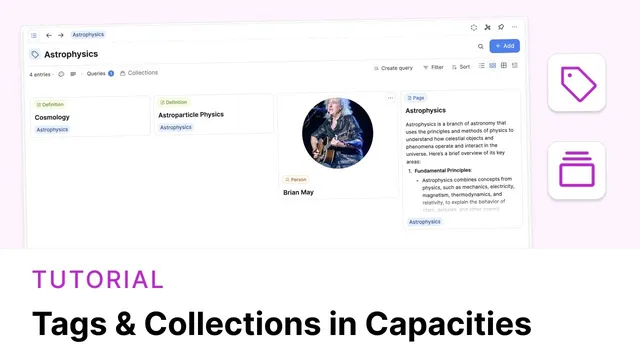
Tags are introduced as the counterpart that unites content across object types. Using Brian May again, the example shifts from grouping people to building a topic view. A user can create a tag like “astrophysics” and assign it to Brian May’s person record, then add related Pages (such as an AI-generated introduction appended to an astrophysics note). Unlike collections, tags provide a single view that can include multiple object types at once. The tag page supports filtering and sorting and includes an add button to quickly attach more related objects.
As the workspace expands, the tag view can keep growing across types—for instance, creating a Definitions object type and linking new learned terms back to the astrophysics tag. The transcript frames the core difference this way: collections drill down within one object type, while tags “go the other way,” surfacing anything connected to the tag name regardless of what type it belongs to. Together, the two mechanisms create a flexible, scalable organization system for both themes and structured subgroups.
Cornell Notes
Collections in Capacities are nested under a single object type and work like subgroup views—for example, grouping People into “musicians” or “scientists.” Objects can belong to multiple collections, so someone like Brian May can appear in more than one view without forcing rigid silos. Tags, by contrast, span object types: a tag like “astrophysics” can include a person record and related pages under one unified view. With AI enabled, an AI button can suggest appropriate collections or tags using the object’s context (name properties and notes), speeding up organization while still allowing review. This combination supports both drill-down organization (collections) and cross-type thematic browsing (tags).
How do collections differ from creating new object types for every interest or occupation?
Why can one object appear in multiple collections, and what does that prevent?
What does AI do for collections and tags when it’s enabled?
How do tags unite content across object types in a way collections cannot?
What’s the practical workflow for building a growing tag-based knowledge hub?
Review Questions
- When should a user choose a collection instead of a tag, and what structural limitation drives that choice?
- Give an example of how one person could be organized using collections without losing cross-topic visibility.
- How does AI-assisted assignment change the day-to-day effort of organizing collections and tags?
Key Points
- 1
Collections create subgroups within a single object type and appear under that object type in the left sidebar.
- 2
Objects can belong to multiple collections, enabling overlapping categories without rigid silos.
- 3
AI-assisted assignment can suggest collections or tags using object context such as name properties and notes (when AI is enabled).
- 4
Tags provide cross-object-type views, letting a single tag page combine related content from different object types.
- 5
Use collections for drill-down organization (e.g., “musicians” within People) and tags for thematic or topic organization (e.g., “astrophysics” across People and Pages).
- 6
A tag-based hub can grow over time by adding new related objects and even new object types while keeping the same thematic label.