How to organize your daily notes
Based on Reflect Notes's video on YouTube. If you like this content, support the original creators by watching, liking and subscribing to their content.
Treat each daily note as a “home base” that centralizes tasks, outcomes, and saved inputs for that day.
Briefing
Daily notes work best when they function as a “home base” for everything a person needs to think, track, and revisit each day—then stay tidy through consistent structure. The core setup is a dedicated note per day, organized like a calendar-and-notebook hybrid, where lists, saved content, and quick capture all land in one place. Without guardrails, that same convenience turns into clutter; the organizing method relies on divider lines, nested bullets, and backlinks so information stays searchable instead of buried.
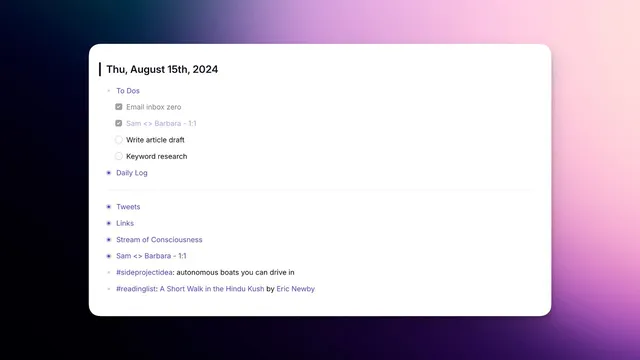
The most important structural choice is splitting the daily note into sections that match how work actually changes across a day. One top section holds a to-do list and a daily log, separated by a divider line. The to-do list records what needs to happen; the daily log records what actually happened. Keeping both helps highlight mismatches—tasks that didn’t get done and outcomes that weren’t planned—so the next day starts with clearer context rather than vague memory. Each nested bullet under these sections is also backlinked, letting the user pull up related days and content quickly. The method even supports evergreen material: backlinks can aggregate recurring context, goals, or background information into the right place.
Task management inside the to-do list is handled with a practical rule: tasks that must be done daily (like working toward “email inbox zero”) shouldn’t automatically roll over if missed, because that creates duplicates. In contrast, longer projects—such as drafting an article or doing keyword research—become tasks that can appear in a separate task manager view. This keeps the daily note focused on what’s happening now while still feeding a broader system for execution.
The daily note also becomes a capture hub for “inputs” that would otherwise scatter across apps. Tweets can be saved automatically via a Chrome extension that inserts them into the daily note as backlinked items, placed under the divider line and collapsed for quick scanning. Links to articles work the same way: clicking the Reflect icon on a webpage creates a backlinked note tied to the daily entry, again designed to be expandable without leaving the workspace. Audio memos add another layer for meetings and spontaneous thoughts; recorded audio appears as an audio note block that can later be organized using an AI assistant prompt. After organizing, the user can replace the raw transcript with a cleaner, structured version and optionally remove the audio-note tag.
Finally, tags provide the missing layer for fleeting ideas. Instead of letting quick thoughts live only inside a single day, the method adds tag line items (for example, “idea” tags tied to side projects, article concepts, or reading lists). Clicking a tag surfaces all notes containing it, turning daily capture into a searchable knowledge trail rather than a one-day log.
Cornell Notes
Daily notes are most useful when they act as a “home base” for both action and reflection: a dedicated note per day that holds tasks, outcomes, and saved inputs. The organization strategy uses divider lines to separate a to-do list from a daily log, nested bullets to keep sections readable, and backlinks so each item can be aggregated and revisited across days. To prevent clutter, daily tasks that should not duplicate are handled differently from longer projects that feed a task manager. Saved content (tweets, links) and audio memos are captured via a Chrome extension and recording tools, then collapsed for quick scanning. Tags add a cross-day index for fleeting ideas like side-project concepts or reading lists.
Why keep both a to-do list and a daily log in the same daily note?
How do divider lines and nested bullets prevent daily notes from becoming chaotic?
What’s the practical difference between daily recurring tasks and longer project tasks?
How do backlinks and backlinked titles improve retrieval across days?
How are tweets, links, and audio memos integrated into the daily note workflow?
Why add tags to daily notes, and what kinds of tags are useful?
Review Questions
- If a task is missed one day, how should it be handled differently when it’s a daily recurring task versus a longer project task?
- Describe how divider lines, nested bullets, and collapsing work together to keep a daily note readable while still storing lots of detail.
- How do tags complement backlinks in making daily notes searchable across time?
Key Points
- 1
Treat each daily note as a “home base” that centralizes tasks, outcomes, and saved inputs for that day.
- 2
Use divider lines to separate a to-do list from a daily log so planning and results stay distinct.
- 3
Keep sections tidy with nested bullets and collapse them for fast scanning.
- 4
Backlink key sections and items so related days and evergreen context can be retrieved without manual searching.
- 5
Handle daily recurring tasks differently from longer projects to avoid duplicate carryover in the to-do list.
- 6
Capture external inputs (tweets, links, audio memos) via the Chrome extension and recording tools, then keep them organized with collapsible blocks.
- 7
Add tags for fleeting ideas so cross-day retrieval works for side projects, article concepts, and reading lists.