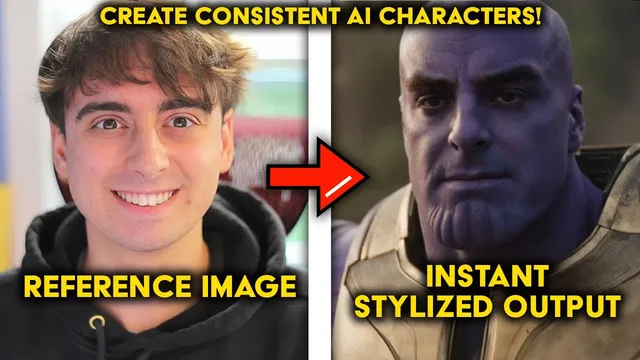
Instantly Put Yourself In AI Art! FREE & Open Source!
Based on MattVidPro's video on YouTube. If you like this content, support the original creators by watching, liking and subscribing to their content.
Photomaker customizes Stable Diffusion outputs to a specific identity using stacked ID embedding, enabling near-instant character generation without training.
Briefing
Photomaker is an open-source system that customizes Stable Diffusion outputs to match a specific person (or character) from a single uploaded reference image—effectively creating a “custom model” on the fly without the time and compute costs of traditional training. The practical payoff is speed and consistency: upload one photo, then generate new images where the same face and identity appear in new scenes, costumes, and styles. In demos, a single reference image can be transformed into “Instagram-ready” results in seconds, including high-fidelity scenarios like putting a person into Iron Man armor, Game of Thrones settings, or even a Marvel Thanos look.
The core mechanism is “stacked ID embedding,” a technique that injects identity information into the generation process so the model behaves as if it has been tailored to the uploaded subject. That matters because it sidesteps the usual workflow for character consistency—collecting many photos, training or fine-tuning a model, and waiting for results. Instead, Photomaker uses a simple trigger in prompts (the short prefix “IMG” tied to the uploaded image) and then relies on Stable Diffusion prompting plus adjustable settings to steer the output. Users can also choose templates (including a “photographic” default and stylized options) and tune parameters such as style strength, guidance scale, and the number of sampling steps.
Demos show both strengths and limits. Using more reference images (10 versus 1) can improve realism, but the system still depends on prompt quality; adding details like glasses can help a “Harry Potter to Joker” transformation land facial features more accurately. For custom characters generated elsewhere (e.g., a “Lemon ninja” created in Bing Image Creator), Photomaker preserves a consistent face shape across different prompts, though clothing consistency remains harder—suggesting that identity transfer is stronger than full outfit/style locking.
Photomaker’s behavior also shifts when the subject isn’t human. Tests with a dog produce results that resemble the animal’s face, but stylization and “style strength” can behave differently than expected—style strength appears tied to the selected style template rather than strengthening the uploaded subject itself. A separate “Photomaker style” Gradio demo is mentioned as potentially more effective for non-human stylization, but access can be blocked by GPU availability on Hugging Face Spaces.
Finally, the project’s open-source nature is positioned as a major enabler: it can be run locally, integrated into tools like ComfyUI, and potentially adapted to other diffusion models beyond Stable Diffusion. The transcript also highlights a practical friction point—running the Spaces demo may require a Hugging Face account and a token for model weights—while the project page offers additional examples, including public figures rendered in space or historical “bring-back” concepts like age and gender changes. Overall, Photomaker is presented as a meaningful shortcut for custom AI character creation, trading training time for prompt-driven, identity-anchored generation.
Cornell Notes
Photomaker is an open-source method for customizing Stable Diffusion outputs to match a person’s identity from a single uploaded image. It uses stacked ID embedding to inject identity information so the same face can appear across new prompts and scenes without training a new model. Demos show fast results—often in seconds—and strong identity preservation for humans, with improvements possible when using more reference images. Results still depend on prompt details, and clothing or full character consistency can be harder than face consistency. Non-human subjects can work, but stylization behavior and access to the “Photomaker style” demo may vary due to template settings and GPU availability on Hugging Face Spaces.
How does Photomaker achieve “instant” character customization without training?
Why does using more reference images sometimes improve results?
What role do templates and parameters like style strength play?
How reliable is Photomaker for non-human subjects like pets?
What limitations remain even when identity transfer works well?
Review Questions
- What does the “IMG” prefix do in Photomaker prompts, and why is it central to identity transfer?
- In the transcript’s comparisons, how did using 10 reference images change outcomes versus using 1 image?
- Why might clothing consistency be harder than face consistency when using Photomaker for custom characters?
Key Points
- 1
Photomaker customizes Stable Diffusion outputs to a specific identity using stacked ID embedding, enabling near-instant character generation without training.
- 2
A single uploaded reference image can be enough to anchor a face across new prompts, with results often appearing within seconds.
- 3
The prompt workflow uses the “IMG” prefix tied to the uploaded image to trigger identity conditioning.
- 4
Templates (e.g., photographic and stylized options) and parameters like style strength, guidance scale, and sampling steps influence output appearance, but style strength is linked to the style template rather than strengthening the uploaded subject.
- 5
More reference images (e.g., 10 vs. 1) can improve realism and identity alignment, but prompt quality still strongly affects final results.
- 6
Non-human subjects can work but may require different handling; stylization behavior and demo availability can vary due to GPU limits on Hugging Face Spaces.
- 7
Open-source availability supports local installs and potential integration into tools like ComfyUI, with the transcript noting a token requirement for some Hugging Face Spaces usage.