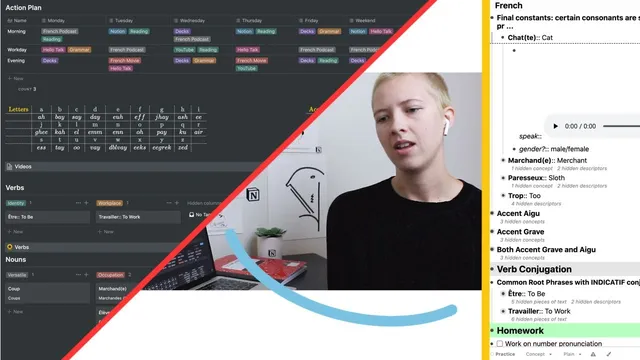
Language Learning: Notion, RemNote And Reverso (French)
Based on Red Gregory's video on YouTube. If you like this content, support the original creators by watching, liking and subscribing to their content.
Use RemNote as the drill engine: convert words and sentences into flashcards with prompts and audio, then practice via tagged decks.
Briefing
Learning French on a budget becomes far more manageable when the workflow is split into two complementary systems: RemNote for flashcards and conjugation practice, and Notion for organizing vocabulary and dissecting sentences. The core idea is to treat language study like a structured knowledge base—collect words and examples in one place, then repeatedly drill the parts that matter (pronunciation, gender, and verb forms) while using context to understand how sentences work.
The plan starts with a “first few weeks” routine built around sentence work. Learners focus on dissecting sentences from reading and viewing, memorizing vocabulary, tracking grammar rules, and practicing conjugations. Instead of translating everything, the routine emphasizes reading for context clues. Homework is organized week-by-week: pronunciation (especially tricky sounds), vocabulary decks, and “four-plus verb conjugations” per sentence set—finding verbs and conjugating at least four forms as the grammar target.
RemNote is set up like a wiki library for French notes, but with an Anki-like flashcard layer. Words and phrases are turned into cards with audio and prompts. For nouns, cards include gender questions and speech prompts; for adjectives and adverbs, cards add example sentences and alternative meanings; for verbs, cards use templates that pre-create conjugation slots across moods and tenses (indicative, subjunctive, conditional). Audio clips are pulled from Reverso by using its speak/context features and, when needed, extracting media links via browser “inspect network” to embed or reference pronunciation audio inside cards. Cards are tagged heavily—nouns, verbs, adjectives, adverbs—then further categorized by semantic buckets like identity, versatile, animal, weather, workplace, and more, so practice can be filtered by deck.
Notion functions as the reference layer and the “sentence dissection” workspace. After daily RemNote study, the learner transfers the day’s items into Notion tables: verbs, adjectives, adverbs, nouns, and sentences. Each database entry stores structured fields such as definitions, alternatives, gender, plural status, synonyms/antonyms, and example sentences. Filters keep the dashboard from becoming overwhelming by showing only items created today or within the past week. The sentences database is where the method sharpens: each saved sentence is tagged by sentence type, then broken down into verbs (and their conjugations), nouns, adjectives, adverbs, and subject identification.
Immersion is handled pragmatically through tools rather than full quarantine travel. Morning work includes listening to French podcasts (Coffee Break French is named) and seeking additional options. During the day, HelloTalk provides conversation practice with native speakers, with mutual corrections in English and French. For reading, short news headlines and articles are clipped and saved for sentence analysis—because their brevity and straightforward style make beginners’ sentence dissection more feasible.
Overall, the system is designed to evolve: RemNote stays the engine for memorization and conjugation drills, while Notion becomes the growing map of how words connect inside real sentences. The workflow is shared as a starting point for beginners—explicitly not presented as finished or universally “factual,” but as a practical template for building a personal French learning knowledge base.
Cornell Notes
The workflow for learning French blends two tools: RemNote for flashcards and verb conjugation practice, and Notion for organizing vocabulary and dissecting sentences. RemNote cards are built with audio (often sourced from Reverso) and structured prompts—nouns include gender questions, adjectives/adverbs include example usage, and verbs use templates that create conjugation “slots” across tenses and moods. Notion acts as a wiki-style reference with database tables for verbs, nouns, adjectives, adverbs, and sentences, including fields like definitions, alternatives, synonyms/antonyms, and sentence-type breakdowns. The method matters because it turns passive exposure into repeatable drills while keeping context analysis separate and searchable.
How does RemNote turn vocabulary into something you can drill effectively (not just read)?
Where do the audio clips and example sentences come from, and how are they inserted?
What’s the division of labor between Notion and RemNote?
How does the system prevent the database from becoming unmanageable as vocabulary grows?
What does “sentence dissection” look like in practice?
How is immersion handled without full-time immersion conditions?
Review Questions
- If a new French noun is added, what specific fields/prompts does the system require (gender, audio, example usage), and where does each piece live?
- How do RemNote verb templates change the conjugation workflow compared with manually creating conjugation lists each time?
- In Notion’s sentences database, what steps are used to break down a sentence, and how does the system decide what to include for each entry?
Key Points
- 1
Use RemNote as the drill engine: convert words and sentences into flashcards with prompts and audio, then practice via tagged decks.
- 2
Use Notion as the reference and analysis engine: store structured tables for verbs, nouns, adjectives, adverbs, and sentences with fields like definitions, alternatives, and example usage.
- 3
Pull audio and examples from Reverso, using its context/speak features and browser “inspect network” media extraction when needed.
- 4
For verbs, rely on RemNote templates that pre-create conjugation “slots” across tenses and moods so practice becomes filling answers, not building structure.
- 5
Keep sentence study separate and systematic: save sentences into Notion, identify sentence type, then extract verbs (and conjugations), nouns, adjectives, adverbs, and the subject.
- 6
Control information overload with Notion database filters (e.g., show items created today or within the past week).
- 7
Add immersion through targeted tools: Coffee Break French for listening and HelloTalk for native-speaker conversation with mutual corrections.