Layouts will make your Notion pages 10x better
Based on Thomas Frank Explains's video on YouTube. If you like this content, support the original creators by watching, liking and subscribing to their content.
Layout Builder is a database-only feature that applies one customized property layout across all pages in the database.
Briefing
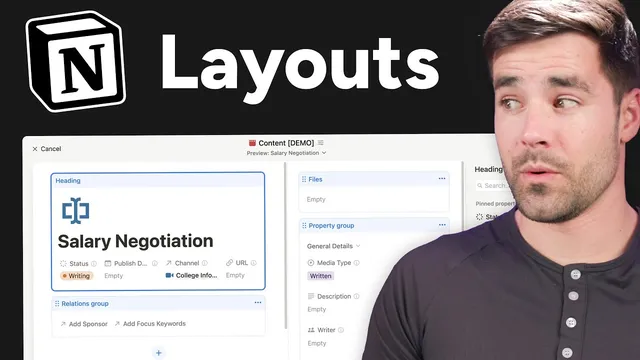
Notion’s new Layout Builder is a database-only feature that lets users redesign how properties appear on every page in a database—turning sprawling property lists into a structured, collapsible side panel. The biggest practical win is keeping key content “above the fold” by pinning up to four frequently used properties under the page title in a horizontal row, so scripts, notes, and other body content don’t get pushed far downward.
Layout Builder works across all pages in a database, meaning changes apply consistently even when a database contains hundreds of entries. Users can customize the property area by creating multiple property sections (for example, “General details,” “Relations,” “Sponsorship details,” and “Helper properties”), then collapsing sections to match the context of what they’re working on. This makes it easier to surface the right fields—like media type, description, writers/editors, and sponsorship rate/URL—without forcing constant scrolling through dozens of properties.
A key interaction improvement is the ability to show or hide the property panel quickly. In full-screen mode, a keyboard shortcut (Command Shift Backslash on macOS or Control Shift Backslash on Windows) dismisses the panel and brings it back when needed. The same “view details” access also appears on mobile, where properties can be opened directly beneath the page title.
Layout Builder also supports breaking out specific properties into their own dedicated sections. The transcript highlights file properties as a standout case: when separated, files render with a more polished layout (including rounded corners) and can display in larger formats for numbers and people—while most other property types look similar to how they appear inside the standard property group. The feature includes a preview selector so users can check how layouts look across different page templates within the same database.
Relations get special handling too. Users can add relation properties to the layout, then convert them into a relations group. From there, relations can be displayed as “minimal” (showing a compact link/picker that requires clicking to view details) or switched to a fuller “page relation” display that surfaces related properties directly on the page. The transcript notes this minimal workflow is a bit more click-heavy than older behavior, where relation details were more readily visible.
Beyond property organization, Layout Builder includes universal page settings such as showing backlinks, inline comments, page discussions, and toggling property icons for a cleaner look. If the customization needs to be undone, a reset option restores the original page layout.
The creator closes with three usability complaints: the keyboard shortcut doesn’t work the same way in Side Peek mode (requiring mouse movement), file/image rendering uses a fixed aspect ratio that can crop tall images like book covers, and there’s no way to create multiple property groups by moving an entire section outside the property group. Even with those gaps, the layout system is positioned as a major quality-of-life upgrade—especially for Side Peek workflows and complex content databases—while also being compatible with the creator’s templates via an updated “Ultimate Brain” layout.
Cornell Notes
Notion’s Layout Builder lets users redesign database page layouts by reorganizing properties into sections, pinning key fields under the title, and applying the same layout across every page in a database. The feature is especially useful for complex databases because it supports collapsible property sections and quick access to important fields via a side panel. Pinned properties (up to four) stay horizontally arranged so the main page body isn’t pushed too far down. Layout Builder also improves relations by converting relation properties into a relations group and supports different display modes like “minimal.” Users can further adjust universal settings like backlinks, comments, discussions, and property icons, then apply changes to all pages.
What makes Layout Builder different from older ways of customizing database pages?
How do pinned properties help with long pages and “above the fold” usability?
How can property sections reduce clutter during content planning?
What’s the workflow for displaying relations in the page header area?
Why are file properties treated as a special case in Layout Builder?
What are the main limitations and friction points called out after customization?
Review Questions
- How does applying a Layout Builder configuration to a database differ from customizing individual pages, and why does that matter for large databases?
- Describe the difference between “minimal” and “page relation” display for relation properties and when each would be useful.
- What three specific shortcomings are mentioned after using Layout Builder, and how do they affect day-to-day workflow?
Key Points
- 1
Layout Builder is a database-only feature that applies one customized property layout across all pages in the database.
- 2
Users can organize properties into multiple collapsible sections (e.g., general, sponsorship, helper) to match the context of work.
- 3
Pinned properties (up to four) sit under the page title in a horizontal layout to keep the main content from being pushed too far down.
- 4
A keyboard shortcut can dismiss or reveal the property panel in full-screen mode, and “view details” access is available on mobile.
- 5
File properties, numbers, and people can look significantly better when broken out into their own dedicated sections.
- 6
Relations can be converted into a relations group and displayed as “minimal” or “page relation,” changing how much related data appears without clicking.
- 7
Universal settings (backlinks, inline comments, discussions, property icons) and a reset option help manage the customization’s impact.