Managing My Time With the Week Blueprint Method
Based on Mariana Vieira's video on YouTube. If you like this content, support the original creators by watching, liking and subscribing to their content.
The week blueprint method treats scheduling as risk management by using a stable template to prevent overwhelm from erasing priorities.
Briefing
A “week blueprint” reframes time management as risk management: instead of dynamically blocking every hour, it uses a static, repeatable template of how a person wants their week to look—so priorities, self-care, and work commitments don’t get derailed when life gets chaotic. The method is built around the idea that life behaves like a project, where unexpected events can throw schedules off course. By planning a realistic ideal week in advance, the blueprint becomes a reference point for regaining direction when priorities get fuzzy or overwhelm hits.
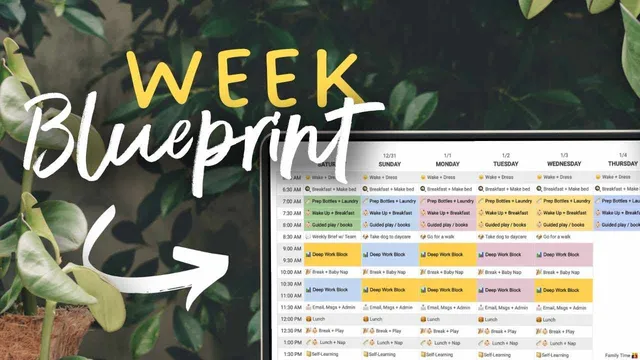
Unlike calendar blocking, which adjusts to the specific tasks and events of a given week, the week blueprint is intentionally stable. It’s a “vision board” for the week: a template that defines when work happens, how long deep-work sessions last, when breaks and meals occur, and where time goes for reading, self-learning, exercise, and family. The goal isn’t to predict the week perfectly; it’s to make a consistent effort each week to align actual scheduling with the desired lifestyle. When things go wrong—like uncertainty about how to prioritize self-care, family time, strategic meetings, or learning—the blueprint provides a quick way to re-check what matters and how to allocate time.
The approach starts with self-awareness. Creating the blueprint forces introspection about what’s truly important by visualizing an ideal day or week and deciding which tradeoffs reflect personal values—whether that’s productivity, relaxation, growth, or time with loved ones. That clarity then supports empowerment and autonomy, because time allocation becomes a conscious choice rather than a default reaction to whatever shows up.
Two creation methods are recommended. One uses an overlay calendar: a separate calendar layer in a calendar client that can be shown or hidden, with all events set as weekly so the template repeats automatically. The other—preferred for flexibility—uses a spreadsheet or other static format, where categories can be color-coded and “moving parts” of the schedule can be seen at a glance. The blueprint is designed to be printed, bookmarked, or kept as an embedded link for fast access.
Implementation is gradual. If the current routine differs sharply, switching all at once can feel overwhelming, so changes should be introduced in stages. Reflection is also built in: at least once a month, the blueprint should be reviewed to see whether more time can be gained and whether the template still fits real life, including mundane constraints like commuting, showering, and breaks.
A concrete example breaks the week into 30-minute chunks and balances deep work (research, writing, and workflow-heavy tasks) with admin and email blocks to avoid constant inbox checking. Meetings are grouped in the afternoons (Tuesday through Thursday) to reduce focus fragmentation, with prep and follow-up time treated as part of the meeting block—especially helpful for an introvert who needs mental grounding. The method also allows optional time blocks for skill practice, language learning, networking, weekly financial reviews, journaling, and tech-free time.
Finally, the transcript ties time-blocking execution to a tool: Akiflow, promoted as a Google Calendar alternative, consolidates tasks from apps like Gmail, Slack, Todoist, Notion, and ClickUp into a universal inbox and supports organizing tasks with lists, tags, and calendar views—positioned as a way to manage the blueprint-to-reality workflow in one place.
Cornell Notes
The week blueprint method turns time planning into a risk-management practice. Instead of dynamically calendar-blocking every week, it creates a static, repeatable template of how the week should look—covering work, breaks, meals, self-learning, exercise, and family time. The blueprint acts like a reference point when unexpected changes or overwhelm make prioritization difficult, helping people realign their schedules with their values. Building it starts with self-awareness: deciding what matters most by mapping an ideal week. Implementation works best in stages, followed by monthly reflection to adjust for real-life constraints while keeping the template stable.
How does the week blueprint differ from traditional calendar blocking?
Why is the method framed as “risk management” rather than just productivity?
What’s the purpose of creating the blueprint if control over schedules is limited?
What are the two recommended ways to build a week blueprint?
How does the example blueprint handle work, meetings, and email without losing focus?
What does “gradual implementation” and “monthly reflection” look like in practice?
Review Questions
- What makes a week blueprint “static,” and how does that design choice help when unexpected events disrupt a schedule?
- How would you translate your top priorities into broad categories (not hour-by-hour tasks) while still keeping the template useful?
- What would you include in a monthly reflection checklist to decide whether your blueprint needs adjustment?
Key Points
- 1
The week blueprint method treats scheduling as risk management by using a stable template to prevent overwhelm from erasing priorities.
- 2
Unlike calendar blocking, the blueprint stays consistent and repeats weekly, serving as a reference point when weeks go off track.
- 3
Creating the blueprint starts with self-awareness: visualizing an ideal week clarifies values and tradeoffs across productivity, rest, growth, and relationships.
- 4
A blueprint can be built via an overlay calendar (weekly repeating events) or a spreadsheet/static format (better for color-coding and seeing “moving parts”).
- 5
Implementation should be gradual to avoid overwhelm when the current routine differs from the template.
- 6
Monthly reflection helps keep the blueprint realistic by checking constraints like commuting, hygiene routines, and break needs.
- 7
The method supports optional time blocks for skill practice, language learning, networking, financial reviews, journaling, and tech-free time.