Merging Old Notes into One: Illustrations & Insights Combined
Based on Zsolt's Visual Personal Knowledge Management's video on YouTube. If you like this content, support the original creators by watching, liking and subscribing to their content.
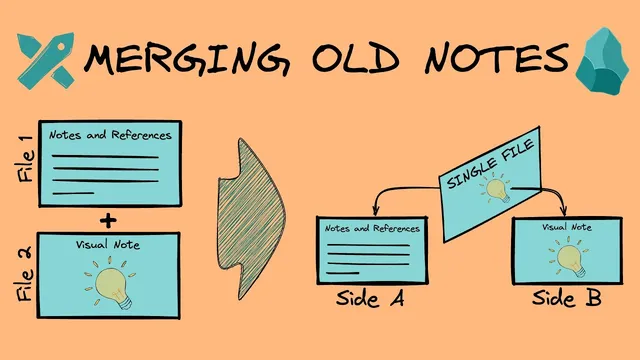
Excalidraw cards can store markdown notes on the back side, letting diagrams and analysis live in one file.
Briefing
A single Obsidian Excalidraw card can now hold both a diagram and its supporting notes—without splitting the content into separate files—by using Excalidraw’s “back side” as a markdown note. The practical payoff is that related information stays physically together: the drawing remains the illustration, while analysis text (like SWAT, Porter’s Five Forces, or PESTEL-style writeups) lives on the reverse side so it can be referenced, edited, and linked as one unit.
The workflow starts by converting an existing note into the two-sided card format. For SWAT analysis, the notes are moved onto the back of the Excalidraw card by opening the drawing as a markdown note and inserting the analysis text into the back-side region. When the document references a section, that back-side content can be embedded into other pages as an image—so the main business analysis document keeps a clean, single-image representation while still retaining the underlying editable notes on the card itself.
A key detail is how self-references are handled. An image embedded inside the note can point to the drawing file itself without creating recursive loops, because the reference targets the file as an image rather than referencing a text section that would re-trigger the same embedding behavior.
The transcript then walks through converting a Porter’s Five Forces note into the same structure. The user opens the existing Porter’s Five Forces markdown note and the corresponding Excalidraw drawing, flips the drawing to its back side, and copies the note text into the back-side area (the “sweet spot” is above text elements but below document properties/front matter). After pasting, the crucial step is preserving existing links: instead of deleting and renaming the original note file, the user merges the empty note with the Excalidraw file using “merge entire file with…”. This results in one file name that now contains both the drawing and the back-side notes, so references across the knowledge base remain intact.
Once converted, the business analysis document can embed Porter’s Five Forces as an image using a section hashtag/selection mechanism, returning the original reading experience—heading plus image—while the full analysis remains accessible by flipping the card. The same pattern is applied to SWAT analysis and other visual thinking tools.
Finally, the setup includes a speed shortcut: a hotkey in Obsidian settings toggles between Excalidraw and markdown mode (configured as Control+Alt+E in the example). That lets the user quickly turn the page to the back side to add or refine notes, without repeatedly switching modes manually. The result is a tighter, more maintainable knowledge system where diagrams and their rationale travel together.
Cornell Notes
The method merges Excalidraw drawings and markdown notes into one two-sided card so diagrams and analysis stay together. By opening an Excalidraw drawing as a markdown note, text can be pasted into the back-side region (above text elements, below front matter/properties) and then referenced elsewhere as an embedded image. When converting existing notes (e.g., Porter’s Five Forces), links are preserved by merging files rather than deleting and renaming, so other pages don’t break. The approach also avoids recursive self-references by embedding the drawing file as an image rather than referencing a text section. A hotkey toggles between Excalidraw and markdown mode to flip the card quickly.
How does placing notes on the back side of an Excalidraw card change what “one source” means in a knowledge base?
What’s the practical reason to paste text into the “sweet spot” region when converting an Excalidraw drawing to a markdown note?
Why does merging the entire file matter when converting an existing note into a two-sided card?
How can a drawing embed itself without causing recursion?
How does the system embed the two-sided card into a larger document while keeping the full analysis accessible?
What hotkey setup speeds up flipping between front and back editing modes?
Review Questions
- When converting a markdown note into a two-sided Excalidraw card, what region of the markdown representation is safe to edit, and why?
- What link-preservation problem does “merge entire file with…” solve, and what would likely happen if the original note were deleted and replaced?
- How does referencing the drawing file as an image prevent recursive embedding compared with referencing a text section?
Key Points
- 1
Excalidraw cards can store markdown notes on the back side, letting diagrams and analysis live in one file.
- 2
Notes pasted into the back-side region should be placed above text elements but below document properties/front matter to avoid Excalidraw overwrites.
- 3
Converting existing notes without breaking references requires merging files rather than deleting and renaming.
- 4
Self-references work when the drawing is embedded as an image of the file, not as a recursive text-section reference.
- 5
Business analysis documents can embed the two-sided card as an image while the full editable notes remain on the back side.
- 6
A hotkey toggle between Excalidraw and markdown mode enables fast front/back switching for note-taking.